In a corporate network environment, hundreds or even thousands of computer devices utilize different network elements to achieve digital communication. Today, we'll discuss network devices typically deployed in LAN campus networks.
- Layer 2 switch
- Layer 3 router
- Multi-layer switch
- wireless access point (AP)
- fire door
- Server
switch
A switch is a device that connects computer devices to one or more LAN areas through multiple ports. It includes all computer devices that require network connectivity, such as PCs, printers, CCTV, and VoIP phones. Switches come in various port counts, including 8, 12, 24, and 48.
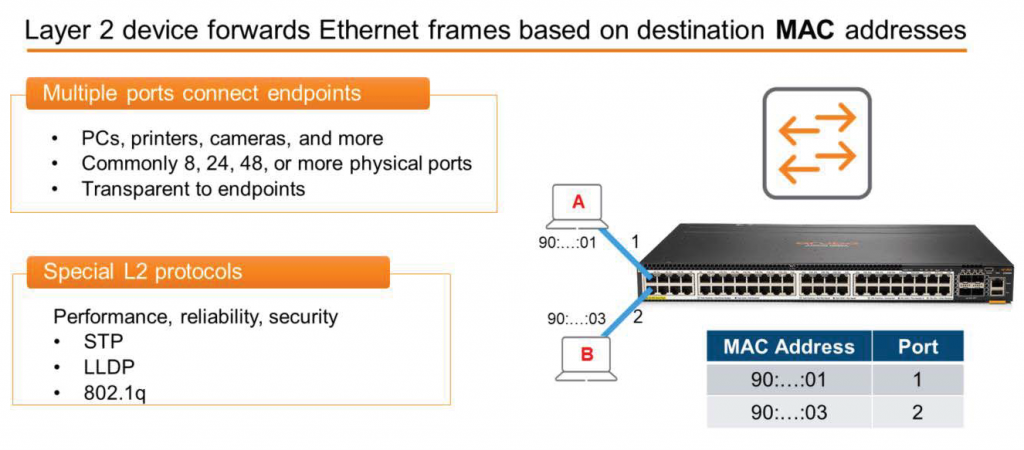
It's important to understand that the switch acts as a "transparent entity" to each endpoint. Each connected device is unaware of the presence of the intermediate switch and believes they are directly connected to each other.
The switch is based on the destination MAC address. Ethernet frameIt is a Layer 2 network device that transmits .
MAC addresses are considered Layer 2 network devices because they are part of the data link layer.
Looking at the image above, the icon with arrows extending outward on both sides represents a switch. You can also see a picture of the actual switch. Furthermore, the MAC address table stored in the switch's memory confirms that the MAC address ending in 01 is connected to port 1, and the MAC address ending in 03 is connected to port 2.
Switches have special languages or protocols they use to ensure network performance, reliability, and security. These include Spanning Tree Protocol (STP), Link Layer Discovery Protocol (LLDP), and 802.1q.
This will be covered in more detail in a future post.
router
A router is a Layer 3 network device that forwards packets based on their destination IP address. IP addressBecause it is part of the network layer, a router is considered a Layer 3 device.
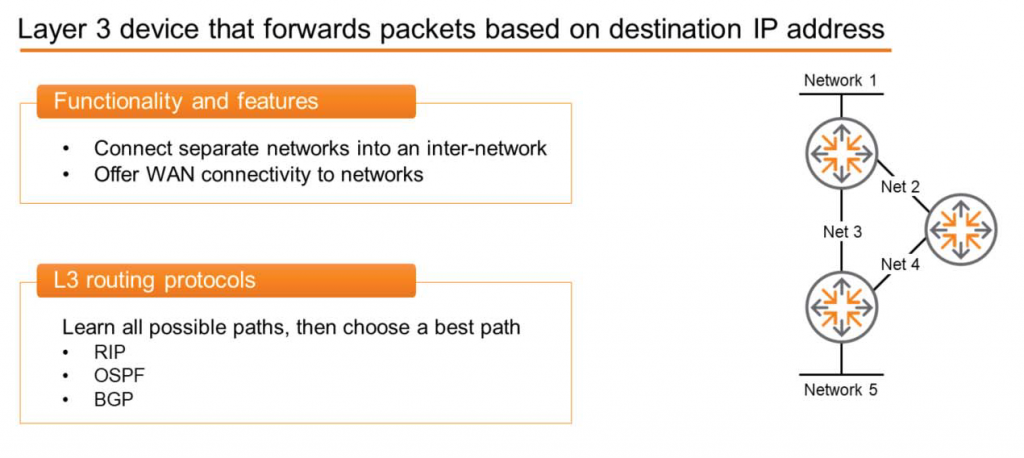
A switch connects computing devices to one or more networks. However, the role of a router is to connect these separate networks together to create a larger network (internetwork). The Internet we use is a good example of the largest internetwork. As you can see in the diagram, three routers are used to interconnect five networks.
Switches have dozens or hundreds of ports, but routers have relatively few ports (typically two to six) and are used to connect to WAN networks.
Typically, when we travel by car, there are multiple routes to reach our destination. We choose the most suitable route among them. We choose the best route based on several criteria, such as the shortest distance, the fastest distance, or the most scenic route.
Similarly, routers run protocols between available networks to discover all possible routes between them. They then select the optimal path for each destination and forward packets along that path. Some of these protocols include Routing Information Protocol (RIP), Open Shortest Path First (OSPF), and Border Gateway Protocol (BGP).
Multi-layer switch
The OSI model clearly distinguishes between Layer 2 switches and Layer 3 routers. However, networking experts believe a single device that can perform both functions—a hybrid between a router and a switch—might be better.
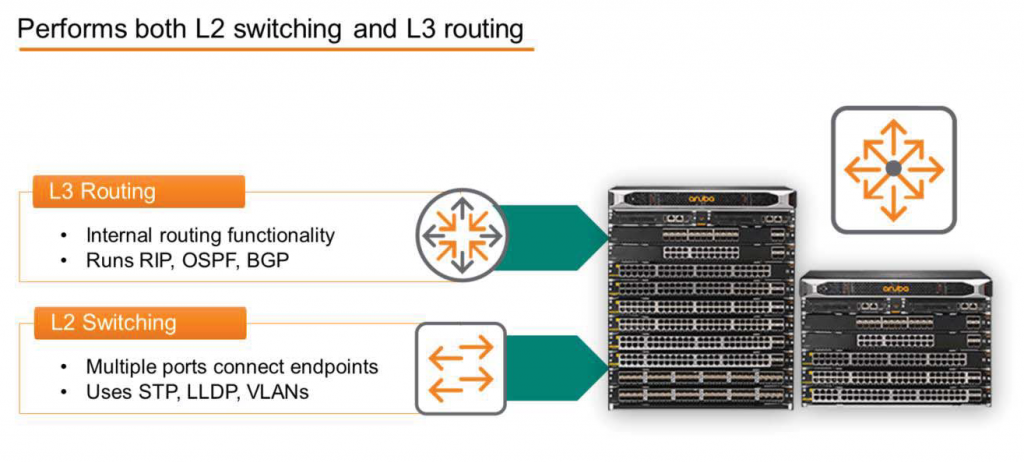
A multi-layer switch has all the features of a Layer 2 (L2) switch. It supports common L2 features such as STP, LLDP, and VLANs. Multiple ports allow various endpoints to be connected to one or more networks.
Multilayer routers also possess all or most of the functionality of a Layer 3 (L3) router. Therefore, they can route between internally separated LANs, creating an internetwork environment within a single physical device. And like other routers, they support routing protocols such as RIP, OSPF, and BGP.
Naturally, multi-layer switches support Layer 1 data transmission and reception, and can also perform some Layer 4 functions, including specific security features. These devices enable more secure and flexible networks.
wireless access point (AP)
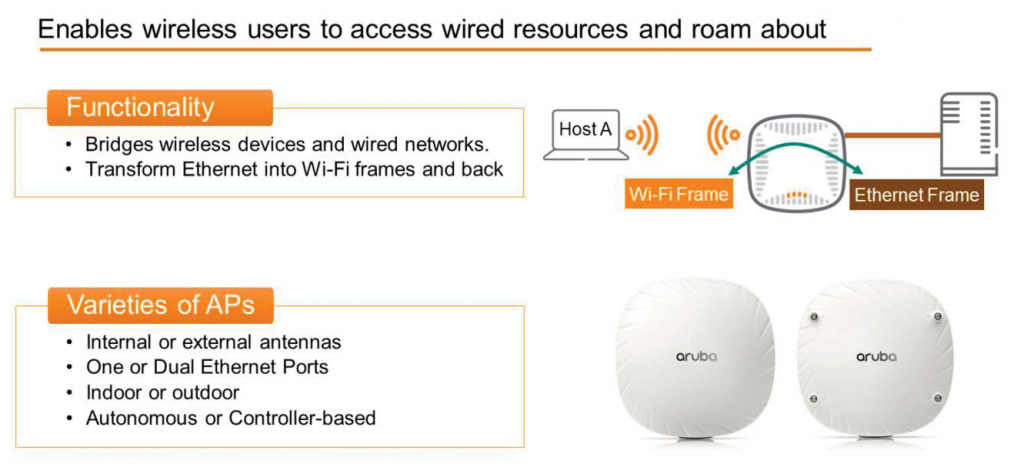
APs allow wireless users to access wired network resources, allowing them to freely use the network without being tangled in Ethernet cables.
The AP is a conversion bridge. It receives Wi-Fi frames from endpoints, converts them into Ethernet frames, and then forwards them to wired resources. These could be internal corporate servers, storage, applications, or Internet resources. When these wired resources respond, the AP accepts the Ethernet frames, converts them into Wi-Fi frames, and then forwards them to the wireless host, as shown in the figure.
There are various AP models available, depending on your technical and budgetary requirements. They can be equipped with internal or external antennas and one or more Ethernet ports. Some APs are designed for indoor use only, while others can be installed outdoors. Furthermore, Wi-Fi systems can be designed for use as controller-based APs or as standalone APs without a controller.
Standalone or autonomous APs, without a controller, can perform all the functions required to create a system. They process wireless and Ethernet frames and offer a certain level of manageability and control. As the name suggests, they operate autonomously, without the control of any external devices. While relatively simple and easy to deploy, they are not highly scalable, making them popular in small-scale environments.
With controller-based AP solutions, APs transmit and receive wireless and Ethernet frames like standalone APs. However, most processing and management functions are performed by one or more centralized devices, called controllers. While this centralized configuration and control may increase complexity during initial deployment, once deployed, it provides significantly greater visibility into network health, supports more proactive network management, and can scale to very large scales.
fire door
A firewall is a security device that monitors and controls network traffic based on security rules.
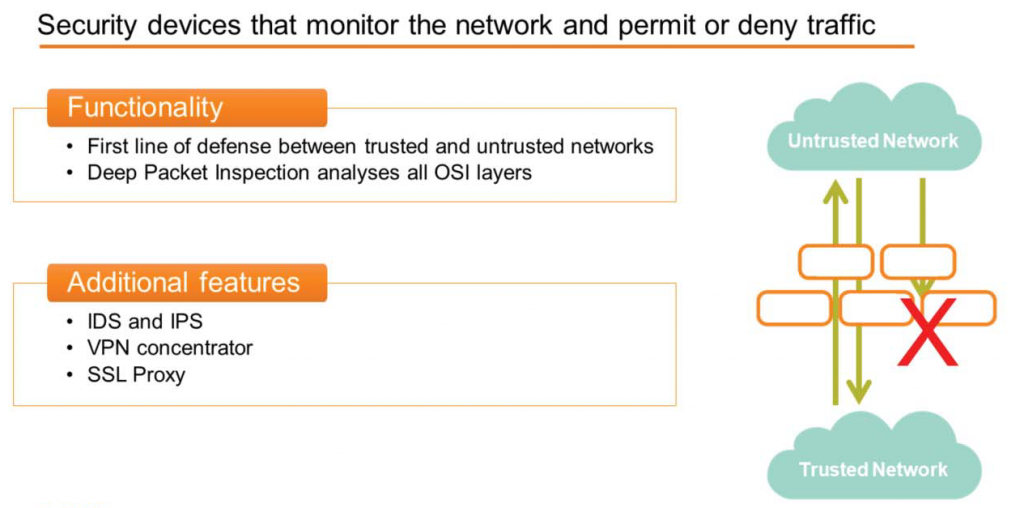
Appropriate traffic is allowed, while suspicious traffic is blocked. Security rules determine whether each packet is allowed or not.
It is typically deployed as a first line of defense between a trusted network (such as a company's internal network) and an untrusted network, such as the Internet, to allow necessary connections.
Because many firewalls can inspect all OSI layers, engineers can create sophisticated application-based rules. Unlike legacy firewalls that only understand Layer 4 of the OSI model, modern firewalls can delve deep into packet headers, all the way down to Layer 7. This is called Deep Packet Inspection (DPI).
Some firewalls also include features such as:.
- Intrusion Detection System (IDS)
- Intrusion Prevention System (IPS)
- VPN Concentrator
- SSL Proxy
Server
A server is a computing device that provides services to other programs or devices, called clients. In other words, the recipient of a service is called a client, and the provider of the service is called a server.
By default, switches, routers, APs, and firewalls support this client-server communication.
A client sends a request message to the server to inquire about a specific service, and the server responds with a response message to provide that service. To ensure that clients can connect to the server at any time, the server uses hardware and software designed to be always available.
Servers are often categorized based on the services they provide.
- Application Server
- Communication Server
- database server
- file server
- web server
- Game Server
Operational Plane – Control, Management, Data
A network device is logically organized into three Operational Planes, each of which performs a specific task.
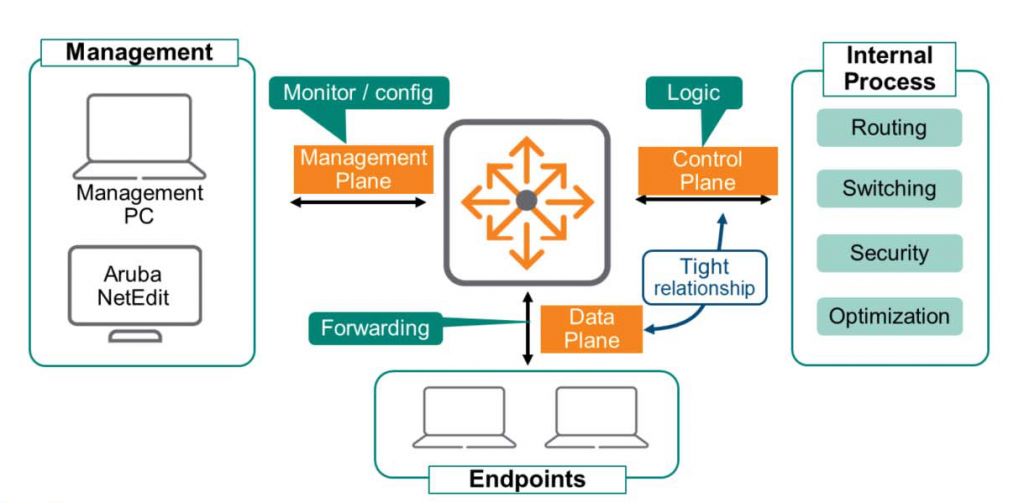
The data plane uses specialized hardware called Application Specific Integrated Circuits (ASICs), which are much faster than software, to receive and transmit frames. The ASICs modulate and demodulate data and handle other functions related to frame transmission and reception.
The control plane determines what to do with the received data. These decisions are made through internal processes such as routing, switching, security, and network flow optimization. The data plane and control plane work closely together to ensure all data is processed as quickly as possible.
The management plane monitors and configures devices. For security and accessibility, this plane must be separated from the data plane. Devices must remain accessible even if the control and data planes fail, and end-users must be prevented from accessing the management plane, as this could lead to serious security issues.
※ Note: ArubaOS-CX devices have a specific VRF (Interface and Virtual Routing and Forwarding) instance used for out-of-band management, maintaining complete isolation from the data plane. We will cover this in a future post.
So, today we looked at physical devices. While there are many more network devices, we've only looked at Aruba wired and wireless devices. Along with the various physical devices required for endpoints to connect to the network, The OSI model we learned earlierIt would be better if you think about it in connection with .
Next, let's learn about commonly used network services.