


[ACSA Education #11] Network Services
In this post, I'd like to introduce some very commonly used network services.
DHCP (Dynamic Host Configuration Protocol)
First, there's DHCP. Every terminal on a TCP/IP network needs an IP address.
Of course, you can configure it manually, but how much work would that be if you had to manually assign hundreds/thousands of IP addresses?
In the worst case scenario, if you have manually set an IP address for your laptop for use within the company, you will not be able to connect to the network when you go home or to a cafe, and you will have to set a new IP address every time you move.
To alleviate this inconvenience, DHCP automatically assigns network information to client terminals.
Therefore, when the terminal boots up, it automatically obtains the necessary configuration information, such as the IP address, subnet mask, and default gateway.
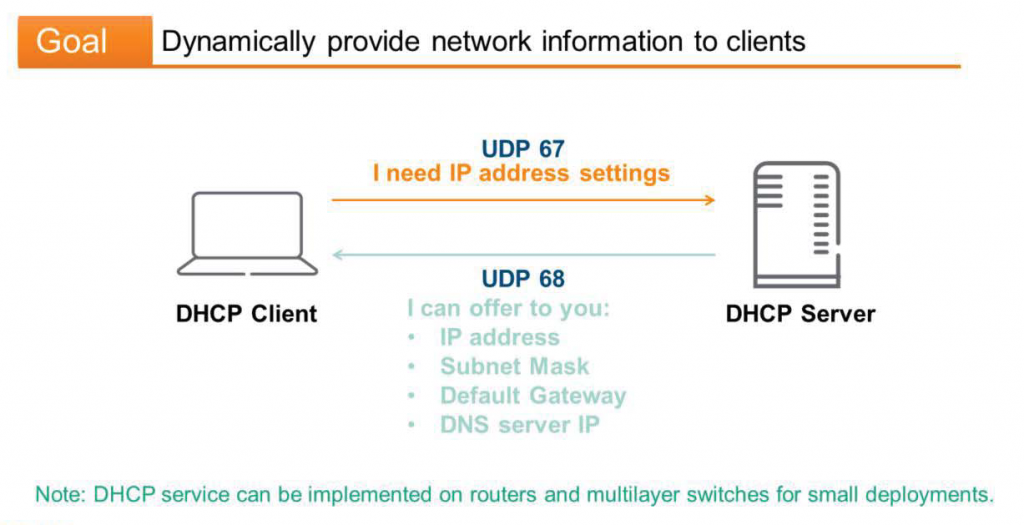
To do this, the client broadcasts a DHCP request over the network.
“Attention everyone! We need your IP address.”
The DHCP server listens to this message and responds to the request.
If the request is suitable, the client will receive the necessary information.
Previously, TCP and UDP included the destination port number in the header to indicate the type of application data to be received.For DHCP requests, the client uses UDP 67, and the DHCP server responds using UDP 68.
In large environments, a separate server is typically used for this DHCP service. However, in smaller environments, a router or multi-layer switch may perform this role.
DNS (Domain Name Service)
To transmit and receive data, every terminal on the network must have a valid IP address. A typical corporate network has hundreds or thousands of terminals. This presents two problems.
- How to identify the target terminal to be connected?
- And how do we find out the IP address of the target terminal (destination IP address)?
To solve the first problem, you can assign intuitive names to your endpoints. For example:, “fileserver01” or “Rubaruba-PC”As such, the grouped devices are also www.arubanetworks.com You can also attach a general domain like this.
This naming scheme makes computing devices more human-friendly. However, network devices still require L3 IP addresses to communicate with each other. This brings us to the second problem: how do we determine and translate the IP addresses of devices with domain or intuitive names?
DNS connects the names we humans are familiar with to the IP addresses our computers need.
The client asks the DNS server unicast using UDP 53.“What is the IP address of www.hpe.com?”"The server searches its database for the domain name, and if a record is found, it provides the IP address to the client.
DNS uses UDP for general, small requests. However, it also uses TCP 53 for large-scale operations like "Zone Transfer." Unlike DHCP, DNS is not intended to be served by network devices; it is recommended to use a separate, dedicated server.
HTTP
The HTTP protocol is used to transmit hypertext pages from web servers to clients. A hypertext page is a document composed of tags and links. When a user clicks a tag, they are taken to a new page. Tags are typically used in languages such as HTML (Hyper-Text Markup Language) or XML (eXtensible Markup Language).
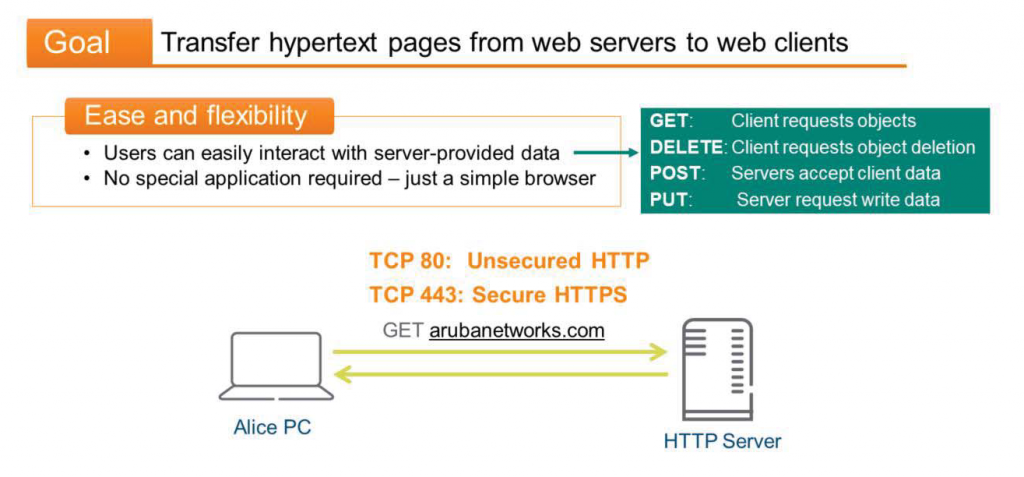
The HTTP access method provides a flexible communication mechanism. Users can easily interact with the data provided by the server using one or more of the following access methods:.
- GET: The client requests a specific object from the server.
- DELETE: The client requests the server to delete a specific object.
- POST: The server accepts the data sent in the request message's body. It typically stores it.
- PUT: The client requests that the server input specific data.
The client doesn't need a specific application; all it needs is a web browser capable of handling HTTP sessions.
While HTTP is a well-known protocol, browsing popular internet sites can be dangerous. This is because HTTP doesn't provide any security mechanisms. This means that every action can be monitored and manipulated by hackers. Even if you think you're visiting a legitimate banking site, you might actually be visiting a fake phishing site created by hackers. Or, they could view and copy the data you send and receive.
To prevent this, we recommend using HTTPS, the secure version of HTTP. While HTTP uses TCP port 80, HTTPS uses TCP port 443.
TELNET & SSH
Network administrators may need to configure and troubleshoot dozens, hundreds, or even thousands of devices.
Connecting physically might require crossing a building or traveling to another city. Perhaps you need to monitor and configure a router or switch from your office desk. Connecting to network devices is as simple as using Telnet—no need to cross the building, climb to the 12th floor, or hunker down in an MDF communications room.
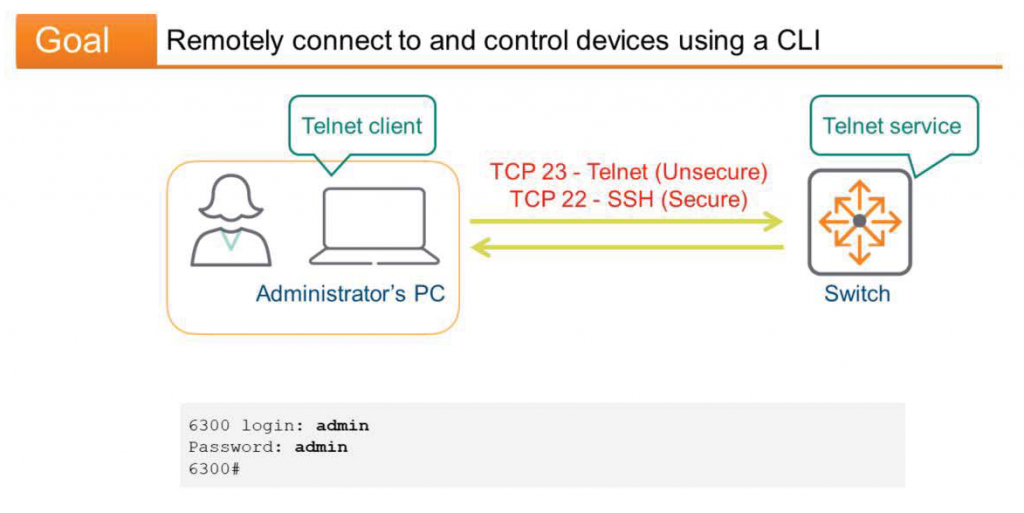
The Telnet protocol allows remote access to and control of other devices using the terminal's Command Line Interface (CLI). Telnet does not support a graphical interface.
First, establish a Telnet session using a Telnet client, such as PuTTY. Then, send commands to the remote device. Naturally, the remote device must have the Telnet service running.
Like HTTP, Telnet lacks a security mechanism. Hackers can intercept your session and steal data, including your username and password. For this reason, many people avoid using Telnet and use SSH (Secure Shell) instead. Aside from the security and encryption mechanisms of SSH, it is functionally identical to Telnet.
Telnet uses TCP 23, SSH uses TCP 22.
FTP
FTP allows you to download or upload files from a server, regardless of the operating system.
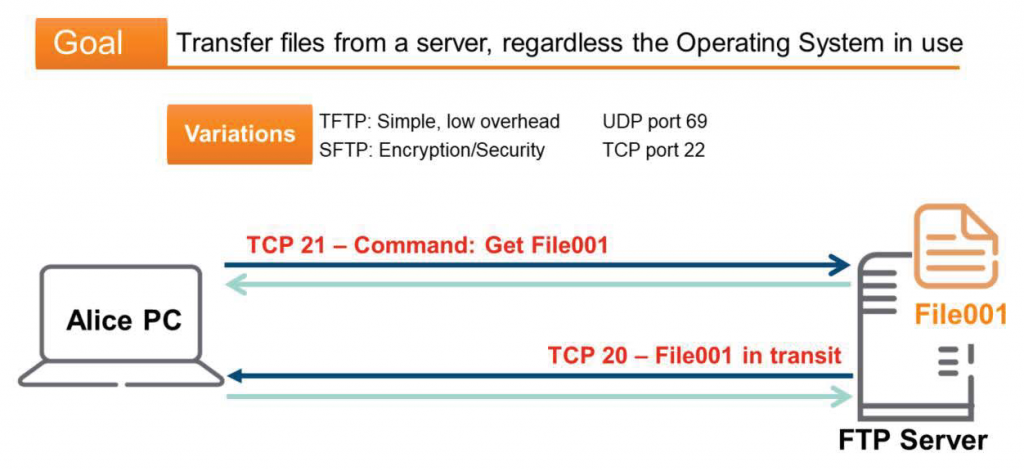
FTP uses the TCP protocol, which is reliable and provides flow control, for complete file transfers. It uses TCP 20 for data transfer and TCP 21 for control. FTP requires user authentication to verify credentials when connecting to a server.
While clients use a dedicated application for FTP connections, you can also simply use a web browser. However, you must connect to the FTP server using ftp:// instead of http://.
And there are two FTP variants:.
Trivial File Transfer Protocol (TFTP) operates identically to FTP, but uses UDP instead of TCP. The smaller header size reduces overhead and ultimately results in faster transfers. However, because there is no trust mechanism, TFTP applications require built-in reliability checks. TFTP uses UDP 69.
Another variant is Secure File Transfer Protocol (SFTP), which offers enhanced security and encryption over FTP. SFTP operates over SSH sessions and typically uses TCP 22.
We've covered five or six representative network services. Beyond these, there are many others, including SMTP, SNMP, SYSLOG, NTP, and LDAP, each used for a specific purpose. Typically, each service has its own process ID and port number. This relationship will be particularly helpful when studying servers, operating systems, and socket programming.
In the next post, we will take a look at the Wi-Fi frame mentioned in the previous post.
Although this is an ACSA training course, I will briefly introduce and move on since wireless APs are connected to wired switches.
![[ACSA 교육#12] Wi-Fi 프레임](https://egstory.net/wp-content/uploads/2021/02/SD_Launch-SD-WAN_Page_Module_3_580x320.jpg)
![[ACSA 교육#39] Stacking](https://egstory.net/wp-content/uploads/2021/11/aruba_vsx.png)
![[ACSA 교육#27] RSTP 동작 방식](https://egstory.net/wp-content/uploads/2021/04/freeway.aerial.night_.GettyImages-683888632-768x576.jpg)
![[ACSA 교육#22] Forwarding Table](https://egstory.net/wp-content/uploads/2021/03/MAC-table-768x332.jpg)
![[ACMA 교육#2] RF 기본](https://egstory.net/wp-content/uploads/2022/04/image-1-768x450.png)