In the last post, we learned about the IPv4 header at the Layer 3 network layer.
Today, we will learn about TCP and UDP, which can be seen in the transport layer, Layer 4.
3-Way Handshake
First, TCP establishes a controlled connection to ensure reliable data delivery to the destination before processing application data. As shown in the figure below, Host B's HTTP application has data waiting in a sort of outbox to be transmitted to Host A.
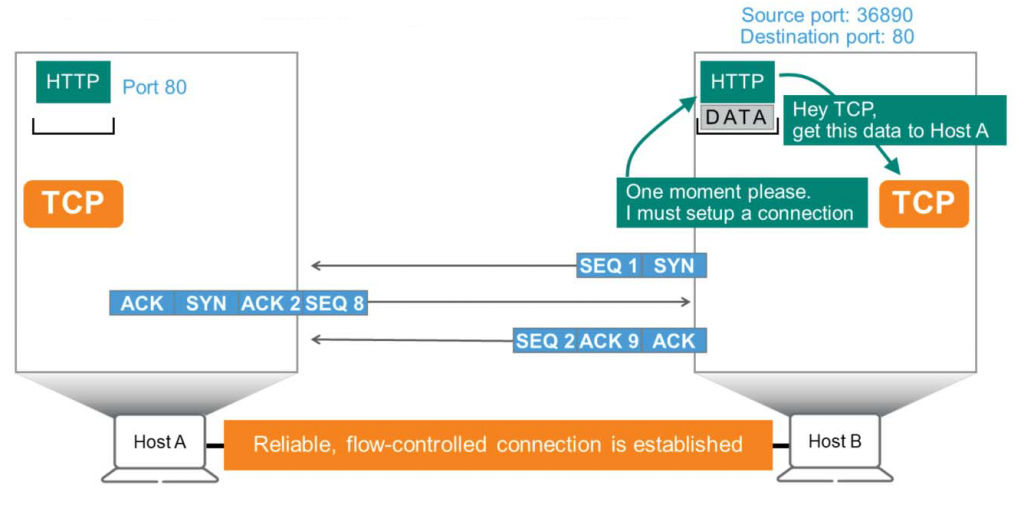
HTTP is “TCP! This data needs to be sent to Host A!”It is said that TCP “"Yes, I understand. But first, we need to establish a connection with Host A so that the data can be transmitted in a trusted and controllable manner."” He answers:.
The TCP header contains four basic fields: a sequence (SEQ) number, an acknowledgement (ACK) number, and a synchronization (SYN) and acknowledgement (ACK) flags. Host B begins by creating a TCP packet. This packet does not carry any data and is sent to Host A. “We need to connect”It will only send a signal called .
- As you can see in the picture, Host B sets SEQ = 1 and raises the SYN flag (set to binary 1).
- Host A receives this and “This packet came from Host B with the SYN flag set. Host B wants to establish a connection with me.”You will find out that.
Host A needs to inform Host B that it has received SEQ = 1 and waits for the next SEQ = 2. To do this, Host A sends a packet with both the SYN flag and the ACK flag set, including ACK = 2. Since Host A and Host B are independent computers, Host A tags the packet with SEQ = 8, even though Host B tags it with SEQ = 1. That is, Host A says, “Acknowledge receipt of your packet number 1 (SEQ=1) using packet number 8 (SEQ=8).“" I will say. - Host B receives this packet and says, “Waiting for the next SEQ=2. So, here we go... using packet number 2 as an indication that we have received your packet number 8. We will wait for the next packet number 9.”" will respond. As you can see here, the ACK flag is displayed.
Right here Stable and control possible connection(Reliable and flow-controlled connection)This will be concluded.
Once a host successfully receives and acknowledges a series of packets from another host, TCP is ready to begin transmitting data to the application. HTTP uses specific ports to transmit information (data). In this diagram, the destination port number is 80, and the source port number is randomly generated by Host B, 36890.
Sequence Number
TCP sometimes receives requests to transfer very large files that cannot be transmitted all at once. In such cases, the TCP process on Host B divides the large file into smaller pieces called segments and assigns a unique sequence (SEQ) number to each segment. As shown in the figure below, Host B “DATA”To convey the message “DA”와 “TA” You can see it split into two pieces.
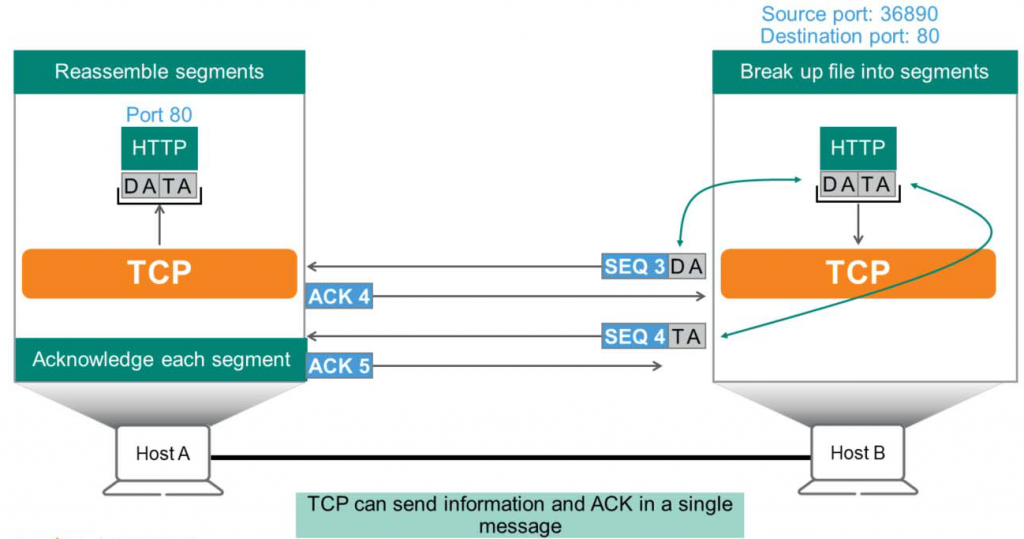
- In the figure, TCP assigns sequence (SEQ) = 3 to the first fragment “DA” and sends it to Host A.
- Host A sends an ACK (Acknowledgement) number = 4 packet to confirm receipt.
That is, the response will be “I received SEQ=3, so please send the next SEQ=4.”. - Then, Host B sends the next fragment “TA” to Host A with SEQ = 4.
- Host A will then send an ACK=5 to acknowledge receipt.
- Once Host A receives all the pieces, it assembles them in order and passes them to the application.
port number
As explained earlier, TCP literally acts as a medium for transmission. When an application requests data transmission, it acts as an intermediary. It receives requests from many other applications, such as HTTP and FTP.
As if the applications
“Hey TCP, establish a connection with that host and make sure my data gets there reliably.”
It can be likened to saying that.
TCP tracks each application providing a service using the destination port number. To achieve this, each application is assigned a standard port number.
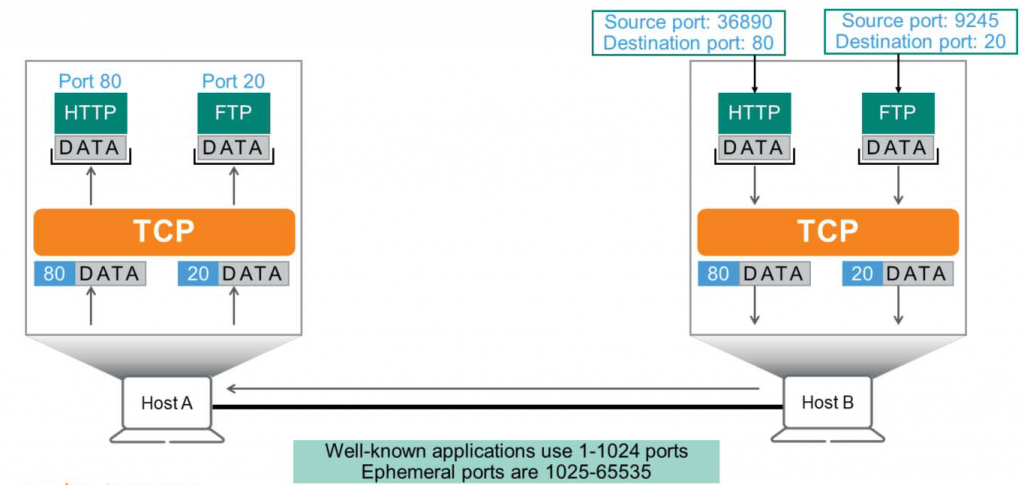
Typically, FTP uses port 20 for data transfer, while HTTP uses port 80. If Host B handles HTTP data, the destination port would be set to 80.
Since Host A received data on destination port 80, it should forward this data to the HTTP application, not DNS or FTP. TCP can use up to 65,536 ports, but the first 1,024 are reserved for well-known applications. Ports 1025 to 65,535 are known as ephemeral ports.
TCP header structure
The figure below illustrates the structure of the TCP header. Let's highlight and explain the most important fields in this header.
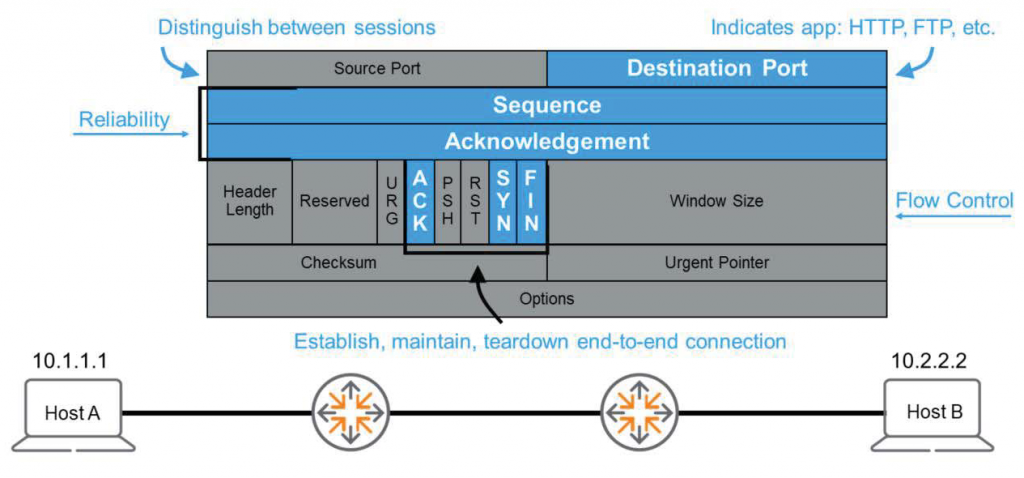
Destination Port
The first field in the header is the source and destination port numbers. As discussed above, Host uses the destination port to communicate with various applications. However, how do you differentiate between two or more HTTP connections?
For example, if I open a web browser egstroy.net I came here by adding this blog as a favorite. search engineAll of the links that come in after searching directly and clicking have the same destination address and use port number 80.
In this case, TCP sets the source port to a random number.
That is, sessions through search engines Source port = 58936 / Destination port = 80, sessions via favorites Source port = 57576, destination port = 80This allows TCP to distinguish between multiple concurrent sessions even if they use the same application.
Sequence & Acknowledgement
The Sequence and Acknowledgment (SEQ & ACK) flags are the same as those discussed above. They are used in conjunction with the ACK and SYN flags to ensure reliability and flow control.
When Host B sends SEQ = 5, Host A responds with ACK = 6.
But what if Host A responds with ACK = 5? Host B will say, "Hmm... I guess Host A didn't receive SEQ = 5, so I'll resend it." This is how TCP ensures reliability by retransmitting lost packets during transmission.
Flags
We already know that TCP uses SYN and ACK flags to synchronize packet (sequence) numbers and to confirm packet reception. In addition, to the receiver, “Host A! This file is the final piece.”There is also a FIN (Final) flag that tells you that.
The URG (Urgent) and PSH (Push) flags are used when specific data needs to be transmitted urgently to the receiving application. The URG flag is used in conjunction with the Urgent Pointer field, which indicates where the urgent data is located. There's also the RST (Reset) flag, which is used to reset the connection.
Checksum & Window Size
There is a checksum for reliability and a window size field used for flow control. If Host B sends too much data at once, Host A may be overwhelmed and unable to process it. In this case, Host A sends a message to B. “Don’t send too much data at once. Please slow down.”This will allow you to reduce the window size.
I will cover the remaining fields in future posts when I have the chance.
In the next post, we will cover another Layer 4 protocol, UDP.