The HPE Aruba Networking Certified Professional – Data Center (ACP-DC) certification tests your knowledge and skills required to design, deploy, and manage a secure, scalable, resilient, high-performance data center network infrastructure based on HPE Aruba Networking data center products.
Learn data center networking using HPE Aruba Networking's CX switches, a new architectural approach that is simplified, scalable, and automated for virtualized compute, storage, and cloud.
Training for this certification assumes knowledge of the architecture, CLI commands, and functions of the AOS-CX switch, as well as basic networking knowledge.
Four types of data centers
A data center is a facility that stores and processes data, and can be broadly divided into four types depending on how it is operated.
1. Traditional Enterprise Data Center
Enterprise data centers A private facility that a company owns and operates to meet its IT infrastructure needs.no see.
Ideal for businesses that need to build their own custom networks or that need to scale due to the large amount of data they process.
It may be located on-premises or off-premises, depending on requirements such as power supply, connectivity, and security.
Many companies maintain this approach for reasons including regulatory compliance, privacy, enhanced security, and cost efficiency.
Typically, IT equipment such as servers and storage are managed by internal IT departments, while power and cooling facilities, security systems, etc. are managed internally or outsourced to external facility management companies.
2. Edge Data Centers
Edge Data Center (DC) Small, distributed facilities located close to where data is generated and used.no see.
Real-time data analysis is possible because data is processed close to where it is generated.
As the physical distance becomes closer Reduced latency and optimized data transmission bandwidthIt will work.
This allows for rapid development of new applications.
Edge DCs can be installed in a variety of environments, including telecom headquarters, base station towers, or within enterprises, and typically range in size from 5 to 50 racks.
Connecting multiple edge DCs together can increase capacity and improve reliability.
Advances in new technologies such as 5G, the Internet of Things (IoT), artificial intelligence (AI), and big data analytics are driving the growth of edge data centers.
3. Multi-tenant Data Centers
Multi-tenant data centers are A facility shared by multiple companies (tenants)로 ColocationAlso called.
Each company leases off-site space to house its computing, storage servers, and related equipment.
This approach is very useful for companies that lack the space or IT resources to operate their own data centers.
Businesses can rent as much space as they need and flexibly scale up or down depending on their business needs.
Typically, facility providers offer high availability (stable operating hours), excellent network bandwidth, low latency, and are constantly updated with the latest hardware and technologies.
4. Cloud Data Centers
Cloud Data Center는 Hyperscale data centersAlso called a cloud, it is a massive, centralized, custom-built facility operated by a single company, such as Amazon Web Services (AWS), Google Cloud, or Microsoft Azure. A very large facility owned and operated by a cloud service provider (CSP)no see.
Instead of building their own infrastructure, companies rent computing resources such as servers, storage, and networking from CSPs over the Internet.
These facilities support cloud service providers and large internet companies with massive computing, storage, and networking requirements.
Cloud data centers can also be provided to customers 'as-a-Service' (aaS).
For example, data centers operating HPE GreenLake provide software-as-a-service (SaaS) to customers.
In terms of scale, cloud data centers can range from 50,000 square feet to one million square feet (approximately 5,000 to 100,000 square meters), housing thousands of racks and tens of thousands of servers, and can offer a full range of "as-a-service" services for public, private, and hybrid businesses.
Key Drivers for New Data Center Infrastructure
Data Center Networking (DCN) requirements have been evolving rapidly.
While speed, density, and scale have increased over the past decade, underlay architectures have relied on an oversubscribed, three-tier hierarchical approach.
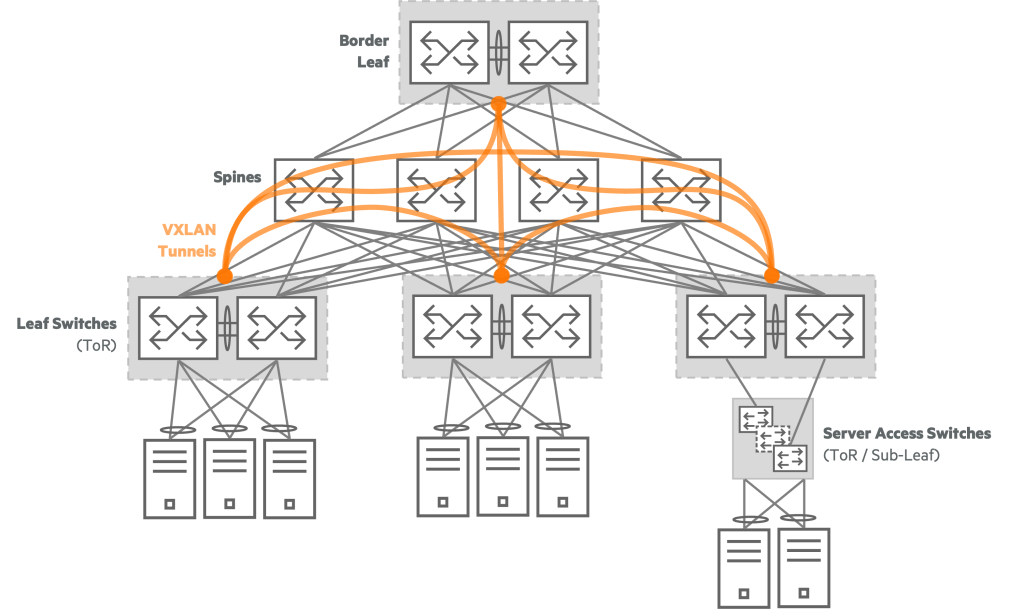
New forms of hyperscale IT have changed the paradigm of IT service delivery.
Hyperscale deployments have impacted the enterprise and SMB DCN markets, now leading even smaller networks to seek out the benefits of this technology. This interest has revolutionized the modern DCN market, creating more efficient architectures.
Now let's look at these main causes.
1. Large-scale data center consolidation
For many enterprise customers, data centers are their business.
Mission-critical applications and services provide the foundation for day-to-day operations and delivery of end-customer services.
Data centers must provide unparalleled availability and meet strict service level agreements (SLAs).
Leveraging server virtualization and affordable computing power, customers are deploying more sophisticated applications at larger scale.
To reduce the complexity of these deployments and improve operations, customers are looking to consolidate their fragmented and disparate facilities into fewer, more centralized locations.
Data center architects must now build data center networks that deliver significantly higher levels of performance, scalability, and availability than ever before to meet service level agreements (SLAs) and maintain operational continuity. Beyond simple performance, networks must rapidly recover from hardware or software failures and protect against server, storage, network, and application vulnerabilities to maintain performance and minimize service interruptions.
2. Blade servers
Increasingly powerful multi-core processor servers, high-bandwidth interfaces, and the adoption of blade servers have dramatically increased the scale of data center deployments. It's now common for tens of thousands of virtual machines (VMs) to be deployed in a single data center, consolidating infrastructure and streamlining operations.
These large-scale solutions significantly increase network performance requirements across the server edge and extended network.
Similarly, virtualization and vMotion/Live Migration tools for moving virtual servers between machines within the same or geographically separated data centers generate large amounts of inter-machine traffic.
This is impacting existing management practices and creating a new “virtual edge” that blurs the traditional lines between network and server management.
3. New application deployment and delivery models
This new approach fundamentally changes the face of data centers, moving beyond traditional server/software architectures and infrastructure deployment models.
The widespread adoption of Web 2.0 mashups, service-oriented architecture (SOA) solutions, and various federated applications is providing integrated, content-intensive, and context-optimized information and services to users inside and outside the enterprise.
These changes create new traffic flows within data centers that demand massive bandwidth, and require low-latency, high-performance connections between servers and virtual machines (VMs).
At the same time, initiatives like cloud computing and "Everything as a Service" (XaaS) are driving the need for more agile and flexible infrastructure, not to mention imposing ever more stringent service-level and security requirements. Employees, customers, and partners can now access applications from virtually any remote location—headquarters, campuses, or branch offices—and the applications themselves can reside anywhere, whether in traditional data centers or cloud environments.
The explosive growth of the cloud opens up new opportunities, but also presents unprecedented challenges.
Networks must become much faster and more flexible to support the demands of diverse mobile users, distributed security perimeters, and constantly changing applications and devices.
To accelerate a successful transition to the cloud, it's crucial to understand the specifics of your applications before connecting them to your network and allowing users access.
Defining application characteristics upfront helps you clarify required network resources, ensure resource availability, and optimize resources for the application, ensuring your network can reliably deliver the expected service levels.
4. AI Workloads
Artificial intelligence (AI) workloads enable application-specific infrastructure deployments. SAP HANA is a prime example.
AI also offers Converged Enhanced Ethernet (CEE), which means storage support over Ethernet networks.
Data Center Networking vs. Campus Networking
There is a lot of confusion about the difference between data center networks and campus networks.
It is important to clearly distinguish between these two.

Data Center NetworkIn , devices are mainly connected to the network.
Rack servers, load balancers, firewalls, and other devices are often fully wired, often at 1G or 10G (or higher) speeds.
The purpose of these devices is to exchange data. Applications typically involve database management, virtual machine management, file transfer, and other types of applications. While relatively simple, they require significant bandwidth. Traffic within data centers primarily flows in an east-west direction.
Campus NetworkThere are devices that users can connect to both wired and wirelessly.
There are many different devices, including desktops, laptops, phones, video conferencing equipment, and printers.
These devices utilize a mix of wired and wireless Ethernet, typically operating at speeds ranging from 100 Mbps to 1 GHz. Applications vary widely and can require a wide range of bandwidth. For example, traffic such as email, web, and video primarily flows in a north-south direction.
Typical Data Center Network (DCN) Characteristics
- A stable, low-latency fabric: Provides high availability, performance, density, and scalability
- East/West application traffic performance and stability are critical: 80% of all traffic occurs in the EW direction
- North/South Campus/Server/Server Application Traffic Connectivity: Connecting via border switches and routers
- Cloud computing and virtualization technology support required
- Requires VLAN scale expansion beyond 4K: Network virtualization/overlay networking is the solution.
- Lossless/Converged Fabric for Network Storage
- Convergence Recommendation at Top of Rack (ToR): Separate/integrate IP/Ethernet/FCoE storage into a SAN (Storage Area Network)
- Connecting VMs/Containers/Bare Metal Servers
- VRF1/ACL2, network security/isolation through microsegmentation between VMs/containers/bare metal servers
- Network connectivity of servers, apps, firewalls, and load balancers
- PoE (Power over Ethernet), 802.1X not applicable
- Higher bandwidth required: High-speed network bandwidth such as 10, 25, 40, and 100 Gbps is required.
- Need a better Oversubscription: Over-allocation for efficient resource utilization3 Management is important
- Separate Out-of-Band (OOB) network: Connect server iLO ports, switch management ports, etc. to ensure that devices can be accessed even when problems occur with the in-band network.
- Speed/Network Agility through Network Automation
- Network automation through commercial solutions with self-service portals.
- Power/Cooling Considerations
- Cabling Considerations: More cables are required compared to campus wiring closets, and differences in MMF/SMF/BiDi cable types are taken into account.
Data Center Requirements
Typical data center design requirements include:.
- Virtualization: It is necessary to improve the efficiency, agility, and resilience of data center network operations.
- Multi-tenant support: While this may not be a primary consideration in a private cloud, it's a key reason why so many data centers exist: hosting the infrastructure of multiple organizations is their core business.
- Multiple data centers: It is often required to add capacity or to ensure disaster recovery and resiliency.
For example, if a natural disaster occurs on one continent, redundant data centers on another continent may not be affected. - WAN connections: Required to connect each corporate branch or tenant to a data center facility.
- Storage services: They are often centrally located for efficient server access and simplified management.
- Security: Especially for multi-tenant data centers, it is crucial to adhere to strict, generally accepted security best practices and procedures across all types of networking environments.
- Visualization: The ability to see traffic flow.
Impact of network requirements on the network
Each requirement listed in the requirements outline influences design and deployment decisions.
Let's revisit each requirement and its impact on your data center network:.
Virtualization: Increasing device density increases bandwidth demand.
Every physical device must be capable of hosting a virtual machine (VM).
This means that the relevant domain or VLAN must be available on any physical server.
These VLANs may need to extend between physically separate data centers, particularly to enable certain disaster recovery scenarios.
Multi-tenant support: A single infrastructure must be able to support and isolate multiple tenants.
You must deploy hardware devices, software, and protocols that can meet these requirements.
Multiple data centers: When servers require multiple data centers for scalability and redundancy, the data centers must be interconnected with links that support connectivity while minimizing the impact of local failures.
For example, a broadcast storm or STP occurring at one site4 Loop errors should not affect the operation of other sites.
WAN connections: WAN connections can be deployed using a variety of technologies.
The option you choose will depend on the service you require and whether you or your provider will manage the link.
For example, some data center tenants may prefer a provider's L2VPN service, while other tenants may prefer a different technology.
Storage services: Often deployed in data centers using converged technologies.
Both iSCSI and Fibre Channel over Ethernet (FCoE) require specific service handling over Ethernet systems.
While iSCSI requires special Quality of Services (QoS) configurations in the Ethernet fabric, FCoE requires the deployment of specific lossless Ethernet services. Of course, the devices deployed must be part of a validated design and support QoS or lossless Ethernet features.
Data Center Network Workloads and Traffic Flows
Workloads
When discussing data center networks, workloads are a key area to manage. So what exactly is a workload?
Workload is the amount of computing resources and time required to complete a specific task or produce a result.
Any application or program running in a data center can be considered a workload.
Unlike on-premises workloads, cloud-based workloads are applications, services, compute, or functions that run on cloud resources. Workloads in a cloud environment offer users greater agility and flexibility.
When your on-premises servers reach their internal resource limits, you can migrate or share some or all of your workloads to the cloud to increase computing power.
Imagine a situation where you distribute tasks across a team of employees.
Distribution is based on each individual's experience, skills, strengths, efficiency, and availability.
If these project tasks are completed efficiently and successfully, it will be considered a good management skill.
Similarly, workload management in a data center is the process of allocating resources to increase efficiency or reduce burden.
Some processes can run on-premises, while others are better suited to a cloud environment.
A workload management solution will consider which tasks are CPU-intensive, memory-intensive, static, periodic, or unpredictable, and allocate the appropriate amount and type of resources to complete them.
When workload management involves allocating a large number of resources to a large number of tasks, you may want to consider automating it.
Workload automation is the use of software to schedule tasks or allocate resources.
The benefit of workload automation is that it frees up staff from having to manage these tasks directly, or it leverages the processing power of software (or AI or machine learning) to determine how and when to best allocate resources more accurately and effectively than humans can.
Because this software is cloud-based, workload protection becomes important to protect workloads from threats as they move between cloud environments.
Traffic Flow
The data center network reflects the spine-leaf data center model.
It is important to note that most of the traffic here flows east-west.
Servers are connected to top-of-rack (ToR) switches or leaf switches, and most traffic occurs between servers.
For example, this applies when an application connects to a database or when linked applications exchange data.
In this way, data moves east-west through the network.
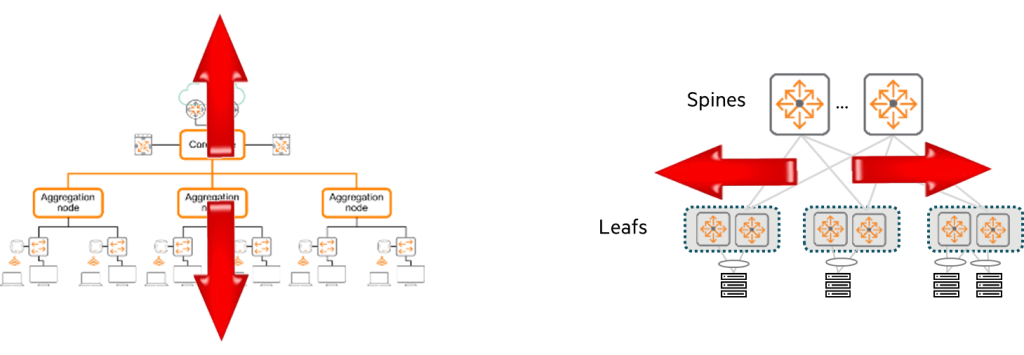
In contrast, campus networks primarily exhibit north-south traffic flow.
Traffic flows from server devices to access switches, then through distribution and core switches, and then back to its final destination.
You'll notice that most user traffic is directed to data centers or the Internet.
Today, as the first part of the ACP-DC certification, I gave a brief introduction to data center networking.
Data center networking is designed for specialized environments, so it requires more consideration.
Next, we will introduce the data center networking product lines and technologies of HPE Aruba Networking.