Wireless network designers have long sought to build multiple, overlapping Wi-Fi networks to serve different user groups and device classes. Now, the new 6 GHz frequency band presents an attractive opportunity for network architects considering such designs.
We tried this in the past at 5Ghz, but the limited number of channels did not produce satisfactory results.
now Wi-Fi 6EThis allows us to create sub-bands for different types of devices and create use cases for users with those requirements.
Aruba is Technical Documentation Related to Wi-Fi 6EThis document provides several perspectives that enterprise wireless network designers may face when starting to deploy new Wi-Fi 6E equipment.
Regarding the newly created channel…
- What will be the future role of the 5Ghz and 2.4Ghz bands in managed networks?
- Would it be best to keep things the way they are now and place all channels in a single coverage layer?
- Should some enterprises add one or more AP layers and segment the new channels into subbands to service different device types?
- In this approach, what is the optimal channel bandwidth for each layer?
If devices supporting Wi-Fi 6E become the mainstream client devices connecting to wireless networks, we will need to fundamentally rethink how large we configure and deploy managed WLANs using the 6 GHz band.
Wi-Fi 6E with changing SSID assignments
As an example from the technical paper introduced above, let's consider how a traditional dual-band enterprise SSID layout might evolve in a triple-band Wi-Fi 6E deployment.
under Table 1is currently the most implemented approach,

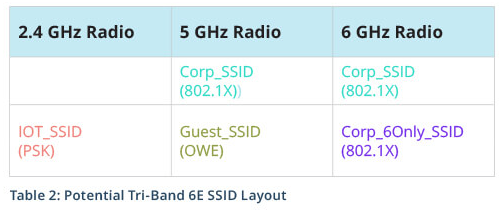
under Table 2Demonstrates an enterprise wireless Wi-Fi scenario using 6E.
The 6 GHz band allows us to rethink our current wireless requirements, rather than simply slicing and pasting 5 GHz configurations into the new band. The table below illustrates the endless possibilities of this new band.
With this new capacity increase, let's consider some additional questions:
- Should the 6Ghz band be restricted to corporate assets, or at least BYOD devices onboarded via a network access control (NAC) solution like ClearPass OnBoard?
- As enterprises invest in native 6E devices for specific business applications, do they want to limit operations to 6Ghz exclusively to ensure consistent performance?
- Before answering the first two questions, is it a good idea to set guest traffic to 6Ghz?
Even the 5Ghz band offers wide compatibility with unknown equipment types? - Given the availability of three bands, is it possible to force all IoT devices using PSK (Pre Shared Key) authentication to use only the 2.4Ghz band?
Referring to the method suggested in the second table above (Table 2), a typical business client terminal, such as a tri-band-capable laptop, can use either the 5Ghz or 6Ghz band depending on the company's circumstances and user preference.
For each band, you can create an SSID that supports only a single band, including a 6Ghz-only Corp_SSID and a guest access restricted to 5Ghz.
You can also configure SSIDs with other combinations.
A new partitioning strategy for the 6GHz band
Most businesses that install tri-band Wi-Fi 6E access points will simply replace their existing infrastructure, adding a third wireless band and creating a new 6Ghz wireless capacity pool.
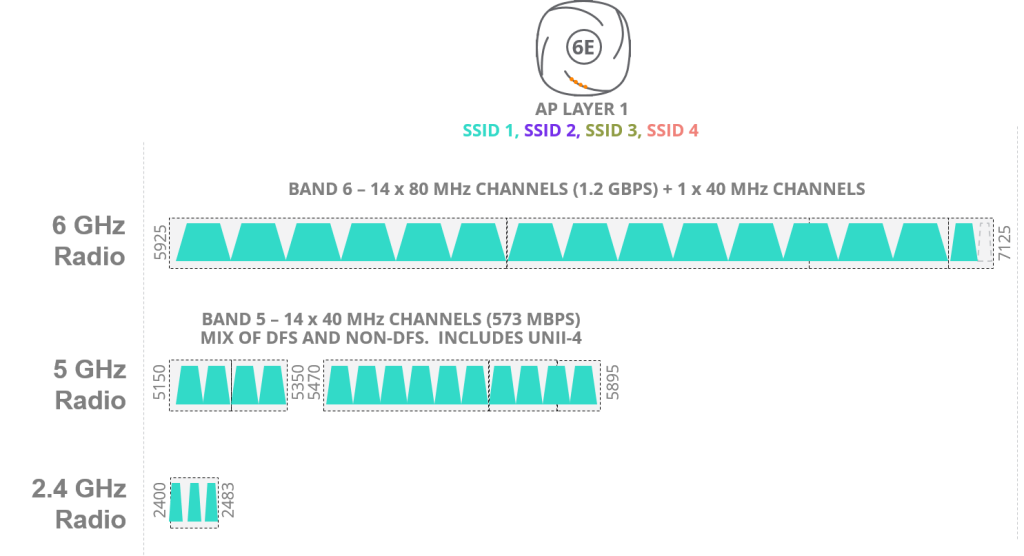
This approach will be used by the majority of organizations deploying managed Wi-Fi 6E systems.
However, certain industries, such as healthcare and manufacturing, require a different approach. They have long desired the ability to "partition" unlicensed spectrum into individual "layers.".
Because in order to guarantee and provide a more reliable level of service, it was necessary to separate frequency bands for different user environments.
For example, consider a hospital with multiple distinct classes of devices, each with widely varying requirements for bandwidth, latency, and life-safety criticality. To address these diverse requirements, attempts have been made over the past several years to partition the 5 GHz band into two or three subbands (or "layers"), but these efforts ultimately proved unsuccessful due to limited available spectrum.
The advent of Wi-Fi 6E
Can the rich spectrum of the 6GHz band accommodate these diverse needs of organizations and enterprises?
The picture below shows 6Ghz “Band 6A”와 “Band 6B”Here is one example of how to divide it into two blocks.
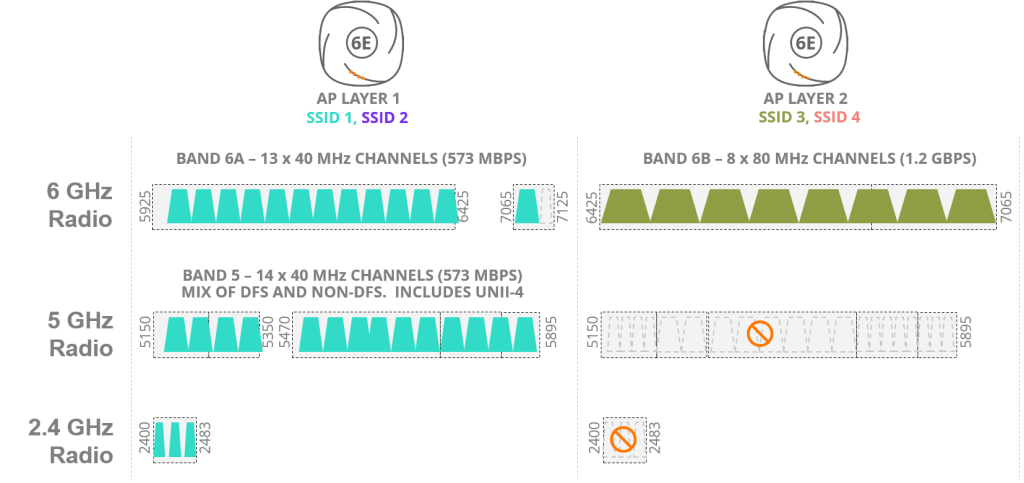
Each subband uses the bandwidth of a different channel.
Implementing this architecture in an existing environment would require new, separate APs and Ethernet cables, but with 6Ghz there are so many available channels that requirements like QoS can be easily implemented.
But as you can see from the picture, 5Ghz “Band 5”It is maintained as only one band block called .
When we open a new door and step inside, a world we never knew existed appears before. Everything begins to look different, and far more possibilities open up than before.
To explore these possibilities, we highly recommend checking out our extensive technical documentation, which covers a variety of scenarios, including different partitioning schemes, how to enable out-of-band AP discovery on 6Ghz, and how to easily implement a 6Ghz-only SSID.