Following the basic training on the ArubaCX switch, this time we will provide training on Aruba wireless LAN (WLAN, Wireless Local Area Network).
In this post, I will explain the basics of wireless LAN and its technology.
Introduction to Wireless LAN Organization
The term "wireless LAN" broadly refers to a wireless local area network (WLAN). Several organizations are responsible for WLAN standards. These organizations define and enforce regulations and restrictions on RF (radio frequency) technology and its use in WLAN environments. The IETF, FCC, IEEE, and Wi-Fi Alliance are the four primary organizations involved in defining and establishing rules and regulations for WLAN use in the United States. In Korea, the Ministry of Science and ICT (MSIT) and its affiliated organizations are responsible for this.
- IETF (Internet Engineering Task Force): International standards organization for the Internet
- FCC (Federal Communications Commission): The most important agency for the RF spectrum (radio frequency bands) in the United States.
→ The FCC determines the available frequencies and power limits for WLAN technology.
※ Other countries and regions ETSI in Europe나 Ministry of Science and ICT in Korea, have regulatory bodies specific to their country or region.
The Institute of Electrical and Electronics Engineers (IEEE) developed the 802.11 technology standard within the unlicensed spectrum range defined by the FCC. 802.11 channels must fall within the FCC unlicensed spectrum range as defined in the standard.
The Wi-Fi Alliance defines additional standards within the 802.11 standard to help interoperability among WLAN equipment vendors.
Over the years, new technologies have been continuously developed and introduced to improve the speed and reliability of WLANs, and the 802.11 standard has been updated to include these new technologies and additional features.
Radio frequency bands and channels
2.4Ghz frequency band and channels
802.11, 802.11b, 802.11g, and 802.11n use the 2.4 GHz Industrial, Scientific, and Medical (ISM) band, and WLAN signals use spread spectrum technology to overlap adjacent channels.
For example, channels 1, 2, and 3 overlap, allowing one channel to hear part of each channel's transmission. Each channel is spaced 5 MHz apart and, according to the 802.11 standard, is spread over 20 MHz or more. Therefore, adjacent channels in the same area will cause RF interference with each other. Because legacy protocols, such as 802.11b, operate above the 22 MHz band, these legacy protocols impact RF planning for legacy devices in the environment.
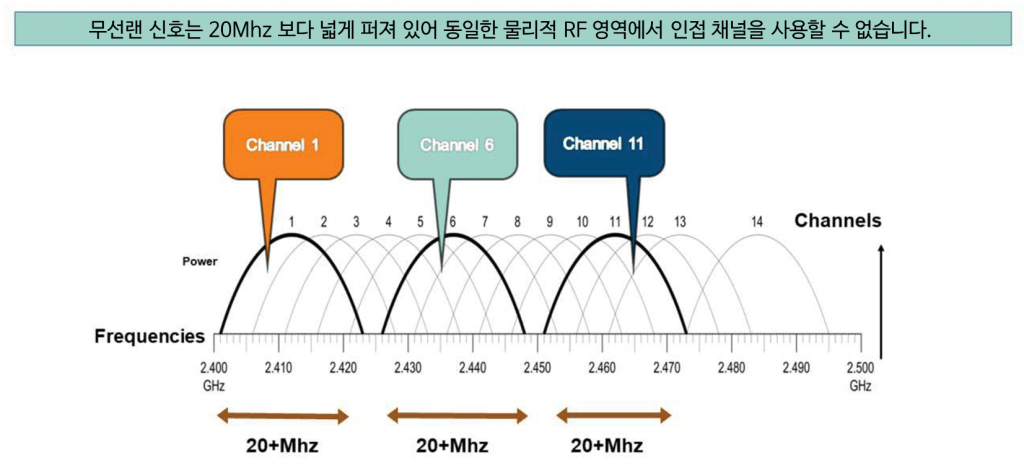
This is similar to how we talk while someone else is speaking, like we're talking over someone else. This means that because we're transmitting over overlapping channels, some or all of the transmission may be received. While 11 to 14 channels are available, typical wireless LAN deployments only use channels 1, 6, and 11 because they don't interfere with each other.
Older 802.11 standards, such as 802.11b, use modulation that operates above 22MHz, while newer standards, such as 802.11g, use modulation that spreads the signal across 20MHz.
5Ghz frequency band and channels
802.11a and 802.11n use the 5GHz Unlicensed National Information Infrastructure (U-NII) band.
There are a total of four U-NII bands.
- U-NII 1 – also known as Lower U-NII
- U-NII 2 – also known as Middle U-NII
- U-NII 2E – also known as U-NII 2 Extension
- U-NII 3 – Also known as Upper U-NII
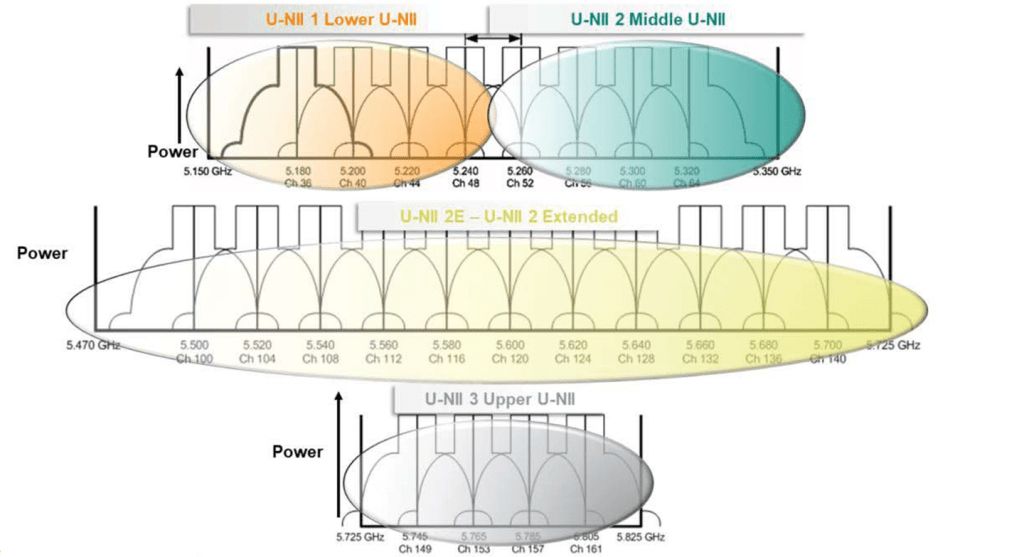
802.11a originally defined the use of U-NII 1, U-NII 2, and U-NII 3. Each of the three U-NII bands is divided into four usable channels, although this varies depending on the approval of radio use in each country. U-NII 2E adds 11 channels in the 5 GHz band.
Typically, Lower U-NII is for indoor use, Middle U-NII is for indoor or outdoor use, and Upper U-NII is for outdoor use only. This means that there are eight usable U-NII channels. Only adjacent channels are at risk of interference, and the power levels between channels are generally low enough that interference is minimal or nonexistent.
While all channels in the 5 GHz band can be used, some clients only support specific bands within the 5 GHz band. Therefore, the 5 GHz range has more available channels. It also offers more bandwidth than the 2.4 GHz band.
The U-NII 2E band can sometimes be problematic here, as some older network interface cards (NICs) don't support it or can only scan other channels after scanning. However, even without using the U-NII 2E band, there are still more non-overlapping channels in the 5 GHz band than in the 2.4 GHz band.
Channel Bonding
Channel bonding is a performance-enhancing feature available in 802.11n and 802.11ac. This feature doesn't technically tie two channels together; it uses the frequency ranges of both channels to treat them as a single, wider channel.
This is similar to the concept of modem coupling for higher throughput on a telephone line.
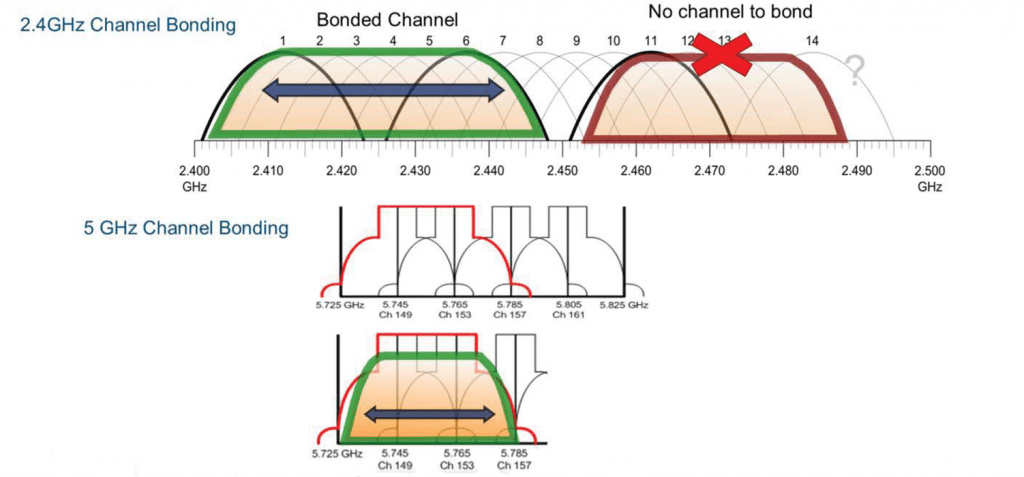
Wider channels allow for more data to be transmitted simultaneously. 802.11n is referred to as HT (High Throughput), with HT20 indicating that 802.11n was deployed using standard 20MHz channels without channel bonding. Conversely, HT40 indicates that 802.11n was deployed using bonded channels with a width of 40MHz.
Channel bonding on 2.4 GHz is not a viable solution, as bonding leaves only one usable channel out of the three available channels. Bonding is only truly effective in the 5 GHz band in enterprise-class WLAN environments. This becomes even more evident with 802.11ac, a 5 GHz technology.
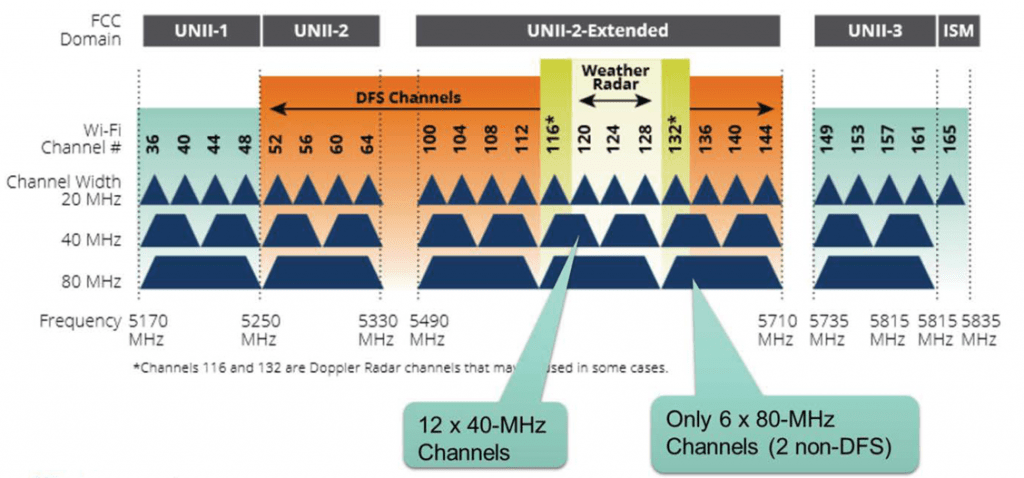
Bonding channels can help provide more bandwidth to a channel, but, Co-channel interferenceThis may result in a reduced number of available channels, which may not provide as much throughput as expected.
For most enterprise WLANs, a 20MHz or 40MHz channel width is optimal for very typical RF environments.
160Mhz channels are not practical because only two channels are possible in the 5Ghz band.
In the above figure, DFS limits the available channels in the 5Ghz range.
802.11 Standards and Revisions
There is only one relevant standard in the IEEE. It is designated as IEEE 802.11, followed by the publication date. IEEE 802.11-2012 is the only currently published version. Task Groups (TGs) can create amendments to update the standard.
Both the working group and the finalized document are referred to as 802.11, without capitalization, such as 802.11a or 802.11b. Revisions are periodically incorporated into the standard.
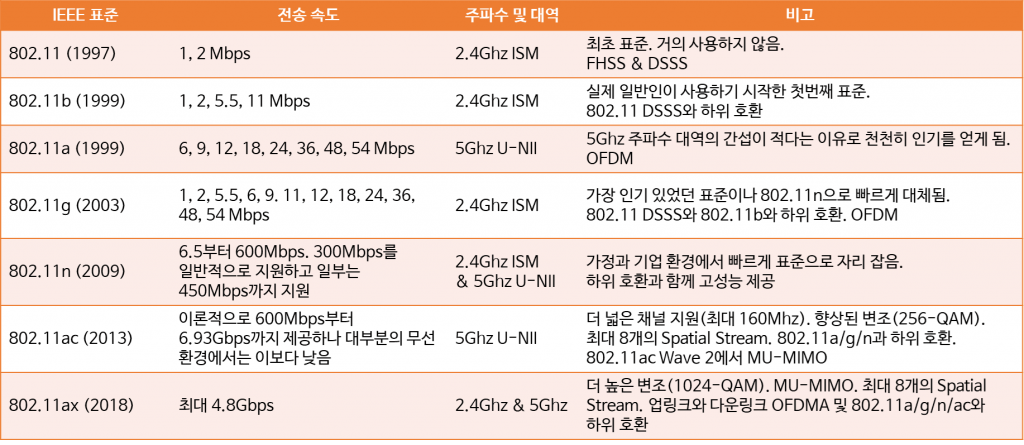
The IEEE ratified the original 802.11 standard in 1997. It could transmit at 1 or 2 Mbps using Frequency Hopping Spread Spectrum (FHSS) or Direct Sequence Spread Spectrum (DSSS) in the 2.4 GHz ISM band. Most 802.11 implementations used FHSS, but it is now rarely used.
Both the 802.11a and 802.11b amendments were ratified simultaneously in 1999. 802.11b entered service immediately, while 802.11a didn't enter service until nearly a year later.
802.11b provided an upgrade from the existing 802.11. It supported transmission speeds of up to 11 Mbps and used the same frequency band as 802.11. It offered backward compatibility with 802.11 DSSS and was the first wireless technology to gain widespread consumer acceptance, primarily due to falling equipment prices.
The 802.11g amendment uses the same modulation and speed as 802.11a. 802.11g uses the 2.4 GHz frequency range to maintain backward compatibility with legacy standards, while 802.11a uses the 5 GHz band to increase throughput and reduce interference.
The 802.11n revision increased data rates to approximately 300 Mbps, theoretically up to 600 MHz. 802.11n added the term "HT" (High Throughput), which indicates a maximum speed of 300 Mbps for wireless LANs.
802.11ac operates only in the 5 GHz frequency range, with a theoretical maximum data rate of 6.93 Gbps. This speed in 802.11ac is also known as Very High Throughput (VHT).
802.11ax is the latest revision to the 802.11 standard, operates on both 5Ghz and 2.4Ghz, and has a maximum data rate of 4.8Gbps.
802.11h – DFS & TPC
802.11h includes two features: Dynamic Frequency Selection (DFS) and Transmit Power Control (TPC), which can affect the available channels in a given location. The 2003 802.11h amendment introduced Dynamic Frequency Selection (DFS) and Transmit Power Control (TPC).
Radar or satellite systems on the same channel as an 802.11 wireless access point (AP) can also use the U-NII 2 or U-NII 2E band. The DFS feature allows wireless devices to detect radar and switch to a different channel.
If a wireless AP manufacturer does not want to support DFS, they can block the use of the U-NII 2 and U-NII 2E bands.
Additionally, TPC functionality allows devices to negotiate the lowest possible power level when communicating. This helps ensure communication while minimizing the potential for interference between other devices.
802.11e – Wireless QoS
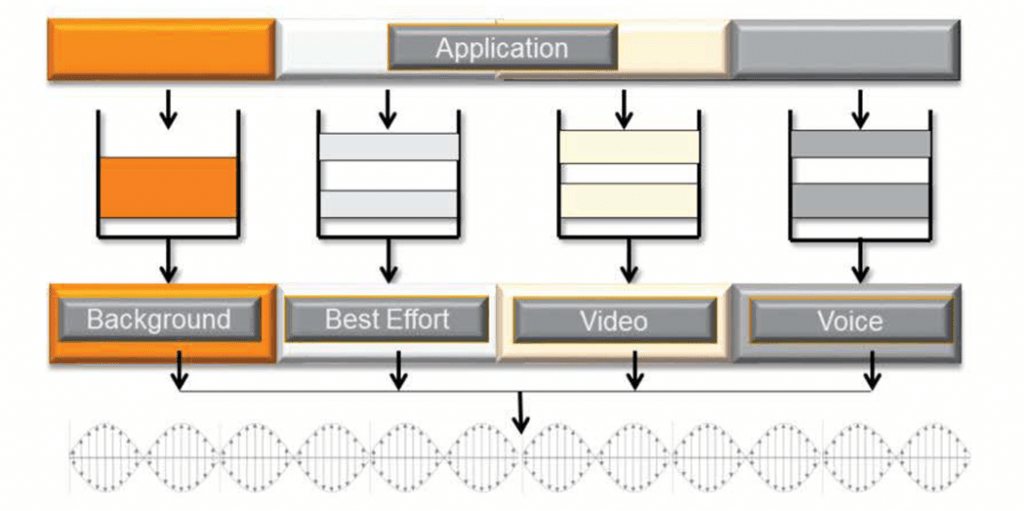
Voice and video are highly sensitive to network latency, and if latency is too high, voice calls or video frames will be dropped. Wireless QoS standards, such as 802.11e, define service levels for each application and then prioritize traffic transmission for latency-sensitive applications.
802.11i – Security
802.11i security authentication can be performed using a password or a RADIUS server.
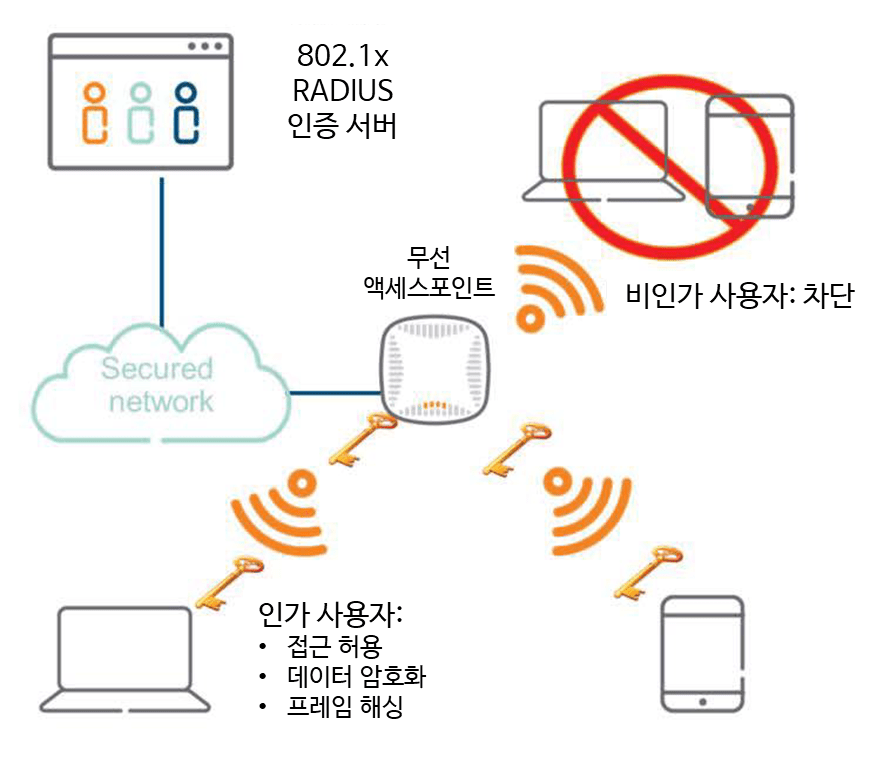
The 802.11i encryption standard is CCMP, which uses the AES algorithm. TKIP can also be used with RC4 to support legacy devices on 802.11i networks.
The Wi-Fi Alliance is an organization that provides interoperability standards to enable APs and clients from different manufacturers to work together.
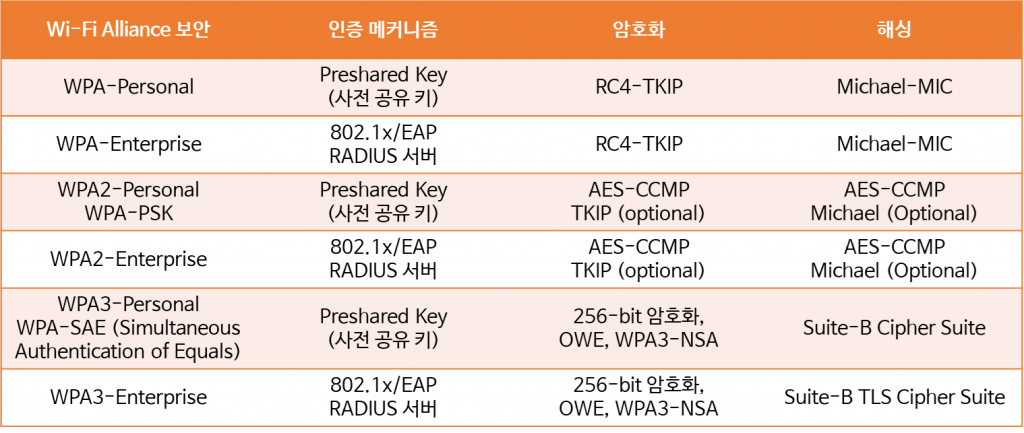
WPA/WPA2 are Wi-Fi Alliance security standards. WPA Personal and WPA Enterprise use the same encryption protocols and algorithms for security, but utilize different authentication mechanisms. Pre-shared key (PSK) is a much simpler authentication mechanism than EAP/RADIUS.
With WPA3, there are no more open networks. Opportunistic Wireless Encryption (OWE) encrypts all previously open wireless network traffic. Simultaneous Authentication of Equals (SAE) replaces the legacy PSK mode, which is vulnerable to active, passive, and dictionary attacks. WPA3 provides 256-bit encryption, CNSA (Suite-B) security features, and baseline rules that ensure consistent security.
WMM is a multimedia standard that provides QoS and prioritizes voice and video traffic.
Other 802.11 standards (roaming)
- 802.11k: This standard allows wireless LAN clients to create an optimized channel list to speed up the discovery of nearby roaming APs. When the signal strength of the current AP weakens, the device searches for a potential AP from this list.
- 802.11v: Enables seamless client switching between access points using the Base Station Switching System (BSS) transition management feature on certain devices. BSS transition management allows the network control layer to provide load information on neighboring APs, allowing it to influence client roaming behavior. Some clients consider this information when selecting a potential roaming destination.
- 802.11r: A roaming standard that allows wireless LAN clients to roam from one AP to another on the same network. 802.11r uses a feature called Fast Basic Service Set Transition (FT) for faster authentication. FT works with both Pre-Shared Key (PSK) and 802.1x authentication methods.
All of these features help improve the roaming capabilities of handheld wireless LAN devices, such as tablets and smartphones. Roaming capabilities for these types of mobile devices are becoming increasingly important in corporate wireless LAN environments.
※ Aruba has written and shared detailed information about roaming as documented below.
– “Optimizing Aruba WLANs for Roaming Devices“
– “RF and Roaming Optimization for Aruba 802.11ac Networks“
802.11 frame types
Wireless APs broadcast beacon frames to provide clients with existing WLAN information. Client terminals send probe request frames to discover the network, and the AP responds with probe response frames containing the same information as the beacon frame.
Wireless LAN clients use the information provided by beacons and probe frames to build a list of available networks to which the user can choose to connect.
Authentication and deauthentication frames are used to perform basic 802.11 authentication. Clients use association frames to request association with an AP, and disassociation frames are used to disconnect the client.
So, in this post, we looked at wireless networks before learning about Aruba wireless LAN.
We've briefly looked at the basic terms and theories you need to know about wireless LANs, along with the 802.11 standard.
In the next post, we will learn about RF wireless signals.