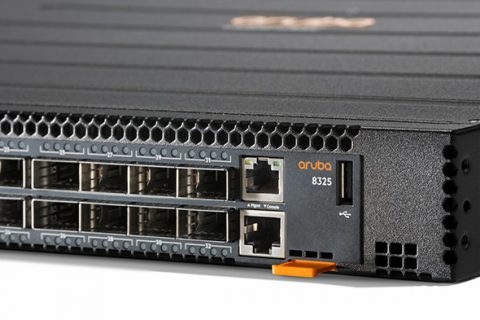
It has become a common technology that we now take for granted., Wi-Fi.
Wi-Fi is a technology used in Layer 1 and Layer 2 of wireless communication. It is a wired technology. EthernetThe biggest difference is that WiFi has two additional frames in addition to the data frame.
This is because there is a special communication between endpoint devices, such as smartphones, and wireless access points (APs) that isn't directly related to payload transmission. These frames are used to manage and control the wireless network itself.
Now, let's take a look at each field in the following figure.
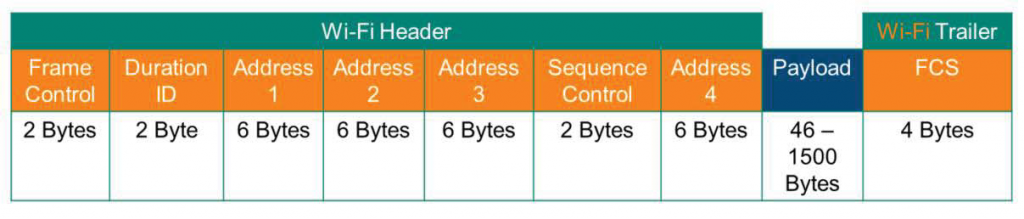
- Frame Control: Indicates that the frame type (control, management, or data) contains fragmentation and personal information.
- Duration ID (=Connection ID): Indicates the time (in microseconds) allocated for the channel to successfully transmit a control frame.
- Addresses: This is the MAC address of the device communicating. The number of addresses varies depending on the frame type and context. Typically, only the first three addresses are used.
- Sequence Control: This field contains information about fragmentation and reassembly.
- Payload: Contains the data to be transmitted.
- FCS (Frame Check Sequence): Use CRC or Checksum method to verify that data is not corrupted.
Wi-Fi header Address In the field understanding
Let's talk a little more about the Address field mentioned above.
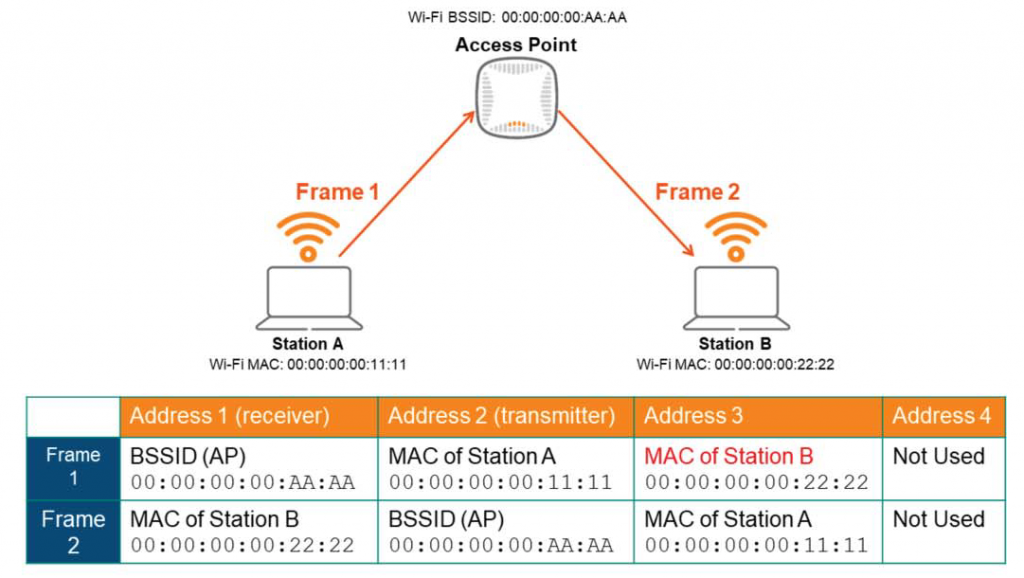
As you can see in the diagram, wireless terminal A (Station A) wants to communicate with wireless terminal B (Station B). Each station will have its own MAC address assigned to its wireless NIC (commonly referred to as a LAN card). The AP (Access Point) acts as a central device. Each station does not communicate directly, but only through the wireless AP.
in other words, ① From Station A to wireless AP, ② From wireless AP to Station B Each generates two frames.
It will be easier to understand if you look at the table.
In the first frame (Frame 1), Station A is the transmitter in the wireless communication, so its MAC address is stored in the Address 2 field. The wireless AP is the receiver, so its BSSID address is stored in the Address 1 field. And Station B is the final destination, so its MAC address is stored in Address 3. Since this is a general communication, Address 4 is not used. Address 4 is used in special environments such as “Repeater”.
The wireless AP receives this frame, generates a new frame, and transmits it to Station B.
In this case, since the AP is the transmitter, it stores the BSSID address in Address 2, and since Station B is the receiver, it stores the MAC address in Address 1. And since Station A is the original transmitter, it stores the MAC address in Address 3.
Here, BSSID (Basic Service Set Identifier) refers to the MAC address assigned to a specific wireless band or WLAN in a Wi-Fi network. In other words, you can think of it as an address that wireless terminals use to distinguish APs, even if they have the same SSID (wireless Wi-Fi name). Since a MAC address is required for Layer 2 communication, the BSSID is the MAC address of the AP that acts as a relay for wireless communication.
So, we've briefly looked at wireless Wi-Fi.
I will explain more details in a future wireless networking lecture.