In the last post, we learned about TCP. TCP and UDP are the most representative protocols used at the Layer 4 transport layer. Today, let's take a look at UDP.
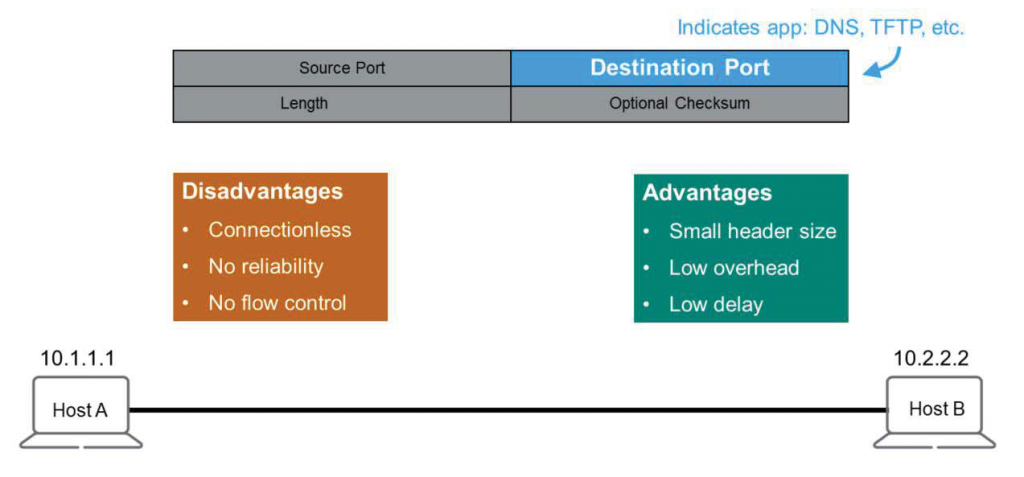
If you look at the picture, the UDP header is Compare with TCP headerIf you do, you will see how simple it is.
It has the same source and destination ports as TCP, and only has length and checksum fields.
From an application's perspective, TCP is a remarkably dedicated and dedicated worker. It establishes a connection, checks for lost packets, retransmits any, and even adjusts data processing to minimize the burden on the receiving end.
Conversely, UDP can be viewed as a lazy worker, lacking connection, reliability, and flow control. It doesn't care whether packets reach their destination or whether the other end is unaffected. However, despite its apparent laziness, it's incredibly cheap. A smaller header size means less overhead. This means UDP can transmit data with lower latency.
Although it's less reliable, it's fast. This makes it ideal for applications like VoIP (Voice over IP) and video streaming. These applications don't require the full reliability of TCP, nor do they want to pay for it. Developers can easily implement the required reliability within their programs.
UDP can also use up to 65,536 ports, but like TCP, the first 1,024 are reserved for well-known applications. The remaining ports, 1025 through 65,525, are known as ephemeral ports, which, like TCP, are deleted after use.
In the past four or five posts, we've covered the expressions used from Layer 1 to Layer 4, as well as header information. I hope you now have a clear understanding of how Ethernet, IP, and TCP/UDP are used in the TCP/IP stack and why they're necessary.
Let's end the theoretical discussion here and learn about network devices in the next post.