I have been posting about 30 ACSA-related training posts, focusing on Layer 2.
Now, let's go up a level from Layer 2 and talk about Layer 3.
Let's take a look at Layer 3 IP packets, routing, gateways, etc.
So, let's first take a look at what routing is.
Routing
We already know how devices communicate with each other on the same network (broadcast domain). Layer 2 switches use Layer 2 frame header information to forward frames to devices on the same LAN. Let's revisit Layer 3 communication, remembering that they create a MAC address table based on the source MAC address and forward frames based on the destination MAC address.
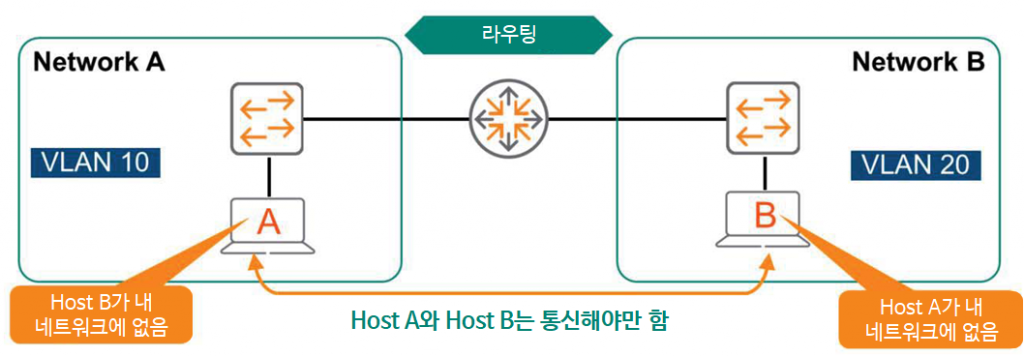
Layer 3 routers move packets between different LANs or different broadcast domains based on IP addresses.
Old Explaining the OSI 7 layersWhile doing so, Layer 3 represents the network layer. Layer 3 devicesThey analyze the IP address and trace it from the origin to the destination. Routing that selects the most optimal path to transmit packets.
IP address
Basically, routing decisions are based on the analysis of addresses at Layer 3, where the Internet Protocol (IP) provides an identifier, or address, for each device within the network.
There are two versions of IP in common use today: IPv4 (version 4) and IPv6 (version 6). The main difference between these two versions is the address space. IPv4 can allocate approximately 4.29 billion IP addresses, while IPv6 can allocate only 340. undecillion (10 to the 36th power), which means it can be used almost without limit.

An IPv4 address consists of 32 bits, expressed in decimal notation. This notation is divided into four sections called octets. As the name suggests, each octet consists of 8 bits (1 byte). The figure below shows three hosts on the same LAN, each with a unique IP address.
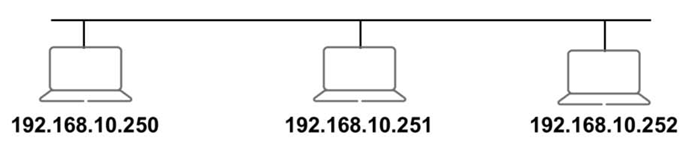
reference: Since an octet consists of 8 bits, one octet is a decimal number. From 0 to 255no see.
IPv4 address
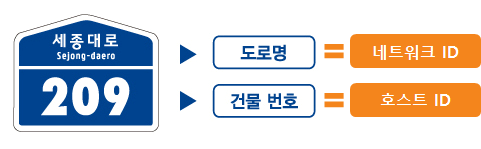
An IP address consists of two parts: a network ID and a host ID. The network ID is the most important part, on the left side of the address, and identifies the network. The host ID is the right side of the address, and identifies the individual host.
The easiest way to understand network IDs and host IDs is to think of them as your home address.
You can think of the network ID as similar to a street name, and the host ID as similar to a building number.
IPv4 addresses are always 32 bits. In some cases, 16 bits represent the network and the remaining 16 bits represent the host. In other cases, 24 bits represent the network and the remaining 8 bits represent the host. In almost all cases, there can be a combination of bits between the network and the host. The distinction between the network and the host is made by the subnet mask.
Network Mask
The network mask is an IP parameter that indicates the number of bits representing the network ID and host ID of an IP address. The 32-bit network mask is a required parameter for all IP network devices.
Network masks determine whether two devices (endpoints) are on the same network or different networks. This process is accomplished through a simple comparison.
If the source and destination network IDs are the same, the two devices are in the same broadcast domain (the same network). Communication between the two devices can be accomplished with Layer 2 switching. However, if the source and destination network IDs are different, the devices are on different networks. In this case, Layer 3 routing communication is required.
The network mask, like IPv4, is 32 bits long. The mask consists of binary blocks of consecutive 1s and 0s. 1s represent the portion of the IPv4 address assigned to the network ID, and 0s represent the portion of the IPv4 address assigned to the host ID.
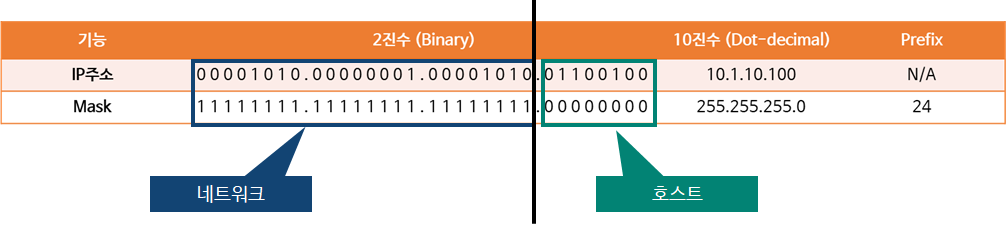
The image above will help you understand. The point where the number 1 in the mask ends and the number 0 begins is where the network ID and host ID are separated.
Network masks are expressed in several ways. Like IPv4, they can be expressed as four octets, each consisting of a decimal number and a period. Alternatively, they can be replaced with a prefix, which is written as a slash (/) and a number following the IP address.
In the example above, it is written as 10.1.10.100/24. Here, Prefix 24 refers to the number of 1s in the network mask.
IP routing
When a device needs to communicate with another device on a different network, it needs to know which network device within the broadcast domain can route the traffic to the destination network. This information is provided to computers using IP routing.
For endpoints, this information must be manually added as a "static route." However, routers and multilayer switches can automatically determine the optimal path for each destination using routing protocols, although they can also use manually added "static routes.".
Static routing
For static routing, you need to specify the following information from Router 1 to Router 2:.
- Destination IP address: Places I want to go
- Subnet Mask: How to distinguish between the network and host portions of a destination IP address
- Next-hop IP address: The IP address of the router on the current network that can send the packet to its destination.
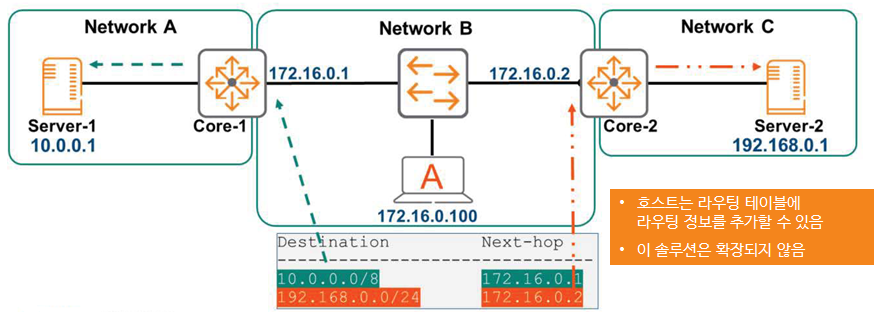
The above diagram shows three networks connected by two routers (Core-1 / Core-2).
Core-1 connects Network A and Network B, and Core-2 connects Network B and Network C.
If Host A (Network B) needs to communicate with Server-1 (Network A), First route marked in greenYou must use .
The content of the first routing is “Destination 10.0.0.1 with mask 255.0.0.0(/8)To reach Next-hop router with IP address 172.16.0.1It means, ”You have to go to .”.
So what if we need to communicate with Server-2?
of course Second routing marked in redwill use: “To reach destination 192.168.0.1 with mask 255.255.255.0 (/24), it must go to the Core-2 router with IP address 172.16.0.2.”.
Default Gateway
A default gateway (DG) is a device that routes traffic from endpoint devices within a broadcast domain or network to all destinations within the network. Simply put, when a host is told, "If you want to go to any external network, go to the next hop address," it's the device that holds the IP address of that next hop.
A default gateway optimizes and simplifies routing decisions because only a single path is required between endpoints.
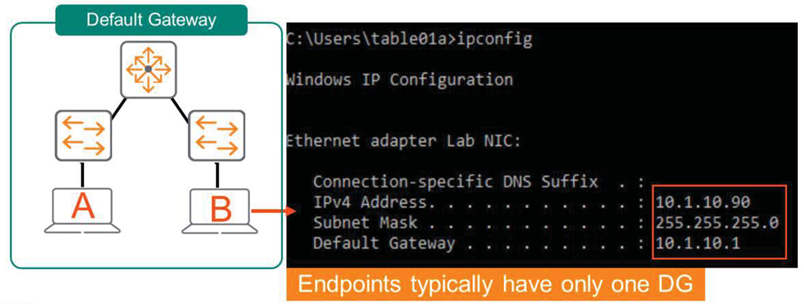
If you look at the picture, you can see that the top router is positioned as the default gateway for Host A and Host B on the same network.
reference: Even if they are on the same subnet, if there are two or more routers on the network, each endpoint can have a different default gateway.
Today, we learned the basics required for Layer 3. As mentioned earlier, Layer 3 routing operates based on IP addresses, and we learned about IP addresses, subnet masks, and gateways.
In the next post, we will learn more about routing.