We have finally successfully completed the first step in building our data center network.
During the past time Data center network Basic Overviewunderstand, Required Products (Hardware)과 Technology (Protocol)We've secured sufficient quantities of these crucial resources and materials. It's like an architect understanding the blueprint and preparing the necessary materials before constructing a building.
From now on, we will actually utilize the resources prepared in this way to build a data center network. Design and buildWe will move on to the next step.
Data Center Network Design Requirements
The most important thing before starting to design a data center network is ‘'What will we achieve?'’ in other words, Knowing the design requirements clearlyno see.
These requirements form the ultimate goal of data center network design, and it's essential to understand how each requirement impacts the overall design. Practical issues, such as airflow for cooling network equipment, must also be considered.
General Data Center Design Requirements
Typical data center design requirements include:
- Virtualization: It is essential to improve the efficiency, agility, and resilience of data center network operations.
- Multi-tenant support: While not as critical in private clouds, it's a primary reason why many data centers exist. Hosting infrastructure for multiple organizations is a core business imperative.
- Multiple data centers: This is often necessary for capacity expansion or resilience enhancement. For example, a natural disaster on one continent would not affect a redundant data center on another continent.
- WAN connections: Required to connect each corporate site or tenant to a data center facility.
- Storage services: They are often centrally located for efficient server access, streamlined communication, and management.
- Security: Especially for multi-tenant data centers, it is crucial to adhere to strict, generally accepted security best practices and procedures in any type of networking environment.
The impact of each requirement on the design
Each requirement has a significant impact on the design and deployment decisions you make.
Virtualization:
- influence: Increases equipment density, which Increasing demand for bandwidthIt leads to .
- Considerations: All physical equipment must be capable of hosting these virtual machines.
This is related Layer 2 domains or VLANs are available on all physical servers.It means that you have to do it.
Additionally, to enable certain disaster recovery scenarios, these VLANs It may need to be extended across physically separate data centers.
Multi-tenant support:
- influence: A single infrastructure supports multiple tenants. isolationMust do.
- Considerations: We need to deploy hardware, software, and protocols that can meet these requirements.
Multi-data center:
- influence: When customers require multiple data centers for scalability and redundancy, Localize the impact of failures while supporting L2 connectivityData centers must be interconnected by links.
- Considerations: For example, a broadcast storm or Spanning Tree Protocol (STP) loop failure at one site should not affect the operation of other sites.
WAN Connection:
- influence: WAN connections can be deployed using a variety of technologies.
- Considerations: The option you choose will depend on whether you want the service and link to be managed by the customer or by the provider. Some data center tenants may prefer the provider to provision and manage specific L2 VPN services, while others may prefer to use a different technology.
Storage Services:
- influence: It is often deployed using converged technologies in data centers.
- Considerations: Both iSCSI and Fibre Channel over Ethernet (FCoE) require specific service handling from Ethernet systems.
iSCSI is special in Ethernet fabrics. QoS (Quality of Service) settings, and FCoE is specific Deployment of lossless Ethernet servicesRequires.
Of course, the equipment you deploy must be part of a validated design and support the required QoS or lossless Ethernet features.
security:
- influence: Virtualization poses security challenges at the network edge.
- Considerations: Maintaining insight into VM communications critical to compliance monitoring and reporting may require specific technologies on your network.
Clearly understanding these requirements in advance and reflecting them in your design is the first step to building a successful data center network.
Data Center Cooling Design
When designing a data center, you shouldn't just think about network equipment.
Surprisingly Cooling designIt affects the overall data center design and even which switch models are used.
especially Airflow of the switchmust be taken into consideration in the design.
Airflow direction of the switch
The switch's fan has two main airflow directions.
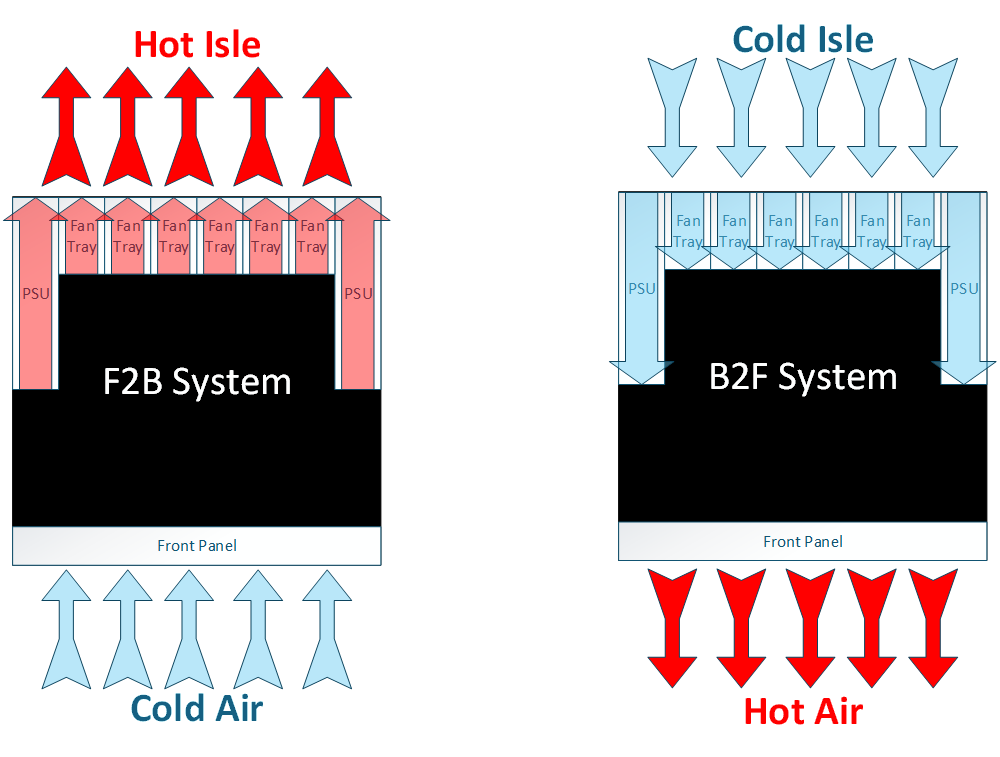
Front-to-back fan (red):
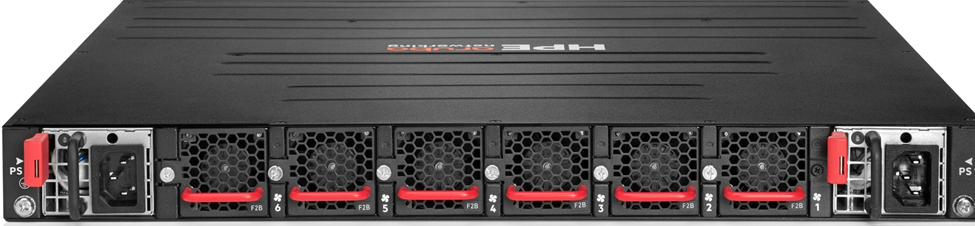
- The air From the port (the side where you plug in the cable) to the power supply side It means flowing.
- This direction is generally Hot-aisle data centerRequired when installing switches on the front of the rack.
This method cools the equipment by drawing in cold air from the port side, and then exhausts hot air toward the power supply side.
Back-to-front fan (blue):
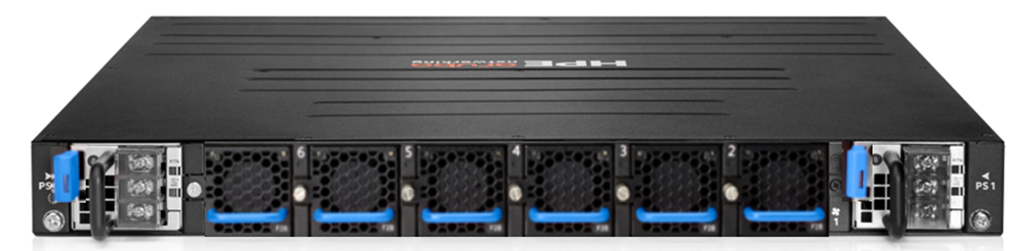
- The air From the power supply side to the port side It means flowing.
- This approach can be used in cold-aisle data centers or specific rack configurations.
AOS-CX switchis the type of fan inserted Automatically detecteddo.
So, if you mount the fan in the correct orientation for your cooling method, the switch will automatically recognize it and provide optimal cooling performance.
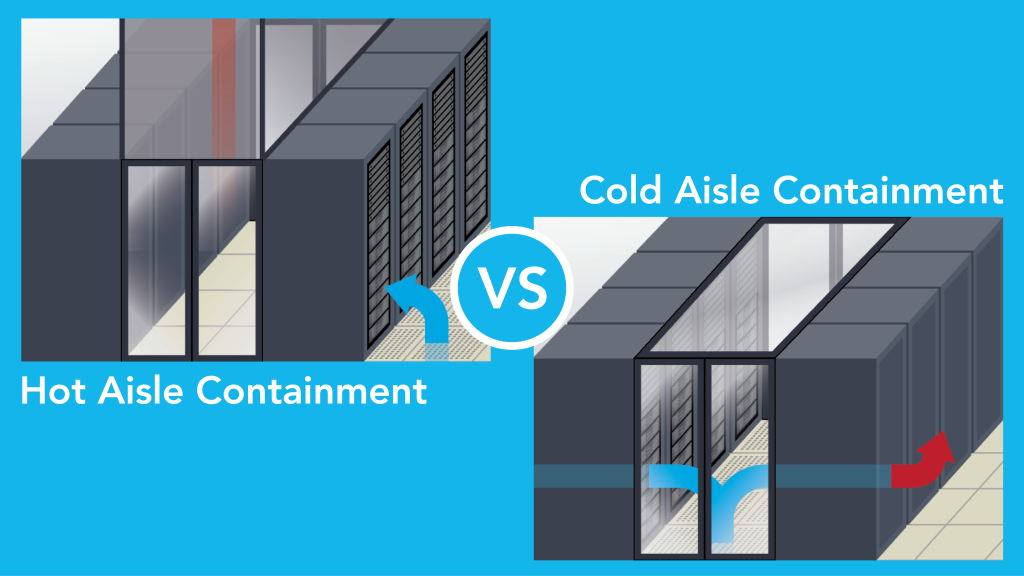
In general Hot-aisle data centerIn the rack frontWhen installing the switch, air flows from the port side to the power supply side. ‘Front-to-back methodThis is required. It involves drawing in cold air from the front of the rack (cold aisle), cooling the equipment, and then exhausting hot air out the back of the rack (hot aisle).
But recently, many customers rear of rack에 Top-of-Rack (ToR) switchis being deployed.
Since the server's network card (NIC) is located at the back of the server, the switch in this case allows air to flow from the power supply side to the ports. ‘Back-to-front approachrequires airflow.
All AOS-CX switchesis basically Front-to-back airflowI have.
However, for certain switch series, we offer separate models to allow you to choose the fan direction to suit your data center cooling method.
today CX switches, categorized by data center product lineI heard air flowChoosing SKU numberThere are some, so you must check before purchasing.
It's important to remember that selecting the right switch model for your data center cooling design is essential to ensuring efficient operation and extended lifespan of your equipment.
Data Center Network Construction Model
There are various models for building data centers, and each data center must choose the model that best suits its unique requirements.
With a variety of deployment models available, we'll explore the questions you need to ask to determine the optimal model for your needs.
Data centers typically have several types of networks.
as soon as Out-of-band management network, Storage Network, and data network (In-Band).
Out-of-band (OOBM) management network
Administrators can manage devices using in-band networks.
but Out-of-band (OOBM) networkIt is recommended to build it separately.
The OOBM network is built to enable network administrators to manage critical devices even when the in-band network is down. Simple parallel networkThis serves as a lifeline, allowing you to access network equipment and troubleshoot issues even in emergency situations.
Storage Network
Storage Networkis generally used for data storage. Dedicated, independent, high-performance networkno see.
This network interconnects and provides a pool of shared storage devices to multiple servers, enabling automatic backup and monitoring of data.
But recently, in-band data networks and storage networks As convergence emerges as an option for some customers and solutions, the lines blur.There are also many newer Hyperconverged Infrastructure (HCI) Infrastructure solutions contribute to these integration scenarios.
Nevertheless, separate Dedicated storage networks will remain very common and essential.no see.
Data Network (In-Band)
Data networks (in-band) are designed to handle large amounts of critical data and support demanding workloads. A high-performance fabric for server-to-server East-West communications.In-band data loads in data centers heavily utilize server-to-server and rack-to-rack traffic patterns.
The architecture described here is designed for maximum bandwidth and high network availability. Loop-free network with multiple active links, enabling and supporting this challenging East-West traffic.
Understanding these network types and choosing the optimal deployment model to meet your specific needs is key to successful data center operation.
Access Layer Switching: Top-of-Rack Design
Access Layer Switchingis a switch located at the top of the data center rack, i.e. Top-of-Rack (ToR) switchIt is done through .
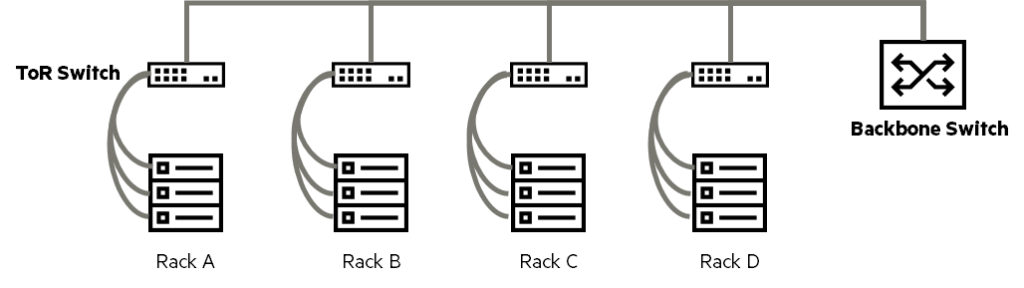
In a ToR design, servers are connected within the rack using copper cables (typical LAN or Ethernet cables) or fiber optics to access switches, which are then connected to the data center backbone switches using multimode fiber (MMF).
The backbone of a data center is usually High-capacity aggregation or distribution switches, and these switches have Layer 2/3 capabilities.
Ethernet cables are primarily used for short distances inside racks, while thinner multimode fiber is utilized for connections outside the rack.
This has the advantage of reducing the weight burden on the cable and allowing connection to interfaces of various capacities to support the bandwidth requirements of the rack.
In a ToR deployment, servers within a rack are typically connected to an access layer switch located at the top of the rack.
Advantages of ToR design
- Isolate the problem: Isolate network issues occurring within a rack to that rack, minimizing their impact on the entire network.
- Traffic isolation: Reduces unnecessary outgoing traffic from within the rack, alleviating network congestion and enhancing security.
- Physical disaster: Even if a problem occurs in one rack, it does not affect the services of other racks, preventing damage from spreading in the event of a physical disaster.
Disadvantages of ToR design
- Increase the number of switches: Because each rack requires an access switch, the number of switches required for the entire data center increases.
- Initial capital expenditures: As the number of switches increases, the initial investment required to purchase the switches also increases.
Access Layer Switching: End-of-Row (EoR) and Middle-of-Row (MoR) Designs
Another option for deploying access layer switches is End-of-Row (EoR) or Middle-of-Row (MoR) switchis used.
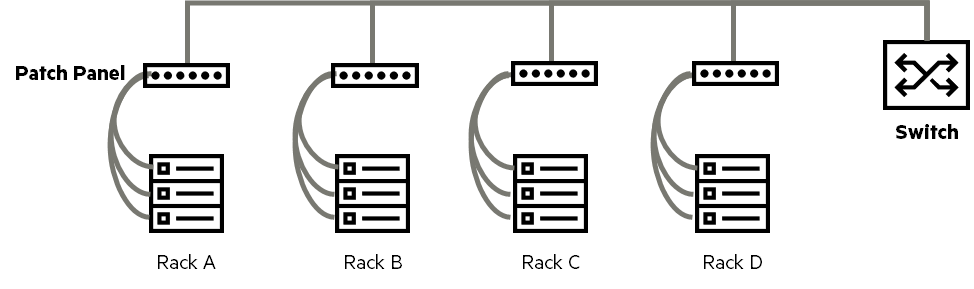
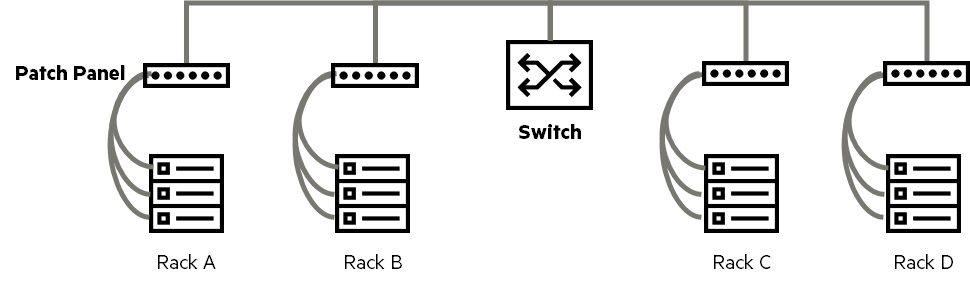
In this design, racks containing switching equipment are placed at either end or in the middle of a cabinet or row of racks.
Each server rack is connected to the switching equipment rack by several cable bundles.
Typically, servers are connected to patch panels inside each server rack.
And the copper or fiber optic cable bundle is connected directly to another patch panel in the rack where the access switch is located.
Then connect the switch to this patch panel via patch cables.
Typically, EoR/MoR switches are connected to the core network with fiber optic patch cables.
EoR doesn't necessarily mean that network racks must be placed at the end of a row.
There are also designs that place the network switch racks in the middle of a row of cabinets/racks.
Placing the switch rack in the middle of the row will reduce the cable length required to connect the furthest server rack to the nearest network rack.
Unlike the ToR model, which treats each rack as an independent module, the EoR/MoR deployment model Consider each column as an independent moduledo.
Advantages of EoR/MoR Design
- Number of switches: Fewer switches required compared to ToR
- Network Pre-Planning: Easy to plan cabling and switch placement in advance
- Initial capital expenditures: Reduced switch purchase costs compared to ToR
- Fewer rack-to-rack hops: Improved network latency by reducing the number of hops between switches.
Disadvantages of EoR/MoR design
- Isolate the problem: If a problem occurs in a specific server rack, it is more likely to affect the entire row.
- Traffic isolation: The risk of congestion due to concentrated traffic between racks is higher than that of ToR.
- Cabling: Long cable bundles are required from each server rack to the switch rack, making cable management and labeling more complex.
Data Center High Availability and Fault Tolerance
High availability and fault tolerance are the first and most important considerations in any data center project. Modern data centers are typically Uptime of at least 99.999%, which means it can only be down for a maximum of 5 minutes and 13 seconds per year. It should operate almost continuously.
There are three main approaches to achieving this high availability:.
1. Physical Redundancy
The most basic thing to consider is Duplicate the device itselfIt is to do.
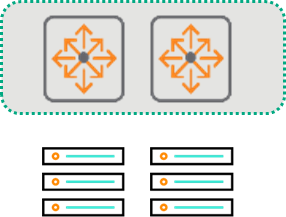
This refers to preparing two or more copies of all core equipment, including switches, servers, storage, power cables, PDUs, and power circuits.
But if you add equipment for redundancy, you get more Rack space, power, and cooling systemsThis is required.
Ultimately, it's important to remember that this will impact the cost and complexity of your project.
2. Link Redundancy
The next thing to plan is the data center devices. How to connect in a dual mannerno see.

It's more than just adding more cables.
For example, even if you connect two cables from a server to the same switch, if the switch itself fails, the connection will be lost.
So the best way is Redundant connections go to different switches or, in the case of modular switches, to different modules.It is to make it possible.
When planning link redundancy, you must consider the added costs of additional cables, connectors, transceivers, and cable management.
3. Redundant Configuration
Duplicate settingsIn addition to duplication of physical equipment, Manage network equipment settings themselves by duplicating themThis refers to the aspect of enabling rapid recovery and consistent service provision even in the event of a system failure. For example, by synchronizing equipment settings in an active-standby or active-active manner, if one device fails, another can immediately take over.
In this post, we looked at some things to consider before building a data center network.
Before designing the overall architecture, it is important to consider and understand the points to avoid creating unnecessary processes.
Next, we'll look at data center network architecture.