ICMP
You've added a new printer to your network and want to use it with your laptop. At this point, you'll need to check that the network is properly configured to ensure normal network communication between the two devices. ICMP can help resolve this issue.
The Internet Control Message Protocol (ICMP) is a protocol within the Internet Protocol. Network devices use ICMP to transmit error messages and operational information, and it also indicates success or failure when communicating with different IP addresses. For example, an error is displayed if the newly added printer service above is unavailable or if the printer cannot connect to the network.
The following table shows common messages used in ICMP.
| message | explanation |
| Destination unreachable | Please notify us of any issues during transmission. |
| Time exceeded | TTL expired or packet was dropped. |
| Redirect | Let others know about better L3 paths. |
| Echo request / reply | Ping: Check connection |
referenceICMP messages do not include TCP or UDP headers. They are placed directly within IP packets. Therefore, ICMP is sometimes considered an extension of the network layer.
PING
Ping The command is ICMP Echo Request Sends a message to the destination device. The remote devices each respond to the received Echo Request message. Echo Reply It responds with a message. If the device sending the Echo Request message receives the message from the destination, it means the network is properly configured (meaning smooth communication between the two devices). Therefore, in real-world environments, the Ping command is often used to check the network status, configuration, and connection between two devices.
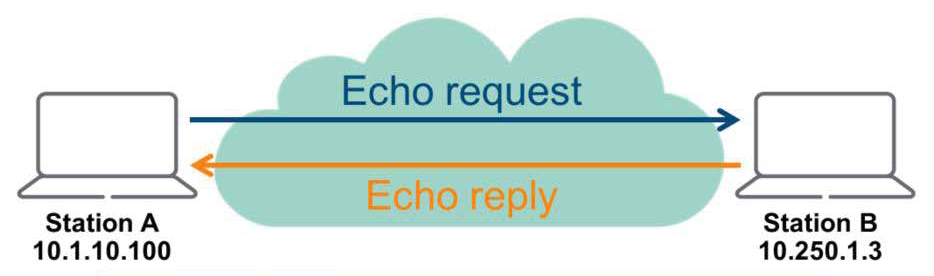
On AOS-CX switches, the ping command must specify an IPv4 address or hostname.
- Syntax: ping
- Command context: Operator (>), Manager (#)
- Authority: Operator or Administrator
The ping command is supported by most client operating systems.
Traceroute
“Traceroute”" command is a derivative of the ICMP protocol. It is a useful troubleshooting tool for applying Layer 3 technologies, such as routing protocols. This command traces the path a packet takes to reach its destination and lists the Layer 3 devices along the path.
On AOS-CX switches, the traceroute command, like the ping command, requires that an IPv4 address or hostname be specified.
- Syntax: traceroute
- Command context: Operator (>), Manager(#)
- Authority: Operator or Administrator

PC-3> tracert 10.11.12.104
1 10.11.11.1 0.002ms 0.002ms 0.001ms 2 10.11.0.2 0.002ms 0.001ms 0.001ms 3 10.11.12.104 0.001ms 0.002ms 0.002ms
As you can see in the example above, PC3 wants to connect to the destination 10.11.12.104 with two routers (10.11.11.1 and 10.11.0.2) between them. (On Windows, use the Tracert command.)
referenceMany firewalls block the ping and trace commands. If you use the ping or traceroute commands to test connectivity across a firewall, the test may not work properly. This is because firewalls block ping messages for security reasons, preventing them from responding properly even if there are no connection issues.
PoE
Power over Ethernet (PoE) is a feature that supplies power to endpoints using Ethernet cables, implemented in network devices such as Layer 2 or multi-layer switches. This feature eliminates the need for external power, saving both time and money.
PoE uses twisted pairs in UTP cables to transmit power to PoE-enabled devices. Original PoE standards used two twisted pairs to transmit data, with the remaining two used for power. Newer PoE standards transmit power and data over four twisted pairs. This is possible because power and data use different frequencies. Typically, power uses low frequencies (60 Hz or less), while data uses high frequencies (10–100 MHz).
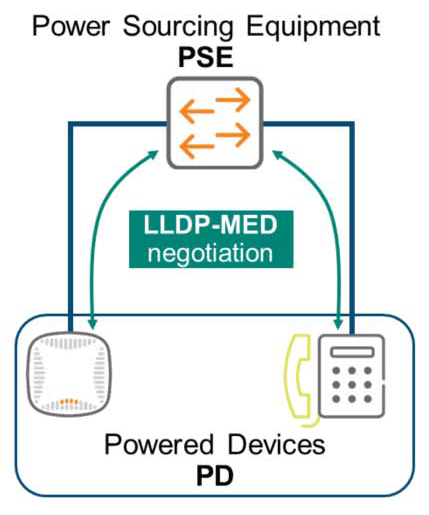
The PoE standard categorizes devices into two types: Powered Devices (PDs) that receive PoE power, and Power Sourcing Equipment (PSEs) that supply power. PDs typically refer to access points, VoIP phones, cameras, or IoT devices. PSEs, on the other hand, refer to PoE network switches.
The following table lists four standards available in the industry. AOS-CX switches support all of these standards.
| name | IEEE standard | PD로 supplied electrical energy | Per port Maximum electrical energy | electrical energy supply line |
| PoE | 802.3af | 12.95 W | 15.4 W | 2 pairs |
| PoE+ | 802.3at | 25.5 W | 30 W | 2 pairs |
| PoE++ | 802.3bt (Type 3) | 51 W | 60 W | 4 pairs |
| PoE++ | 802.3bt (Type 4) | 71.3 W | 100 W | 4 pairs |
The PSE and PD use LLDP messages to negotiate and supply more precisely the power required by the PD.