Previous PostWe learned about TCP/IP Stack in .
We looked at the differences between the TCP/IP Stack and the OSI 7-layer model.
Today, we will learn about Ethernet, which corresponds to Layer 1 and Layer 2 of the OSI 7-layer model.
Ethernet
Ethernet is a computer networking technology used at Layer 1 and Layer 2 of the OSI model.
This standard is used to assign a 6-byte (48-bit) MAC (Media Access Control) address to each device at Layer 2. Manufacturers assign a unique MAC address to each NIC (Network Interface Card, commonly referred to as a LAN card in a PC). Hexadecimal Assigns a MAC address. This address is stored in the NIC's ROM (Read Only Memory).
That means every Ethernet NIC in the world has its own unique MAC address. How is this possible?
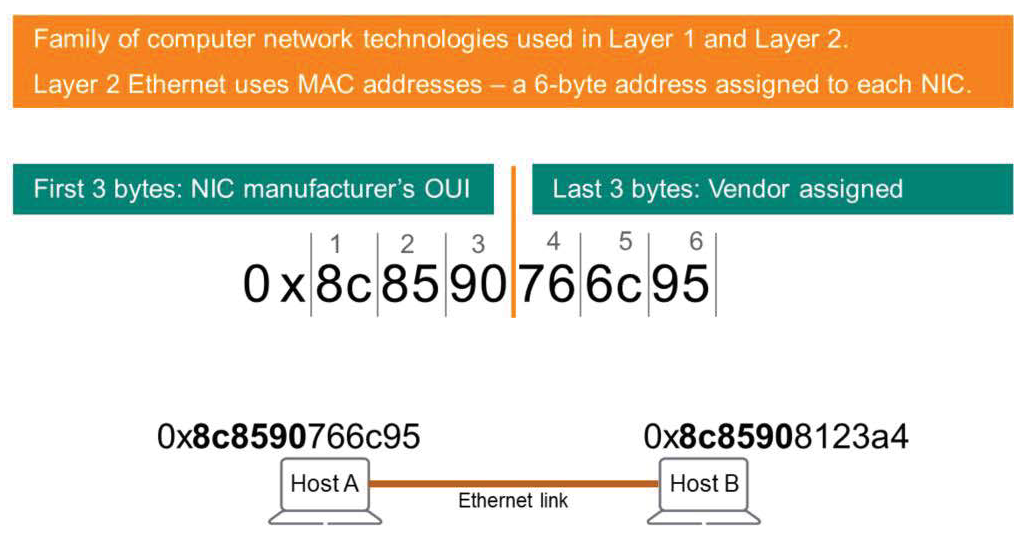
The first 3 bytes of each MAC address are Organization Unique Identifier (OUI)It is called.
Each manufacturer of Ethernet NICs is assigned a unique 3-byte number. While some manufacturers only have one unique 3-byte number, a manufacturer producing many products may have multiple OUIs.
The remaining 3 bytes of the MAC address are NIC Serial No.It consists of:.
In hexadecimal, one byte consists of two digits. Therefore, each MAC address consists of 12 digits. Hexadecimal charactersIt is displayed as . Each byte is usually separated by a colon (:) or a dash (-).
https://macvendors.com You can find the NIC manufacturer by searching for the OUI on a website like .
Ethernet Frame
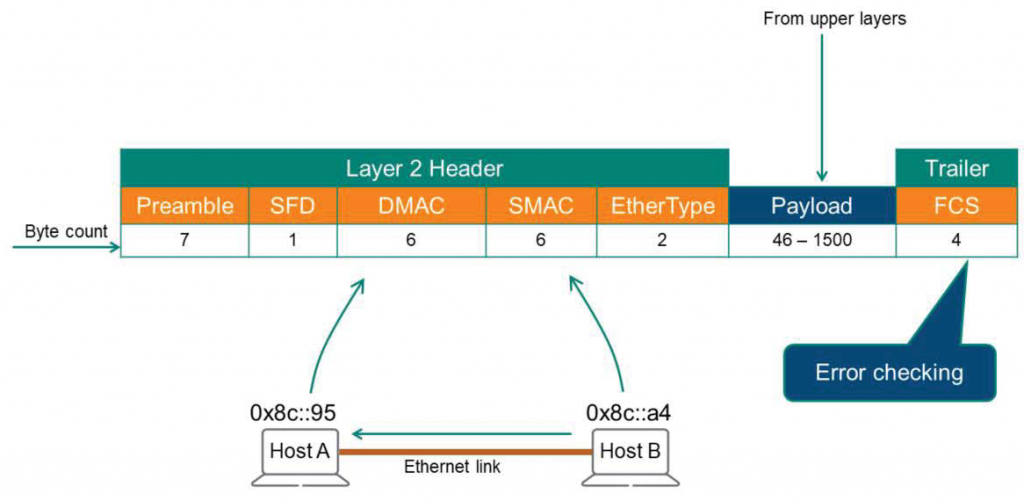
Let's assume Host B receives data from the OSI upper layer.
Let's think of Ethernet as a higher-level worker. They provide a payload to Ethernet and ask Ethernet to deliver it to Host A. The Ethernet process for delivery is as shown in the figure. Header와 TrailerRo Lee Payloadwill be wrapped around.
The fields for each Header and Trailer are as follows:.
- Preamble : Notifies the receiving system that an Ethernet frame is starting and enables synchronization.
- SFD (Start Frame Delimiter) : Indicates that the destination MAC address field starts from the next byte.
An Ethernet segment can have multiple hosts. All hosts recognize the preamble and SFD as a type of signal.
“Look here!! Here’s a Frame. It could be yours!”
When a frame arrives, how does the receiver know whether it is intended for itself or for another host?
The next field is the destination MAC address.
- Destination MAC address (DMAC) : Identifies the NIC of the computer system receiving the message.
For example, Host A reads the MAC address and accepts the frame if it confirms that it is its own MAC address.
Other devices and stations read the MAC address and, if the corresponding MAC address is not found on that station, discard the frame. This is similar to calling out a student's name in a classroom and telling a story. The other students will ignore the message, while only student A will respond. - Source MAC address (SMAC) : Identifies the NIC of the transmitting computer system.
This allows Host A to know where the message came from and who to respond to. - Ethernet Type (EtherType) : Defines the Layer 3 protocol (e.g. IPv4, IPv6) inside the frame.
The EtherType field tells the Host which stack to pass the Payload to for processing. - Payload : Contains the data to be transmitted.
- FCS(Frame Check Sequence): You can detect corrupted data using CRC (Cyclic Redundancy Check) or Checksum methods.
Host B performs mathematical calculations on most of the header and payload bits when generating this frame. The result of this calculation is placed in the FCS fieldWhen Host A receives the frame, it performs the same calculation and compares it with the value stored in the FCS field. If the values are the same, the payload is not corrupted. If the data is corrupted due to electromagnetic interference or a faulty cable, the frame is discarded because Host A's calculation does not match the value in the FCS field.
The Ethernet payload contains not only application data but also header information from higher layers. TCP adds a header that IP considers part of the payload. IP then adds a header, and Ethernet references part of the payload.
In the next post, we will look at the information in the IP header.