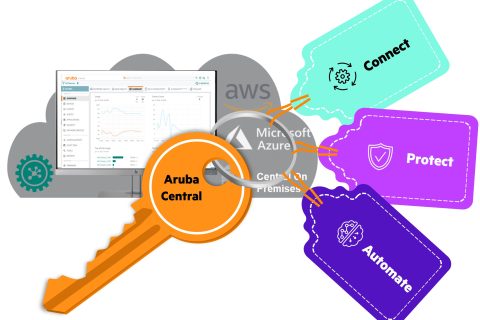
Continuing from the last post, this time we will look at several ways to use Aruba Central.
While Aruba Central is fundamentally a cloud-based SaaS solution, it offers a variety of options to tailor it to your specific environment and requirements. Furthermore, its licensing structure is simplified to make customer choice easier.
Choose the way you want
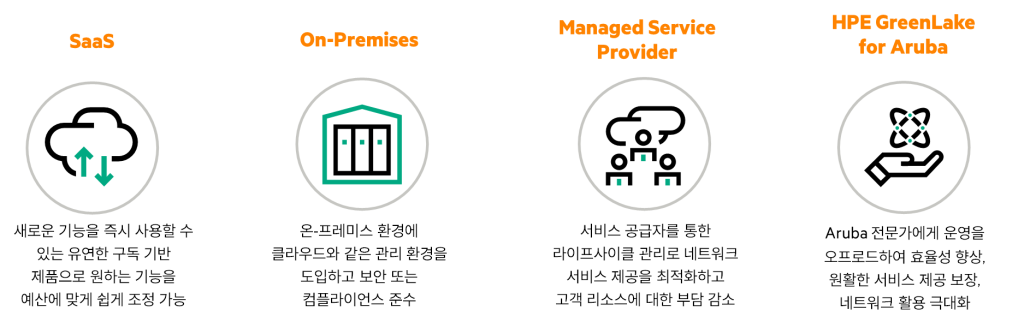
Aruba Cental offers customers choice and flexibility in how they use Aruba technology through a Software-as-a-Service model.
These diverse models provide customers with ultimate flexibility to navigate growing network complexity with pay-as-you-go economics, scalability, and operational simplicity as their organizations grow.
Aruba Central is On-Premises Solutions과 Managed Service OptionsWe can support a variety of technical, human and financial needs through:.
The on-premises version of Aruba Central is ideal for customers who want the agility and efficiency of the cloud but must adhere to strict regulatory or compliance requirements. Customers with legacy network designs that hinder cloud adoption are also potential candidates for this option.
Aruba Central on-premises deployments are recommended to be configured as 3, 5, or 7-node clusters for massive scalability and resiliency.
Additionally, for customers interested in sourcing through a Managed Service Provider (MSP), HPE-Aruba offers a robust MSP program, enabling you to partner with industry-leading service providers.
Additionally, HPE-Aruba offers Managed Connectivity Services (MCS), a Network-as-a-Service (NaaS) option built by Aruba Global Services experts and delivered to partners, for greater operational and financial flexibility.
Aruba Central Licensing Structure
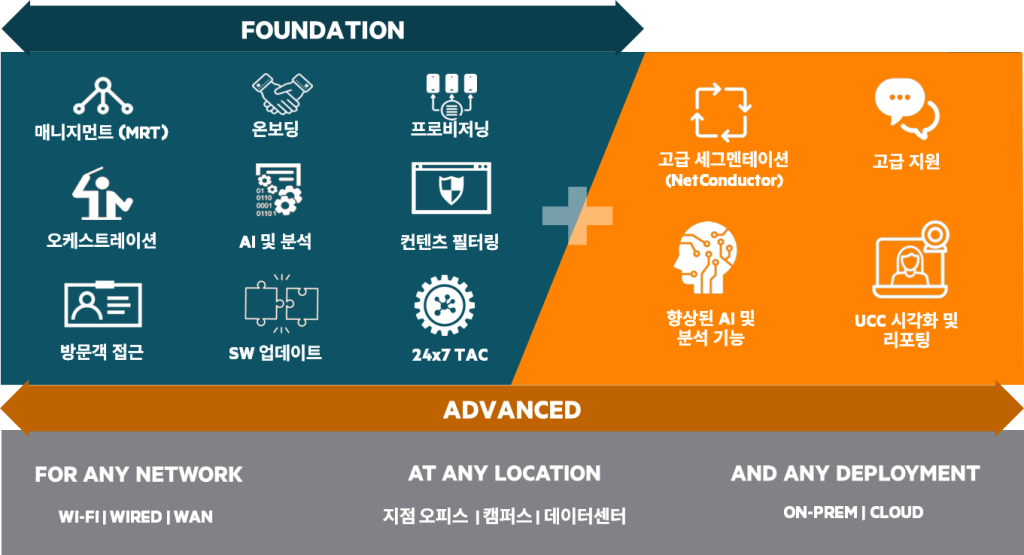
HPE Aruba is part of our strategy to transition to an Edge-to-Cloud platform and As-a-Service organization. Aruba Central Licensing ReorganizationSo we simplified it to Foundation / Advanced.
This is a unified software subscription model that will be extended to all products delivered and managed through Aruba Central in the future.
You can choose from 1, 3, 5, 7, or 10-year contract terms, providing flexibility to choose the service and device operation that best suits your current business type. This license subscription model requires separate licenses for APs, switches, and gateways.
This licensing model provides the following types of licenses, depending on the device:
For more information, see the Aruba Central Help. Supported FeaturesPlease refer to .
- Switch
- Foundation: Provides all functions including configuration management and monitoring of the switch, as well as troubleshooting.
- Advanced: Including Foundation features, NetConductor FabricProvides additional features related to .
- Access Point (AP)
- Foundation: We provide wireless AP configuration management and monitoring, troubleshooting, and value-added services.
- Advanced: Provides additional features related to AI Insight and advanced WLAN-related services, including Foundation features.
- Gateway
- Foundation: Provides all the features required for Aruba SD-Branch functionality.
- Foundation Base: Includes all Foundation features, but supports only up to 75 client devices per branch site.
- Foundation with Security: Provides all the features required for SD-Branch plus some additional security features.
- Foundation Base with Security: Provides the same features as Foundation with Security, but supports only up to 75 client devices per site.
- Advanced: Provides additional features related to SaaS Express and AI Insight, including Foundation features.
- Advanced with Security: Provides security features such as IDPS with advanced features, security dashboard, and anti-malware.
- Wireless Gateway: Provides Foundation-level wireless management capabilities for Aruba gateways.
- Virtual Gateway (VGW): Available for AWS, Azure, and ESXi platforms, and provisioned to your required bandwidth.
Aruba Central license with technical support for the software
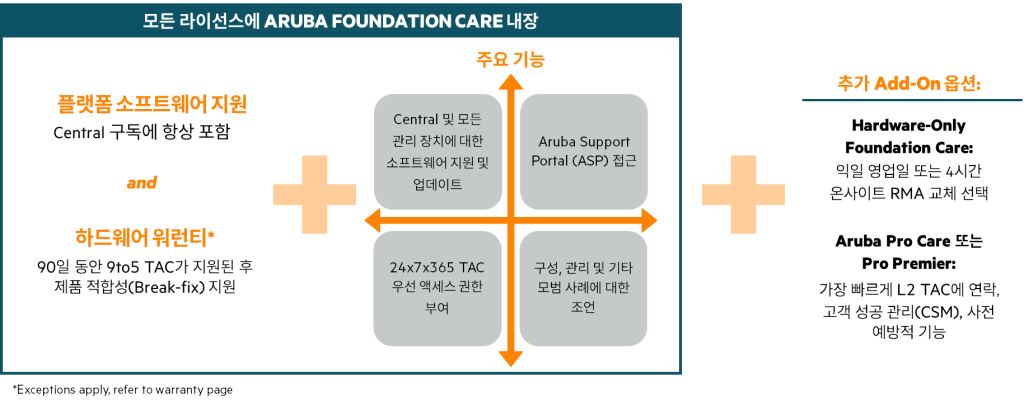
All Aruba Central licenses include: Aruba Foundation Careis built-in.
This means Aruba Central customers always have access to the latest device software for all devices managed through Central, priority access to the Aruba Support Portal (ASP), TAC, and support/guidance for device configuration.
Hardware-Only SupportCombine Aruba Foundation Care with additional add-ons, such as , for next-business-day or 24-hour on-site hardware replacement. Alternatively, combine with Aruba ProCare for a higher level of service.
Aruba Central MSP Mode
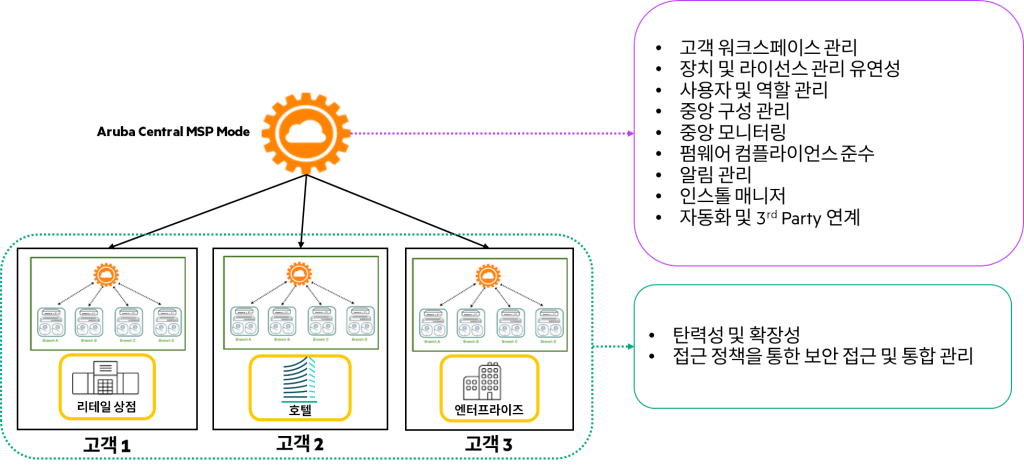
The Managed Service Provider (MSP) interface provides additional capabilities for MSPs to provision and manage customer accounts.
When using MSP mode, service providers (SPs) can manage the network infrastructure of multiple customers from a single interface.
MSP administrators who manage multiple customer networks can provision customer accounts, assign devices and licenses, and monitor customer accounts and networks. Administrators can also drill down into specific customer accounts to perform management and configuration tasks.
Customer access is restricted to their own site and the features and application services for which they have subscribed.
In this three-part series, we have briefly looked at Aruba Central.
To summarize...
- Aruba Central helps administrators simplify network operations by providing a single network architecture across campus, branch, and data center networks.
- This cloud management platform provides an easy-to-use, single pane of glass to manage, configure, and monitor your entire network.
- Aruba Central is available in a variety of ways, including as a subscription-based cloud platform, on-premises, and as a service for MSPs.
From the next post, we will cover the details of operating and using Aruba Central.