

How to Use AI Smarter, MCP
Recently, you have likely encountered powerful built-in AI features such as 'Agentic AI' and 'Marvis' on platforms like HPE Aruba Central or Juniper Mist. However, hasn't it suddenly occurred to you that you didn't have a thought like this?
“Isn’t it possible to check and manage our company’s network status directly from Claude or VS Code, which I usually use?”
Today, going beyond simply using AI as a 'given function,', Technology that makes AI smarter by directly connecting your work tools and infrastructure, MCPI intend to discuss this in depth.
How to Give AI 'Eyes and Ears': What Is MCP?
Large Language Models (LLMs) like Claude or GPT that we use are smart, but they don't know the 'state of our home network'.
Until now, we had to copy and paste the logs.
MCP (Model Context Protocol) is an open standard released by Anthropic that serves as a standard interface connecting AI models with external data (API). Simply put, it creates a channel that allows you to command the AI, "Go to this address (Central API) and check the network status directly.".
MCP, the 'USB-C hub' of AI
Shall we look at the picture below together for the most intuitive explanation?
This figure perfectly visualizes how MCP changes the network management environment.
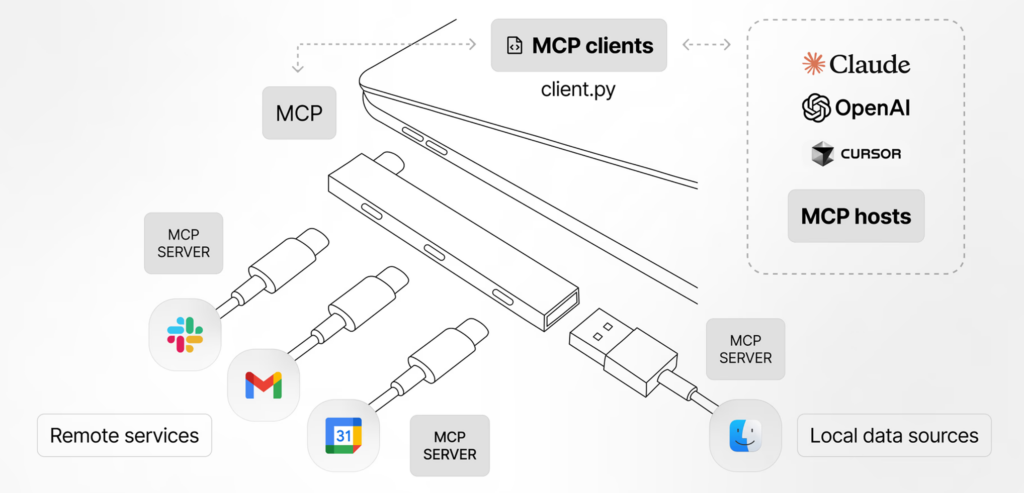
The most striking thing in the picture is the one in the center. USB-C hubIt is. This hub is right MCPno see.
- Standardized connection: In the past, you had to study the Aruba API, Mist API, and Slack API separately to connect them. But now MCP is a standard specification Thanks to this, you can have an immediate conversation regardless of the type of equipment simply by plugging a ‘cable’ called an MCP server into the AI (Host).
- Plug & Play Just as you can use a USB mouse immediately without any separate settings when you plug it in, AI independently discovers what functions services connected through the MCP provide (e.g., equipment lookup, log analysis, etc.) and uses them immediately.
In other words, we Thanks to the standard USB-C interface, you can connect immediately just by plugging in the cable, regardless of the laptop manufacturer or type of peripheral.Just as it works, MCP plays the same role.
- MCP Host: These are the smart AI models we use (Claude, OpenAI, Cursor). They are isolated from the outside world and possess only learned knowledge.
- MCP Server: This is a channel that helps this smart AI safely access external data.
- Local Data Sources: These are files or program data on my PC. (Finder icon in the image)
- Remote Services: These are cloud-based infrastructure management platforms like Aruba Central or Juniper Mist, or collaboration tools like Slack or Teams. (Slack and Google application icons in the image)
Technical operating principles of MCP (Architecture)
MCP does not simply transmit data, but enables AI to 'understand' the tools.
- Discovery: When the AI (Claude, etc.) runs, it asks the MCP server, “What functionality can you provide?” The server
get_inventory,check_alertsIt sends the same list of tools. It is just like when you plug in a USB memory stick, the OS recognizes, “Ah, it has a 32GB capacity.”. - Tool Call (Call): If the user says, “Tell me about the faulty equipment,” the AI makes a decision on its own and
check_alertsCalls the tool. - Grounding (Presentation of grounds): When the server transmits real-time data retrieved via the Central API, the AI generates a response based on it. Thanks to this, Hallucinations are drastically reduced.
Why is MCP necessary when the solution already provides its own AI?
“You might wonder, ”I already have powerful AI on my dashboard, so why go through the hassle of connecting an MCP?”.
To start with the conclusion, if embedded AI is the 'best engineer,' then AI combined with MCP is a 'competent business assistant that understands networks.'.
| Comparison items | Dashboard Built-in AI (Marvis/Central) | MCP + AI Agent (Claude/Cursor) |
| Workspace | Management console web screen | The chat window where I work, IDE (VS Code) |
| Interlinkage range | Limited to the relevant vendor infrastructure | Network + Email + Work Documents + Jira |
| Scalability | Limited to features provided by the vendor | Users can directly define the functions they need using Python. |
| security | Dashboard permission-based | Separation of credentials and data pathways (OS environment variables) |
In particular, currently released GET(query) The central MCP server alone is powerful enough.
Because AI has excellent data 'interpretation' capabilities, it can analyze complex logs to write business reports or draft RMA request emails, etc. It integrates infrastructure operations and business workflows into one.
Shall we compare it with an actual work scenario?
Scenario A: Incident Reporting and Follow-up
- Proprietary AI: “An error occurred on port 3 of the switch at the Seoul branch. We recommend checking the cable.” (Fault analysis completed)
- MCP + Claude: “I checked the switch port error at the Seoul branch. Upon checking the asset management system (Jira/Excel), I found that the equipment in question is new equipment introduced last month. Write a failure report to send to the responsible companydid, Technical Support Request (RMA) Email DraftI have prepared up to that point. Shall I send it?”
Scenario B: Understanding the Current Status of Complex Infrastructure (Multi-Domain)
- Proprietary AI: “Currently, 5 out of the total APs are offline.” (Infrastructure status summary)
- MCP + Claude: “When comparing the locations of the 5 APs currently offline with the office floor plan file (PDF), they are all near the 7th-floor lounge. Today's CalendarUpon reviewing the document, it appears that an electrical inspection is scheduled for that area. Based on the content of the inspection notice email, this appears to be a normal situation.”
Scenario C: Creating Customized Guidelines
- Proprietary AI: “Change the settings of the relevant port to enhance security.” (Providing general guidance)
- MCP + Claude: “According to our company's internal security policy document (Wiki), MAC authentication is mandatory for public ports. The current configuration found in Central is missing this requirement. I have created a configuration script (CLI) modified to comply with the regulations. Please review and apply it.”
💡 Key Differences:
“The AI provided by the solution itself accurately pinpoints the broken parts of my home ‘Smart diagnostic device’no see.
However, the AI connected to the outside world through the MCP to fix the broken parts A 'smart butler' who calls a technician, schedules repairs, and even submits expense reports‘It essentially becomes that.”
[Practical Guide] Build 'Aruba Central x Claude' Assistant in 5 Minutes
The Central MCP server wraps Central's REST API and provides it as a Model Context Protocol (MCP) tool.
Once the setup is complete, AI assistants on supported clients such as Claude Desktop, VS Code with GitHub Copilot Chat, and Claude Code can answer network-related questions by invoking these tools and reporting real-time results.
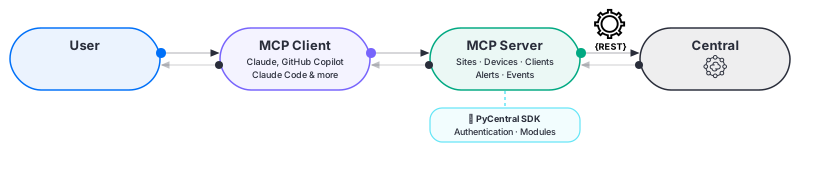
Okay, then Officially proposed by HPEdoing UV We introduce the safest and fastest way to build using a package manager.
① Preparations
- HPE GreenLake API Credentials:
Client ID,Client Secret,Base URL(Verification Method Guide) - UV installation:
Windows
powershell -c ""irm https://astral.sh/uv/install.ps1 | iex""Mac/Linux
curl -LsSf https://astral.sh/uv/install.sh | sh② Claude Desktop Settings
Configuration file to enable Claude to recognize the Central MCP server (claude_desktop_config.jsonModify ).
- Open Claude Desktop
- macOS: Click Claude in the menu bar → Settings
Windows: Click the hamburger menu or profile icon → Settings - ‘Click the 'Developer' tab
- ‘If you click 'Edit Configuration' in the default text editor
claude_desktop_config.jsonThe file opens.
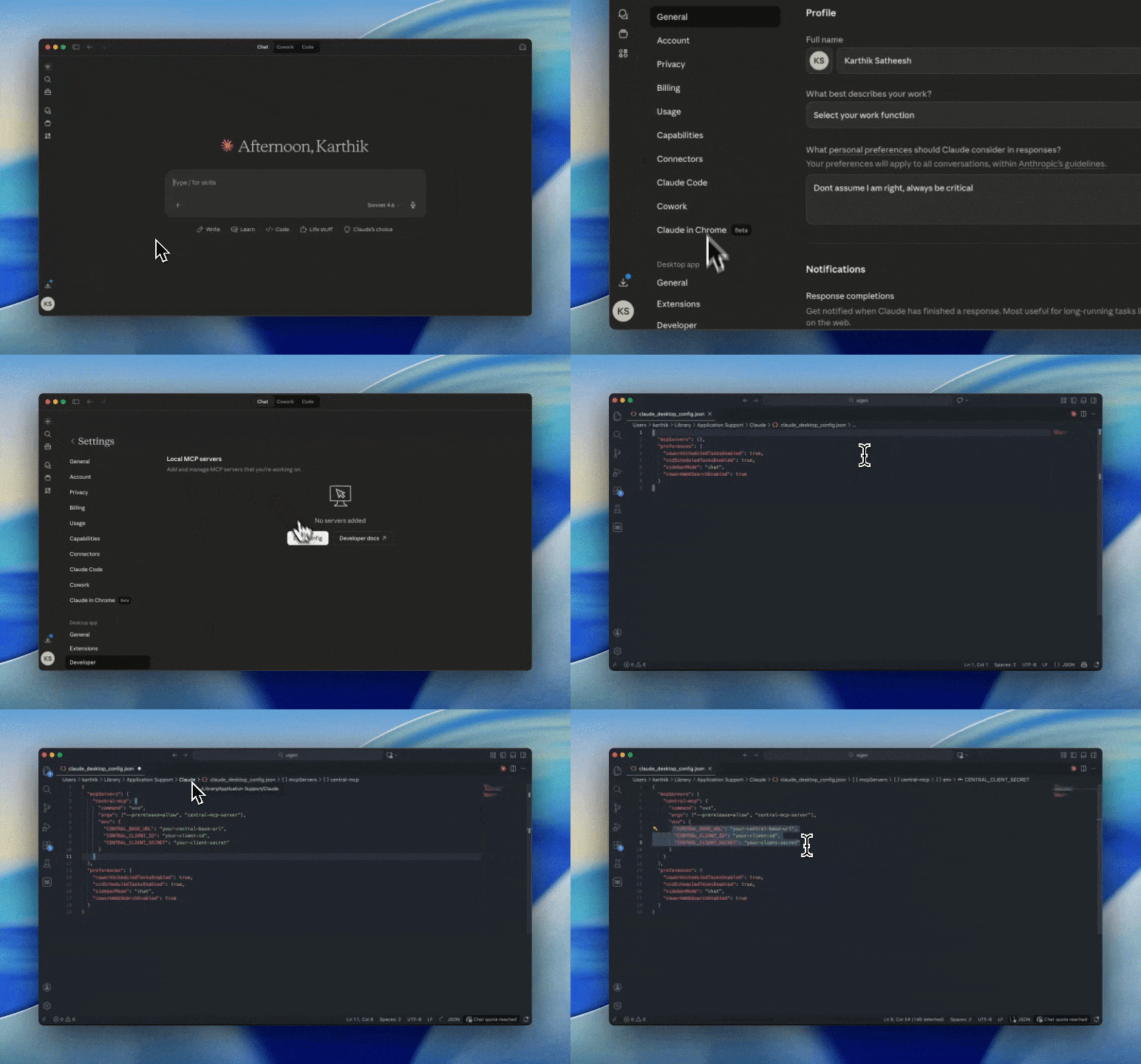
Configuration file path: >
- Windows:
%APPDATA%\Roaming\Claude\claude_desktop_config.json- Mac:
~/Library/Application Support/Claude/claude_desktop_config.json
mcpServers Below central-mcp Add an item:
{
  ""mcpServers"": {
    ""central-mcp"": {
      ""command"": ""uvx"",
      ""args"": [""--prerelease=allow"", ""central-mcp-server""],
      ""env"": {
        ""CENTRAL_BASE_URL"": ""your-central-base-url"",
        ""CENTRAL_CLIENT_ID"": ""your-client-id"",
        ""CENTRAL_CLIENT_SECRET"": ""your-client-secret""
      }
    }
  }
}
③ Check Results: Talk to AI
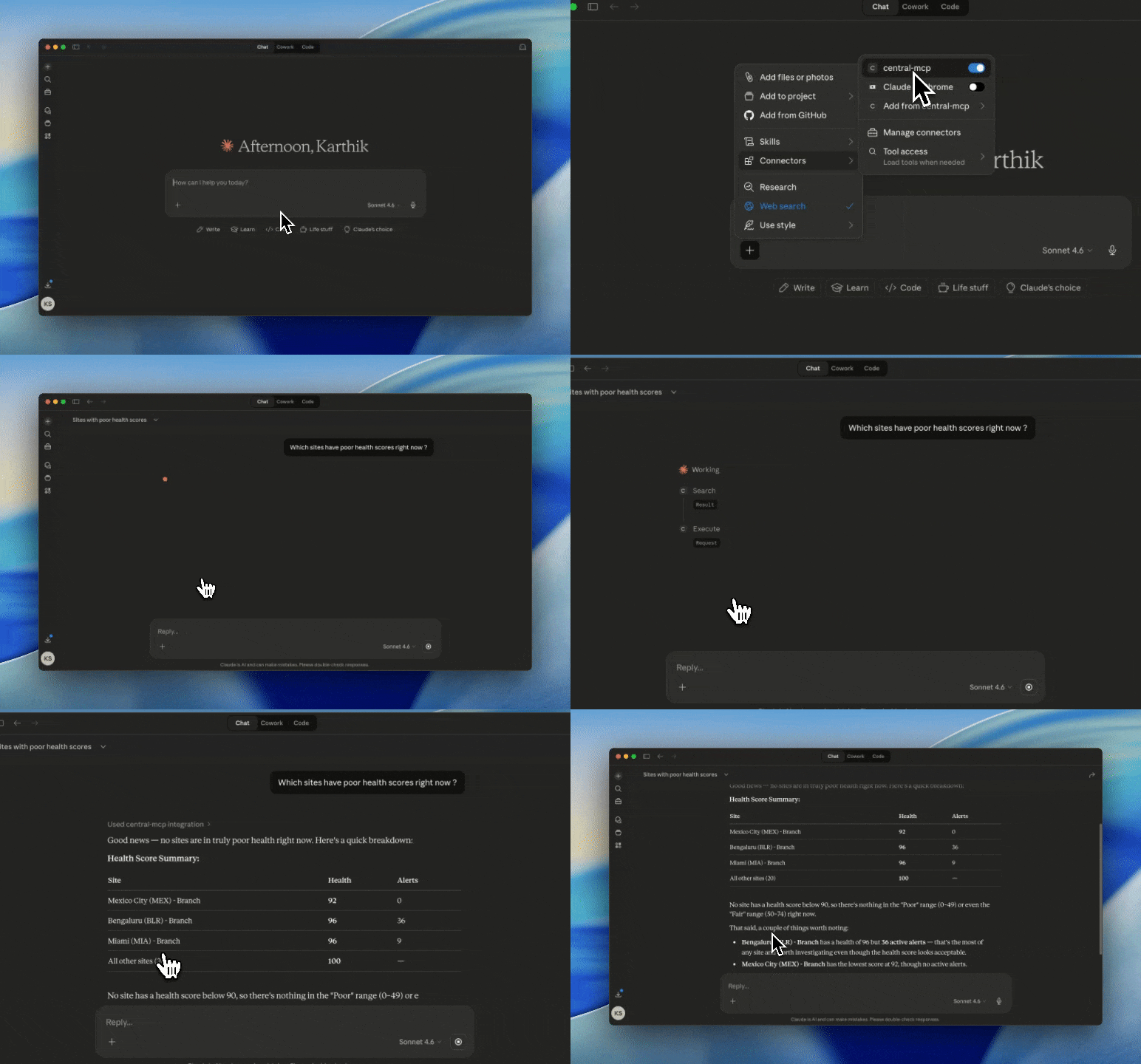
Restart Claude Desktop and check if the Central MCP server is connected. Then, ask this.
“Which site has a bad network connection right now?”
Integration Beyond Vendors: “The Combination of Aruba, Mist, and Collaboration Tools”
The most noteworthy aspect of HPE and Juniper's integration move is Aruba Central과 Juniper MistAll support MCPThe fact is that it does.
This means that administrators are not confined to a specific vendor's dashboard and can have their own 'integrated monitoring tool'.
1. 'Integrated Command Center' in a Multi-Vendor Environment‘
You no longer need to switch between the Aruba and Mist windows.
If you register both MCP servers with an AI agent like Claude, such magical commands become possible.
- “Extract all APs (Aruba & Mist) currently offline from the entire network and write a status report.”
- “Check the port errors on the Mist AP connected to the Aruba switch, and cross-analyze the logs from both sides to find the bottleneck.”
2. Powerful MCP Ecosystem: Integration with GitHub, Teams, and Slack
The value of network data is doubled when combined with other IT service data.
We introduce useful MCP servers currently available through the community and official channels.
- GitHub / GitLab MCP: “Read the recently updated Ansible playbook code and review if there are any differences from the current Central configuration.”
- Slack / Microsoft Teams MCP: “Summarize the network failure analysis results, share them in the Infrastructure Operations team channel, and mention the person in charge.”
- Jira / Linear MCP: “Create a ticket based on the analyzed outage details and set the urgency to 'High'.‘
- Google Calendar MCP: “Please pause the monitoring alarms on the devices (Maintenance Mode) at the scheduled time for the network maintenance.”
- PostgreSQL / MySQL MCP: “Combine network traffic statistics with asset information stored in our company database to generate a usage report by user.”
Ultimately, the future that MCP aims for is the 'democratization of tools'.
The integration of HPE and Juniper goes beyond the combination of hardware, granting administrators powerful freedom through standardized protocols (MCPs).
Now, try adding Aruba Central MCP, Mist MCP, and various other business MCPs to your work environment one by one.
You will experience the transformation of complex multi-vendor infrastructure management into an 'intelligent service tailored just for you.'.

![[APSC 교육#2] Aruba Central 기능](https://egstory.net/wp-content/uploads/2024/01/Aruba-Central-768x543.jpg)
![[ACP-DC 교육#7] 데이터센터 스위치 배포](https://egstory.net/wp-content/uploads/2025/07/HPE-Synergy-RC-plus-blog.jpg)