


Role-based zero trust environments
Until now, our network security has been very static.
We created security policies based on source IP addresses, destination IP addresses, and ports to control traffic and enhance security.
But now, times have changed.
IP addresses are also changing to a DHCP environment, and it is becoming increasingly difficult for IT teams to control user terminals, including personal terminals.
In this environment, existing security methods cannot completely achieve network security.
Recently, numerous security incidents, both large and small, have been occurring. Security breaches can result in financial losses and even service interruptions.
And what we talk about a lot is “Zero Trust Security”no see.
However, legacy security methods based on IP addresses make it very difficult to implement zero trust.
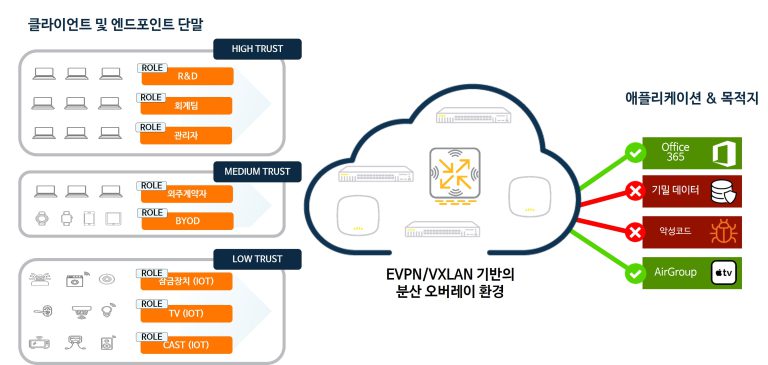
So HPE Aruba Networking has been around for a long time Role-based security policyhas been promoting.
We have been providing role-based access control (RBAC) and policy configuration since the days of Aruba Networks, a company that started out as a WLAN solution.
Role?
So what is a role?
When a terminal is connected to a network, it has numerous attribute values.
Who, when, where, in what way, with what terminal, etc…

You create roles by combining these different attribute values.
For example, outsourced workers who access company assets during work hours, or employees who access their personal PCs remotely on holidays.
Alternatively, you can leverage your employees' R&R to assign them roles that fit their company's needs (web developer, QA tester, purchasing team, etc.).
And by leveraging this role, you can apply various policies.
You may be able to apply firewall policies, or you may be able to apply role-specific QoS policies.
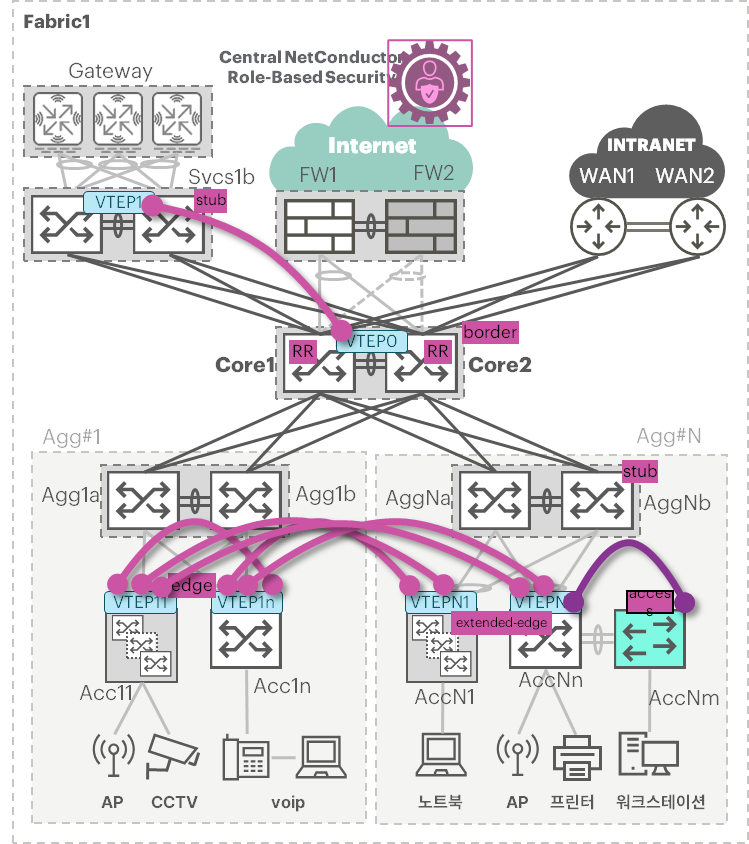
Why use roles?
Applying role-based policies can have benefits from both security and operational perspectives.
Consider the ACL policies that were managed based on IP addresses in legacy environments.
It's difficult to manage numerous IP addresses, and it's easy to miss out on cleaning up policies or IP addresses that are no longer in use.
Additionally, there are cases where this ACL policy is left unattended because it is not known when and for what purpose it was created.
These things can ultimately create security holes and lead to infrastructure operations that do not adhere to the principle of least privilege.
access-list 110 permit udp host 10.191.40.56 gt 1023 host 192.168.12.81 eq snmp access-list 110 permit udp host 10.128.117.156 gt 1023 host 192.168.12.81 eq snmp access-list 110 permit udp host 10.191.40.56 gt 1023 host 192.168.12.82 eq snmp access-list 110 permit udp host 10.128.117.156 gt 1023 host 192.168.12.82 eq snmp access-list 110 deny ip 10.195.138.0 0.56.113.255 host 192.168.12.81 access-list 110 deny ip 10.195.140.0 0.56.112.255 host 192.168.12.81 access-list 110 deny ip 10.194.0.0 0.1.255.255 host 192.168.12.81 access-list 110 deny ip 10.196.0.0 0.3.255.255 host 192.168.12.81 access-list 110 permit ip 10.192.0.0 0.63.255.255 host 192.168.12.81 access-list 110 permit ip 172.16.254.0 0.0.1.255 host 192.168.12.81 access-list 110 deny ip 10.195.138.0 0.56.113.255 host 192.168.12.82 access-list 110 deny ip 10.195.140.0 0.56.112.255 host 192.168.12.82 ... < snipped – can be a very long list of Access Entries > ... access-list 110 permit tcp 192.168.11.0 0.0.0.255 gt 1023 192.168.111.0 0.0.0.255 eq www access-list 110 permit tcp 192.168.11.0 0.0.0.255 gt 1023 192.168.111.0 0.0.0.255 eq 443 access-list 110 permit tcp 192.168.52.0 0.0.0.255 gt 1023 192.168.111.0 0.0.0.255 eq www access-list 110 permit tcp 192.168.52.0 0.0.0.255 gt 1023 192.168.111.0 0.0.0.255 eq 443 access-list 110 permit tcp 192.168.35.0 0.0.0.255 gt 1023 192.168.111.0 0.0.0.255 eq www access-list 110 permit tcp 192.168.35.0 0.0.0.255 gt 1023 192.168.111.0 0.0.0.255 eq 443 access-list 110 permit tcp host 10.58.136.112 range ftp-data ftp host 192.168.111.202 access-list 110 permit tcp host 10.58.136.112 host 192.168.111.202 established access-list 110 permit tcp host 10.58.136.112 range ftp-data ftp host 192.168.111.203 access-list 110 permit tcp host 10.58.136.112 host 192.168.111.203 established access-list 110 permit tcp host 10.128.15.132 host 192.168.111.202 access-list 110 permit tcp host 10.128.15.132 host 192.168.111.203 access-list 110 permit tcp host 10.128.14.19 host 192.168.111.202 access-list 110 permit tcp host 10.128.14.19 host 192.168.111.203 access-list 110 permit tcp host 10.128.56.58 eq 1521 host 192.168.111.202 access-list 110 deny ip any anyHowever, using 802.1x authentication or MAC authentication and using role names instead of IP addresses makes policy management easier.
AOS-CX switches can configure role-based policies with the name Group based Policy (GBP).
class gbp-ip employee-permit 10 match any admin employee 20 match ip employee employee 30 ignore icmp student employe 40 match icmp any employee 50 match udp contractor employee range 3478 3481 60 match tcp contractor employee range 3478 3481 class gbp-ip employee-deny 10 match any student employee 20 match any printer employeeThere Appliaction Regonition functionIf you utilize up to this point, you can also specify the settings for the UDP port above as Application.
50 match udp contractor employee app-category instant-messaging app ms-teamsAs a result, thanks to the short GBP instead of the long ACL, the load on the switch itself is reduced and unnecessarily large TCAMs are not required.
Colorless Port
We have been directly assigning VLAN, ACL, QoS settings, etc. to each port of the wired switch.
These settings are very static, so they had to be changed every time the number of terminals connected to the port changed.
However, AOS-CX switches will inherit policies related to VLANs based on the role assigned by the policy manager, such as ClearPass.
Since each role, such as printer, CCTV, and VoIP phone, is downloaded dynamically, the settings are automatically changed.
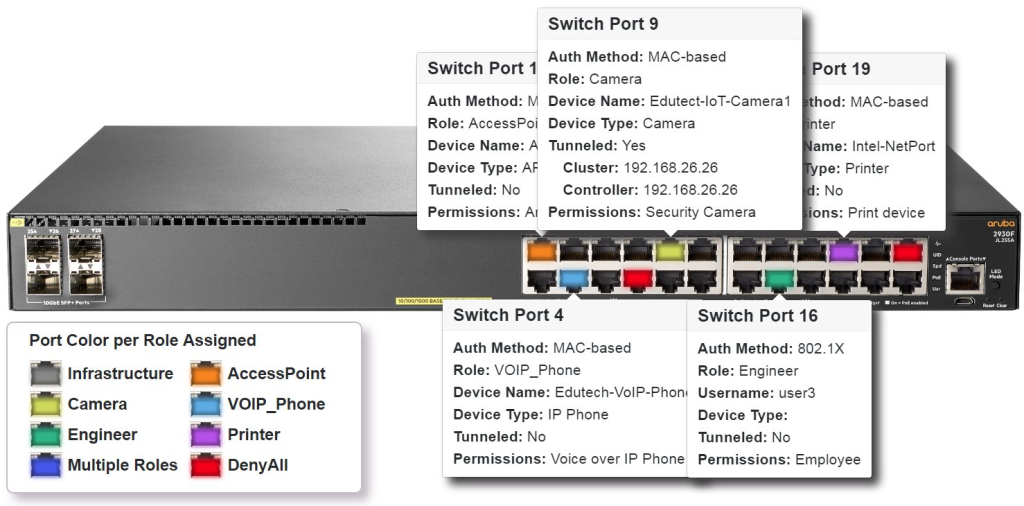
That is, we say it is colorless because no specific policy is statically assigned to each port.
AOS-CX User Role Types
ClearPass (CPPM) makes it easy to assign user roles.
At this time, we use the “Aruba-User-Role” VSA to assign roles.
First, it ensures a minimum level of connectivity before authentication takes place.
For example, allow DHCP and DNS for page connections such as Captive Portal.
After the authentication process, the interface will be assigned one of the following roles:.
- Post-auth role: Authentication successful After that, assign roles with various authorization (permission) policies that match them.
- reject role: Authentication failed
- critical role: If connection to the authentication server (RADIUS) fails
- critical voice role: If the connection to the authentication server fails and it is a VoIP phone
- cached critical role: When the connection to the authentication server fails, the previous role stored in the cache is reassigned (based on MAC address).
- fallback-role: If device registration fails and there are no derived roles assignable to the device.
- UBT-fallback-role: If the UBT area is inaccessible. Configurable at the port level.
interface 1/1/1 description colorless no shutdown no routing vlan access 1 rate-limit broadcast 60000 kbps rate-limit multicast 60000 kbps spanning-tree bpdu-guard spanning-tree port-type admin-edge spanning-tree tcn-guard aaa authentication port-access allow-cdp-bpdu aaa authentication port-access allow-lldp-auth mac source-mac aaa authentication port-access allow-lldp-bpdu aaa authentication port-access client-limit 2 aaa authentication port-access critical-role Critical aaa authentication port-access critical-voice-role V-Critical aaa authentication port-access reject-role Reject aaa authentication port-access preauth-role Preauth aaa authentication port-access auth-role Auth aaa authentication port-access radius-override enable port-access security violation action shutdown port-access allow-flood-traffic enable port-access fallback-role Fallback port-access ubt-fallback-role UBT-Fallback aaa authentication port-access dot1x authenticator initial-auth-response-timeout 3 max-eapol-requests 1 max-retries 1 enable aaa authentication port-access mac-auth enable client track ip enable client track ip update-interval 120 loop-protect ip flow monitor MON4-1 in ipv6 flow monitor MON6-1 inGroup Based Policy (GBP): Role-to-Role policy
As mentioned earlier, managing security policies and access control policies using IP addresses and service ports is an outdated idea.
So I tied the IP address and service port together and assigned it as a role.
And based on this role, you can configure policies into Source Role and Destination Role.
However, role-based policies may be valid within the same switch, but what if we move to a different switch?
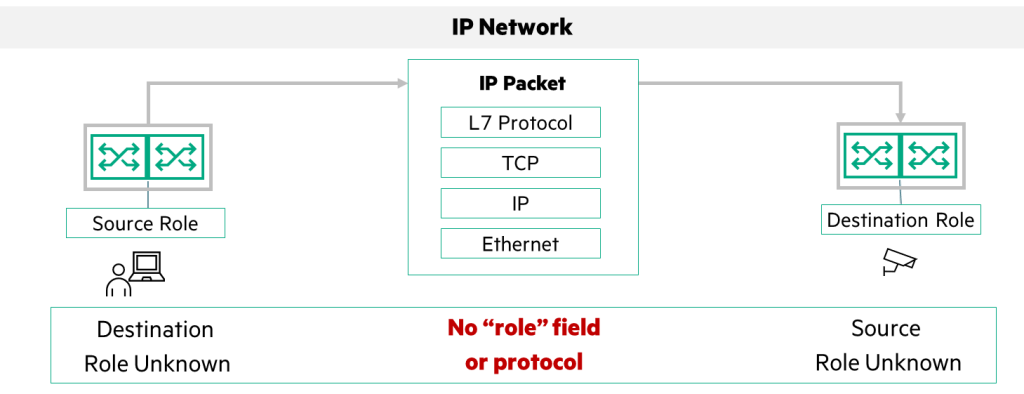
Can a role created in Switch A understand the same role in Switch B?
There is no space in packets on IP networks to contain information about roles.
So, the AOS-CX switch passes the mapping information for the Source Role in the VXLAN header.
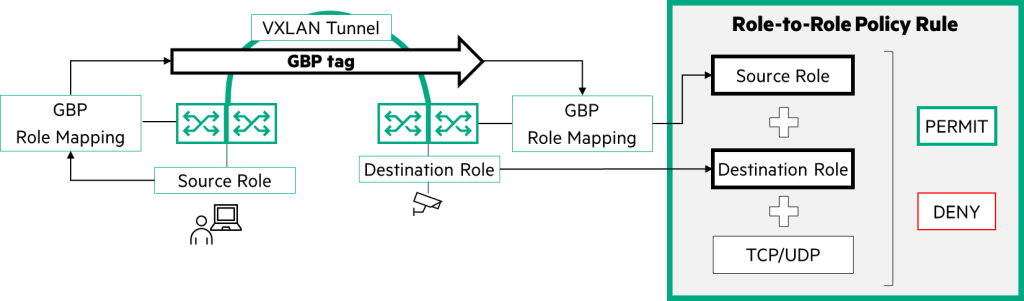
I want to map the information about the role I created to the GBP Tag.
switch(config)# gbp enable
switch(config)# gbp role Employee 100
switch(config)# gbp role Monitor 200
switch(config)# gbp role IOT 300
. . .
The GBP Tag created in this way allows you to configure the same security policy even in remote network environments.
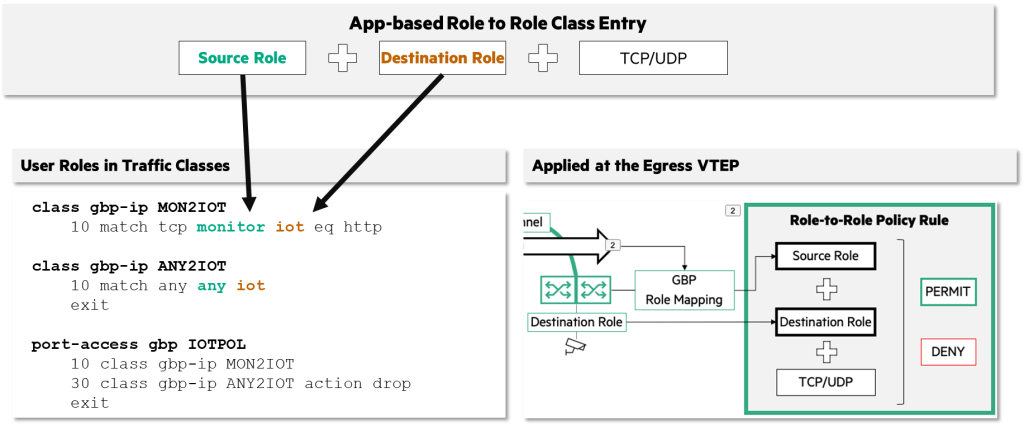
switch(config)# show gbp role-mapping

GBP status: Enabled GBP_ROLE GBP_ROLE_ID ------------- --------------- default 0 infra 2 internet 3 intranet 4
Employee 100 Monitor 200 IOT 101
. . .
Local User Role (LUR) vs Downloadable User Role (DUR)
You can set multiple security policies, such as ACL and QoS, on the switch according to each role.
Let's say you set up each policy for each role one by one like the example above using CLI.
Managing one or two switches might be manageable, but what if I had 100 or 1,000 switches to manage? It would be difficult to manage them properly.
This may be possible when initially provisioning, but if you need to add or update role-based policies in the future, you will miss something.
This can lead to human error and security threats.
So HPE Aruba Networking leverages ClearPass to centrally manage roles and role-based policies.
When you configure the attribute value of “Aruba-CPPM-Role” in CPPM’s Enforcement Profile, the corresponding role and policy are applied to each port.
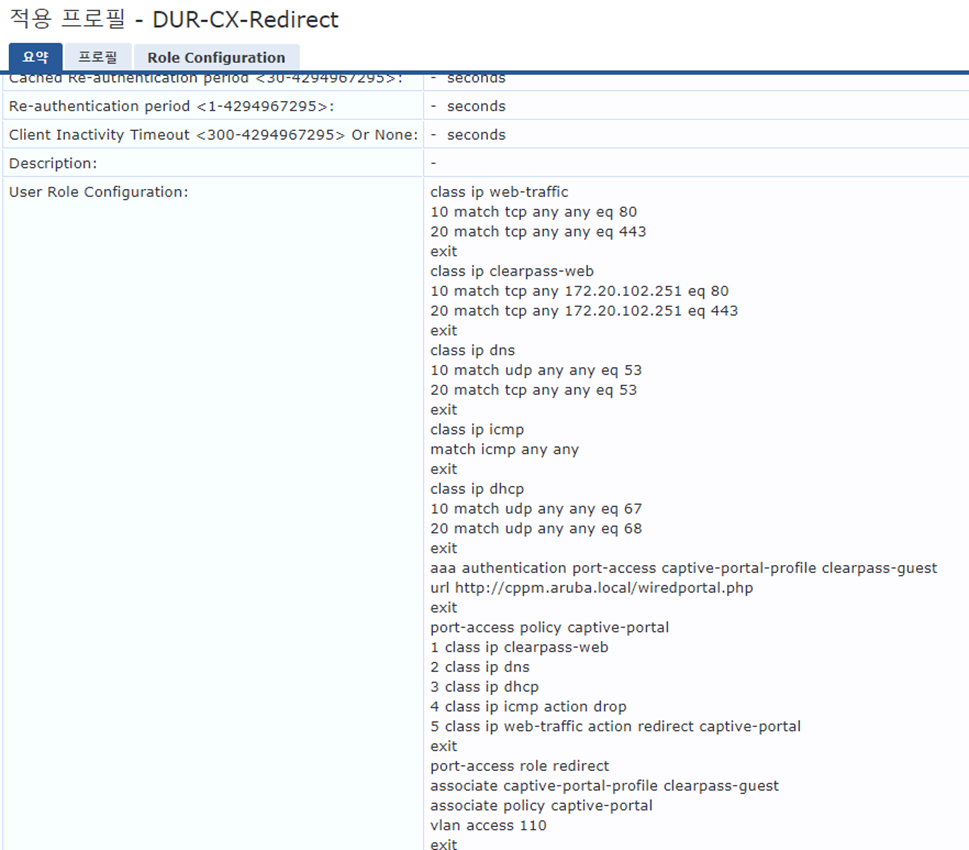
DUR supports both Port Access Policy (PAP) and Application-Based Policy (ABP).
Port Access Policy (PAP)
Port access policies are broadly divided into three categories.
- Class
- Policy
- Role
ClassDefines IP addresses and ports before configuring multiple ACL policies and rules.
When defining, it is composed of protocol (ICMP, IGMP, IP, TCP, UDP, etc.) → source IP address (subnet) → destination IP address (subnet).
class ip dns
    10 match udp any any eq dns class ip dhcp
    10 match udp any any eq dhcp-server class ip internal-subnets
    10 match any any 192.168.0.0/255.255.0.0 20 match any any 172.16.0.0/255.240.0.0 30 match any any 10.0.0.0/255.0.0.0 class ip anyanyclass
10 match any any anyPolicyis defined above ClassWe gathered them together and made them into one policy.
Configure when you want to apply a security policy to a port assigned a specific role.
port-access policy outgoingonly
    10 class IP dns
    20 class IP dhcp
    30 class IP internal-subnets action drop
    40 class IP anyanyclass
finally Roleis the security policy specified above (Policy) specifies the role to download.
When a port is assigned a role, the appropriate configurations for that role are set up along with the specified security policies.
port-access role outgoingrole
    associate policy outgoingonly
    vlan access 552
Application-Based Policy (ABP)
In a previous post, we introduced how to identify applications by leveraging the capabilities of the CX switch.
You can use this identified application information to configure security policies or QoS policies.
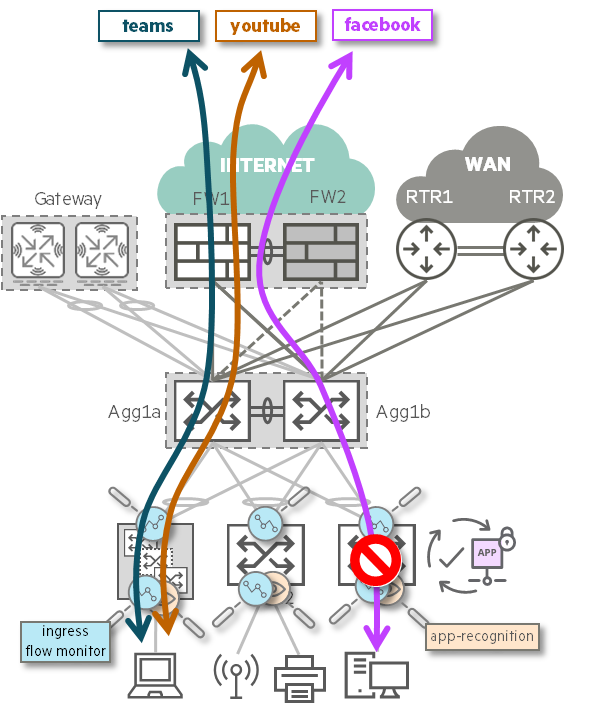
- Control over L4 (TCP/UDP) and L7 traffic
- Supports DUR and configures policies by role
- Control over ingress traffic
- Access Tier (or VTEP) Target Policy
- Advanced Feature Pack necessary
Here's how ABP works:.
- The first 7 packets are allowed
- Once classification is complete, ABP policy is enforced (TCAM, Ternary Content Addressable Memory)
- Implicit deny: Deny all traffic not explicitly allowed in the preceding rules.
- Supported actions: permit/drop/mirror/priority/remark
How to configure ABP (LUR)
1. app-recognition activate
switch(config)# app-recognition
switch(config-app-recognition)# enable
switch(config-app-recognition)# abp-session-limit-exceed-action log-only
2. Create an ABP class
switch(config)# class abp-ip social-v4
switch(config-class-abp-ip)# 10 match any any any app-category any app twitter
switch(config-class-abp-ip)# 20 match any any any app-category any app facebook
switch(config-class-abp-ip)# 30 match any any any app-category any app instagram
switch(config)# class abp-ipv6 social-v6
switch(config-class-abp-ipv6)# 10 match any any any app-category any app twitter
switch(config-class-abp-ipv6)# 20 match any any any app-category any app facebook
switch(config-class-abp-ipv6)# 30 match any any any app-category any app Instagram
switch(config)# class abp-ip catchall-v4
switch(config-class-abp-ip)# 10 match any any any app-category any app any
switch(config)# class abp-ipv6 catchall-v6
switch(config-class-abp-ipv6)# 10 match any any any app-category any app any
3. Create an ABP policy
switch(config)# port-access abp nosocial-lur
switch(config-pa-abp)# 10 class abp-ip social-v4 action drop
switch(config-pa-abp)# 20 class abp-ipv6 social-v6 action drop
switch(config-pa-abp)# 30 class abp-ip catchall-v4
switch(config-pa-abp)# 40 class abp-ipv6 catchall-v6
4. PAP Policy and Role Assignment
switch(config)# port-access role ABP_LUR
switch(config-pa-role)# app-recognition enable
switch(config-pa-role)# associate abp nosocial-lur
switch(config-pa-role)# exit
How to configure ABP (DUR)
1. On the switch app-recognition activate
switch(config)# app-recognition
switch(config-app-recognition)# enable
switch(config-app-recognition)# abp-session-limit-exceed-action log-only
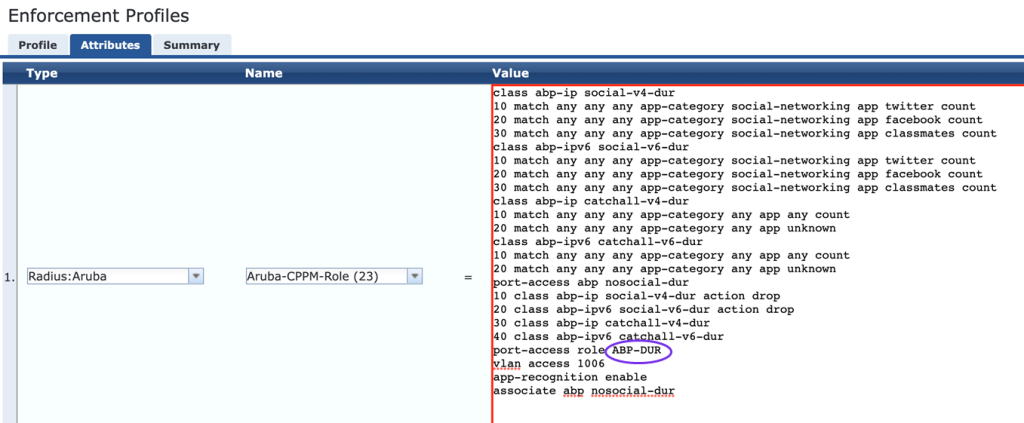
2. Create a DUR using the Enforcement Profile in CPPM
Application-based Role-to-Role Policy
Starting with AOS-CX version 10.14, ABP and GBP will be upgraded to the next level.
Let's say you want to allow only the MS Teams application and block the rest of the apps.
To configure it using the existing GBP method, it was difficult to block only the MS Teams application, so multiple IP addresses and ports had to be opened.
class gbp-ip ms-teams 10 match tcp employee admin eq 443 20 match udp employee admin range 3478 3481 exitHowever, in this case, management is difficult and security is not perfect.
So from CX 10.14 onwards, when configuring GBP application-recognitionBased on the App identified through class Settings are possible.
class gbp-ip ms-teams 10 match any employee admin app-category instant-messaging app ms-teams exitIf you want the Employee role to have a security policy with the Admin role that only allows access to the Teams application, you can configure it as follows:.
port-access gbp-policy employee2admin 10 class gbp-ip ms-teams 20 class gbp-ip non-arc 30 class gbp-ip deny-other-apps drop 40 class gbp-ip explicit-allow-for-arc 50 class gbp-mac allow-arp exit port-access role admin associate gbp-policy employee2admin app-recognition enable exitThere are four things to remember when configuring application-based Role-to-Role (GBP) policies:.
- Define a class for the app to allow:
10 class gbp-ip ms-teams - Allow a list of non-app items, such as unrecognized applications (ICMP):
20 class gbp-ip non-arc - Block all other applications:
30 class gbp-ip deny-other-apps drop - Allow App identification for traffic that has not yet been assigned an App-ID:
40 class gbp-ip explicit-allow-for-arc
Considering today's network environment, which is filled with DHCP environments and various terminals, IP address-based security is not perfect.
Now, we need to assign roles to each terminal based on its type and other attribute values and provide security policies for each role.
Centrally creating and managing role-based security policies and deploying them to all sites will ensure consistent policies regardless of location. This will make it easier to implement a zero-trust environment, regardless of distributed work environments, hybrid work environments, or complex infrastructures.
![[ACMA 교육#6] AOS 8 라이센스 (1)](https://egstory.net/wp-content/uploads/2023/01/Alert_Flag.jpg)


![[ACSA 교육#20] Virtual LAN](https://egstory.net/wp-content/uploads/2021/03/vlan_routing_1.png)