No interruptions in traffic even during firmware updates? The ISSU Complete Guide
⏱️ Estimated reading time: Approx. 13 minutes (13 min read)
One of the first awkward moments you experience after joining as a network engineer is when a senior colleague says something like this.
“"I'm going to update the Switch firmware at 2 AM tonight, so get ready."”
Whenever you update a smartphone or PC, it always reboots and becomes unusable for a few minutes. The same applies to network switches.
To upgrade the firmware version, the equipment must be rebooted, and during that time, all servers and PCs connected to that switch lose their network connection. That is why we perform this task at 2 AM when everyone is asleep.
However, HPE Aruba Networking recently stated that its AOS-CX switches (such as the CX 6300) allow for firmware updates without rebooting the equipment, even with only a single switch. This is called ISSU (In-Service Software Upgrade).
“It is natural to wonder, ”How can traffic not be interrupted when the equipment OS is completely overhauled?”. Before we begin the actual CLI practice, let's go over the core principles of this magical technique in a simple and clear way.
1. The Switch's Brain (Control Plane) and Limbs (Data Plane)
Imagine that inside a network switch, two main departments are working separately.
Mechanical forwarding of actual packets based on the map (MAC/FIB table) drawn by the CPU
characteristic
Complex computations that require thinking (dynamic processes)
Specialized exclusively for packet delivery (ultra-high-speed hardware)
2. Difference between Standard Switch Booting and ISSU
When updating firmware, existing equipment and ISSU equipment operate in fundamentally different ways.
Traditional method (cold reboot): “The boss and the factory manager are both going home!”
To update the firmware reload If you enter the command, the switch's power is completely reset.
The brain (CPU) turns off, and the limbs (ASIC semiconductors) also turn off.
Traffic is interrupted as factory operations completely stop (downtime occurs). It takes a few minutes for the boot to complete and the map to be redrawn.
ISSU method (AOS-CX): “The boss (OS) will go change his clothes, so the factory manager (ASIC) continues with your work!”
When you enter the ISSU command, the following series of processes takes place inside the equipment.
Copy Map (Freeze): The brain (CPU) gives instructions to the limbs (ASIC). “I'll be right back after I quickly switch the OS firmware, so freeze the routing/MAC map you have right now and keep forwarding the traffic!”
Restarting only the brain (Control Plane switching): Only the CPU process daemon is replaced with the new version of the firmware and restarts quickly. (At this point, the SSH session is briefly disconnected.)
Limbs do not rest (Maintain Data Plane): Even during those tens of seconds while the brain reboots, the ASIC chip at the bottom does not turn off and, based on the existing map, user packets Forwarding without a single millisecond pausedo.
Restore Complete (State Restore): After the new OS finishes booting, the brain reconnects with the limbs and synchronizes to a normal state.
ISSU Traffic Processing Simulator
Traffic is basically constantly flowing. [Run ISSU (OS Update)] When you press the button and the CPU reboots, observe what fate awaits each type of traffic.
Data traffic (YouTube, Ping)
Control traffic (OSPF, SSH)
Drop (Unprocessable/Discarded)
3. Why is it possible with a single switch without a chassis or stack?
In the past, ISSU was only possible in expensive chassis equipment with two CPU boards or in VSF/VSS environments where two switches were bundled together. This was because the other would temporarily take over the role when one was rebooted.
but CX 6300 Single Switch ISSUIt also works with a single 1U switch. The secret is that AOS-CX possesses Modular Microkernel Architecture and Central Database (OVSDB) Architecture Thanks to you.
Because state information is completely isolated in a central database, 'Warm Boot' has become possible, allowing only the process to be quickly shut down and restarted without resetting the chip (ASIC). It is the result of advanced software design that prevents the limbs from being paralyzed while temporarily stunning and reviving a single brain.
4. CX 6300 Single Switch ISSU Practical CLI Guide
Now that you understand the principles, let's look at a 5-step practical workflow for performing ISSU via the switch console/SSH in a real-world setting.
The most important thing before starting ISSU is the stability of the equipment state. There should be no STP topology changes or routing flapping immediately before the upgrade.
Plaintext
switch# show boot-historyswitch# show systemswitch# show spanning-tree
Step 2. Download New Firmware (Alternate Bank)
Staging the target firmware image to a secondary partition (e.g., Secondary) rather than the primary partition currently booting.
Plaintext
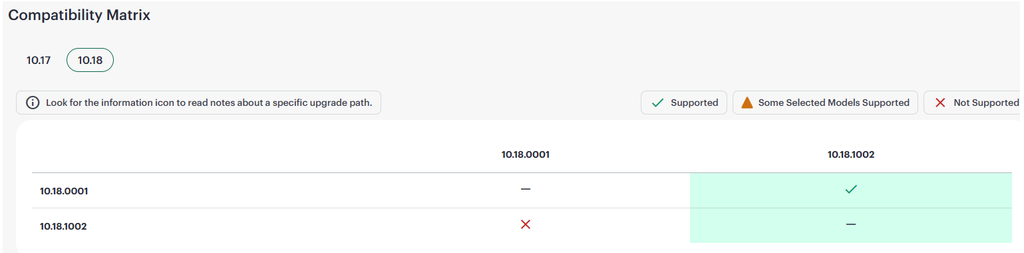
# Check current boot image (e.g., Primary Active status)---------------------------------------------------------------------------AOS-CX Primary Image---------------------------------------------------------------------------Version : FL.10.18.1001Size : 806 MBDate: 2026-08-27 05:07:09 UTCSHA-256: a546d6ad226915ee4a1f484e20c361aea4432112d0829a0588872da7dc926690---------------------------------------------------------------------------AOS-CX Secondary Image---------------------------------------------------------------------------Version : FL.10.13.1170Size : 991 MBDate: 2026-05-21 16:46:25 UTCSHA-256:515774bf7a1b2be959da6ecd92c5018027f9bab12ba0bcf3dc3175c8e0e5c67cDefault Image : secondaryBoot Profile Timeout: 5 seconds------------------------------------------------------Management Module 1/1 (Active)------------------------------------------------------Active Image : PrimaryService OS Version: FL.01.19.0002BIOS Version : FL.01.0016Upload new firmware to the secondary partition via #, SFTP, etc.switch# copy sftp://[email protected]/AOS-CX_6400-6300_10_18_1002.swi secondary vrf mgmt
Step 3. ISSU Pre-verification of Conformity (validate)
Before blindly running an upgrade, the system performs a pre-check to determine if it is ready for a non-disruptive update.
Plaintext
switch# issu update-software validate
Image integrity and hardware compatibility verification
Check for the existence of ISSU incompatible features/settings
In the output result Validation SuccessfulOnce this is confirmed, we will safely proceed to the next step.
Step 4. ISSU Execution and Progress Monitoring (update-software)
Once verification is complete, trigger the long-awaited ISSU.
Plaintext
switch# issu update-softwareThis command will perform an in-service software upgrade using pre-staged secondary operating system image FL.10.18.1002This will save the current running configurationContinue (y/n)? yStarting in-service software upgrade. Use "show issu" to monitor status and progress.Use "show event -c issu" to view event notification.switch# show issuThe current session is being terminated due to an ongoing ISSU upgrade.Please go again to access the router.
💡 Key points to watch during gameplay:
Config Freeze: Settings changes are locked immediately upon execution.
Data Plane Continuity: Continuous Ping in the backgroundping -tIf you keep it open, you can see with your own eyes that traffic drops rarely occur.
Session disconnection: SSH management session temporarily terminated during CPU replacement process (Connection closedThis is a very normal occurrence. Do not panic, and reconnect after about 1 to 2 minutes.
Step 5. Post-hoc verification and rollback tieHair confirmed (confirm) – ★Most important
After reconnecting the equipment, carefully check the upgrade status and whether the service is functioning properly, then make a final confirmation.
Plaintext
Check # status and remaining rollback timer timeswitch# show issuswitch# show versionExecute firmware confirmation command after verifying normal operation of # serviceswitch# issu update-software confirmThe ISSU has been confirmed and the rollback timer has been canceled.
🚨 Fatal Warning:
Until the default rollback timer (e.g., 30 minutes) expires confirm If the command is not entered, the switch considers the upgrade to be a failure and Automatic rollback to previous firmware version and rebootIt proceeds with the process. Once the on-site inspection is finished, be sure to enter the confirmation command.
Conclusion: Paradigm Shift in Edge Switch Operations
ISSU support in a single-switch environment goes beyond simply boasting technical specifications, Substantially innovating engineers' workflows and corporate operating costs (OPEX)do.
In hospitals, factories, etc. requiring 24/7 uninterrupted service Planned firmware change during weekday business hours possible
Even in small branch offices or access environments where redundancy configuration is difficult Ensure high availability
Due to accumulated fatigue from early morning shifts Prevention of human error
Using an automatic rollback timer Minimizing upgrade risk (equipment failure)
The days of posting service suspension notices at dawn and anxiously rebooting the Switch are passing. If you are operating an AOS-CX 6300 environment, we strongly recommend that you test this attractive feature on your lab equipment.
⏱️ Estimated read time: Approx. 5 minutes (5 min read) HPE Aruba Networking's wired mainstream is the AOS-CX switch. It is a product that goes beyond traditional switching capabilities and aims for cloud-native through a microservices architecture. Not only can it monitor and analyze various metrics and logs in real-time through its own internal database, but regarding all switch functions…
⏱️ Estimated reading time: Approx. 8 minutes (8 min read) Until now, our network security has been very static. We controlled traffic and strengthened security by creating security policies based on source IP addresses, destination IP addresses, and ports. However, times have changed. IP addresses are also shifting to a DHCP environment, and user devices, including personal devices, are being controlled by the IT team…
⏱️ Estimated read time: Approx. 5 minutes (5 min read) After purchasing a switch, you must perform a few tasks before connecting it to the network. These include tasks such as setting the switch's name or configuring the interfaces. So today, we will look at the very basic configuration commands for the AOS-CX switch. Hostname configuration Unless you have only one switch…
⏱️ Estimated reading time: Approx. 10 minutes (10 min read) Continuing from the previous post, I would like to cover some more in-depth content this time. We will look at the commands needed to configure the functions required for actual network operations in the field. VLAN Configuration The method for creating and configuring VLANs and VLAN interfaces in AOS-CX is as follows. While it is possible to configure a single VLAN,…
⏱️ Estimated read time: Approx. 5 minutes (5 min read) There are several ways to access an Aruba CX switch. One of them is likely connecting via the Console port. When initially configuring the switch, OOBM (Out-of-Band Management) is typically used through the Console port. This special Console port facilitates configuration, troubleshooting, and management, and all…
⏱️ Estimated reading time: Approx. 4 minutes (4 min read) Mobile World Congress (MWC) 2025 was held in Barcelona again this year. There, HPE accelerated networking innovation while telecommunications carriers launched new services for enterprise customers. Through this, they introduced new solutions to advance their long-standing vision of supporting the connection of the network edge to the cloud. HPE…



![[ACSA 교육#17] 기본 설정 명령어](https://egstory.net/wp-content/uploads/2021/03/maxresdefault-1-768x432.jpg)
![[ACSA 교육#15] AOS-CX CLI 접속](https://egstory.net/wp-content/uploads/2021/02/maxresdefault-768x432.jpg)