Explore the CX Switch with the AOS-CX Switch Simulator

⏱️ Estimated reading time: Approx. 2 minutes (2 min read)

Aruba has released the AOS-CX switch simulator. Let's take a look at it today.
Many people have asked why Aruba doesn't provide a simulator for training or experience.
Although they did provide an OVA file, I had to find, install, and test it on my own without any guidance or guide.

AOS-CX switches are next-generation cloud native switches.It's different from existing legacy switches in both its operational method and the features it offers. Therefore, to properly master this new and complex system, it was necessary to first learn and experience it, and then test it before applying it in a real-world environment.

Aruba's software development team recognized the need for such a simulator from the beginning of the development of the new OS. Therefore, they created an OVA file alongside the development of the AOS-CX switch operating system.

When we built the first prototype, we implemented features such as configuring functionality via the CLI, accessing it via the REST API, and installing the NAE agent. Until now, these simulators have been provided and used only by select customers, partners, and Aruba employees.

This simulator has been continuously developed with feedback from many users, and Aruba has now made it available to the public.
AOS-CX 스위치 시뮬레이터로 CX 스위치 살펴보기 - aos cx simulator 1024x604 1

The AOS-CX Switch Simulator is a virtual machine version of an ArubaCX switch. The ASIC simulator manages device operation through the AOS-CX operating system, as well as provides control, switching, and routing functions.

You can use the AOS-CX Switch Simulator together with ClearPass, and also test unique features of the AOS-CX switch such as NetEdit or NAE.
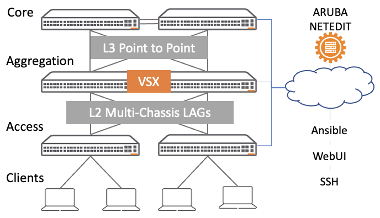
AOS-CX 스위치 시뮬레이터로 CX 스위치 살펴보기 - CX SIM Picture 1
3-Tier Data Center Architecture
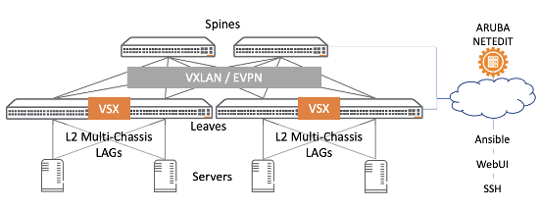
AOS-CX 스위치 시뮬레이터로 CX 스위치 살펴보기 - CX SIM Picture 2
Leaf-Spine Architecture

From downloading and installing to configuring the Lab and various tips Aruba Airheads CommunityYou can check it out here.

Similar Posts

  • AOS-CX CLI Commands (2)

    ⏱️ Estimated reading time: Approx. 10 minutes (10 min read) Continuing from the previous post, I would like to cover some more in-depth content this time. We will look at the commands needed to configure the functions required for actual network operations in the field. VLAN Configuration The method for creating and configuring VLANs and VLAN interfaces in AOS-CX is as follows. While it is possible to configure a single VLAN,…

  • [ACSA Training #4] Types of Traffic

    ⏱️ Estimated reading time: Approx. 2 minutes (2 min read) Today, I would like to learn about the types of traffic. Computer communication can be classified into three categories: Unicast, Multicast, and Broadcast. Unicast represents one-to-one communication (1 transmitter – 1 receiver). To give a simple example, let's assume there are several students in a classroom. And the teacher [closes] the classroom door…

  • [ACSA Education #19] Domain

    ⏱️ Estimated reading time: Approx. 7 minutes (7 min read) In the previous post, we reviewed the basic commands of the AOS-CX switch. This time, we will explore design, deployment, configuration, and troubleshooting to enhance our understanding of Layer 2 concepts. First, let's look at the concept of Layer 2 domains. Collision Domain Alice and Bob…

  • [ACSA Training #29] Rate Limit & Loop Protection

    ⏱️ Estimated read time: Approx. 2 minutes (2 min read) Rate Limit If the Spanning Tree configuration is incorrect, a Layer 2 loop may be created. In this situation, AOS-CX specifies the amount of traffic that can be received on the Ethernet port or Link Aggregation Group (LAG), such as broadcast, multicast, or unknown unicast traffic…

  • [Aruba DevNet Lecture 1] Introduction to Automation and IaC for Network Engineers

    ⏱️ Estimated reading time: Approx. 4 minutes (4 min read) Starting today, I would like to launch a somewhat special and very powerful technical series. It is the 'Aruba Network Automation' series. Haven't network engineers had an experience like this at least once in the field? ‘I have to change the VLAN settings for 50 switches, but I have 50 Putty windows open and Ctrl+C,…

  • Improve network visibility with CX switches

    ⏱️ Estimated reading time: Approx. 10 minutes (10 min read) As the complexity of IT infrastructure increases in recent years, more and more devices are being connected to networks. For network operators, the biggest challenge is determining which equipment is connected where and what actions it performs. For this reason, many observability solutions are being introduced to provide visibility and visualization. Today…