|

[ACSA Education #30] Link Aggregation

⏱️ Estimated reading time: Approx. 3 minutes (3 min read)

A switch must provide connectivity to many devices located on different VLANs. All traffic generated here must communicate with each other, sharing links between switches.

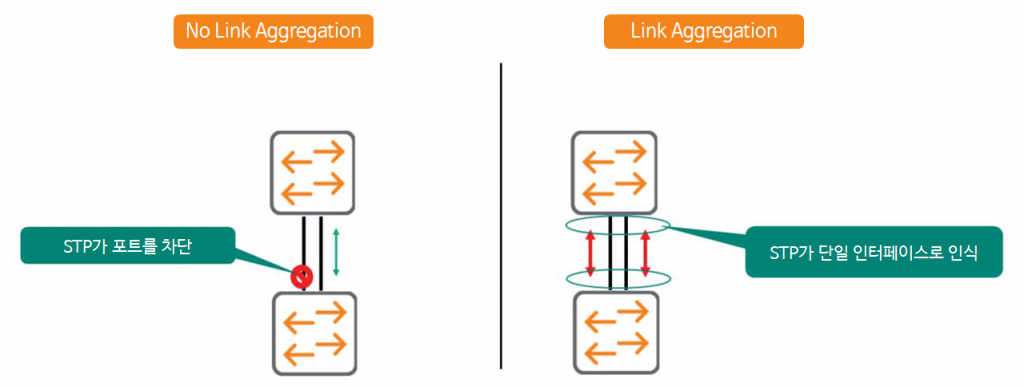
Therefore, multiple links are sometimes connected between switches for resiliency. However, this does not increase the bandwidth of the connection between the two switches. Even if two links are connected, only one is used, resulting in low link utilization, no load balancing, and suboptimal performance.

The solution to this is Link Aggregationno see.
[ACSA 교육#30] Link Aggregation - image 2

Link aggregation refers to combining multiple physical interfaces into a single logical interface.
Protocols like STP do not block this bundle because they see it as a single interface.
You can now bundle traffic between switches, from a single 10Gbps link to two, four, or more. This allows for significantly greater bandwidth because traffic is distributed across each port. Furthermore, even if one port fails, traffic is forwarded to the remaining ports, providing significantly greater resiliency.

reference: Link Aggregation is used not only on links between switches, but also on links connecting servers, storage, and routers.

Link Aggregation Overview

When link aggregation is enabled on a switch, the protocol creates a virtual interface. It then configures physical ports to become members of that virtual interface. Various protocols and processes on the switch only recognize and reference the virtual interface, ignoring the individual physical interfaces.

AOS-CX switches refer to virtual interfaces as Link Aggregation Groups (LAGs), and physical interfaces as member ports. It's important to note that broadcast and multicast traffic is transmitted over only one physical link in the bundled group. This behavior prevents link aggregation from creating Layer 2 loops.

Interface requirements

Interfaces mapped to the same Link Aggregation Group (LAG) must be configured in a consistent manner.
That is, all of the following must match:.

  • Duplex Mode (Full-Duplex | Half-Duplex)
  • Link Speed
  • Media

The AOS-CX switch displays a warning message if you try to map a mismatched interface to a LAG.
For example, a 10 Gbps SPF+ interface cannot be added to a LAG10 group that consists of 1 Gbps interfaces (1000BASE-T).

also, AOS-CX switches for each LAG Up to 8 physical interfacescan have as a member port. “show capacities” You can check the switch capacity via the command.


Okay, so we've briefly covered LAG. Now, let's delve into it in depth.
Similar Posts

  • Installing EVE-NG on Hyper-V

    ⏱️ Estimated reading time: Approx. 6 minutes (6 min read) In the previous post, I introduced the AOS-CX simulator. The AOS-CX simulator can be run through emulators such as EVE-NG or GNS3. Today, I would like to look into the installation using EVE-NG. EVE-NG is a very powerful network virtualization emulator that simulates network equipment from various manufacturers as if it were actual equipment…

  • [ACP-DC Training#11] Loop Prevention and LAG Implementation

    ⏱️ Estimated read time: Approx. 6 minutes (6 min read) Data center design involves multiple layers of redundancy, ranging from server NIC cards to uplinks and switches. While this redundancy is essential, it simultaneously increases the risk of network loops, broadcast storms, and network outages. Today, we will discuss key technologies to prevent these risks and build high-performance, redundant L2 data centers…

  • [ACP-DC Training #2] DCN Products and Specialized Technologies

    ⏱️ Estimated reading time: Approx. 12 minutes (12 min read) Continuing from last time, this time we will cover HPE Aruba Networking DCN products and technologies related to data center network deployment. As this module is the starting point of the process, you must be able to select appropriate products and deploy them in a design suitable for your data center. We will examine various HPE Aruba Networking products and in DCN…

  • IPv6-ready switches: HPE Aruba Networking switches

    ⏱️ Estimated reading time: Approx. 3 minutes (3 min read) Veteran network administrators likely remember the simple network days of the past, when there were few devices required for internet access and connections were static. As the number of network devices increased, to tag them with unique identifiers (i.e., addresses) and to enable management, routing, and security, the Internet…

  • [ACSA Education #16] Show Command

    ⏱️ Estimated reading time: Approx. 5 minutes (5 min read) In today's post, we will explore the general functions of networking equipment along with very basic commands that help you check networking devices. This information is the most important knowledge you can learn during the entry-level course, and in the future, excellent network engineers and administrators will [regard] network connections’…

  • HPE Aruba Networking meets the F1 Mercedes team in an innovative way

    HPE has built a data-driven partnership with the Mercedes-AMG PETRONAS team to continuously improve vehicle performance. HPC and high-speed network solutions are used to reduce simulation time, deliver real-time data for continuous improvement, and ultimately provide a competitive advantage in racing.