AOS 8-based Wi-Fi 7 Support Announced: A 'Strategic Stepping Stone' for Cloud Transition‘
at las AOS 8Officially supports Wi-Fi 7 (7xx series) Access Points (APs) even in environmentsThey announced the welcome news that they would do so.
In the meantime, to adopt Aruba's latest Wi-Fi 7 APs (730 series, etc.) Aruba Central based on AOS 10 (cloud/AI-based operations) A transition was essential. However, this announcement has opened the way to prioritize the adoption of the latest Wi-Fi 7 hardware while maintaining the existing on-premises controller-based AOS 8 environment.
However, the key point of this announcement is not that you should stay on AOS 8 forever.
When immediately changing the OS and entire architecture entails significant practical burdens such as risk or budget, it provides a bridge that allows you to update the hardware first and gradually migrate to AOS 10 in the future. ‘Strategic Bridge’It holds great significance as such.
Here is a summary of the key contents and technical points of this presentation for business engineers and IT managers.
Key Summary: AOS 8.13.3+ Support Begins
The key point is The fact that HPE Aruba Networking 7xx series Wi-Fi 7 APs can be deployed starting from AOS 8.13.3.no see.
It provides a practical and flexible option for companies facing hardware refresh or business expansion issues that found it difficult to immediately switch to AOS 10 or cloud central management (Aruba Central).
Supported Architectures and Deployment Modes
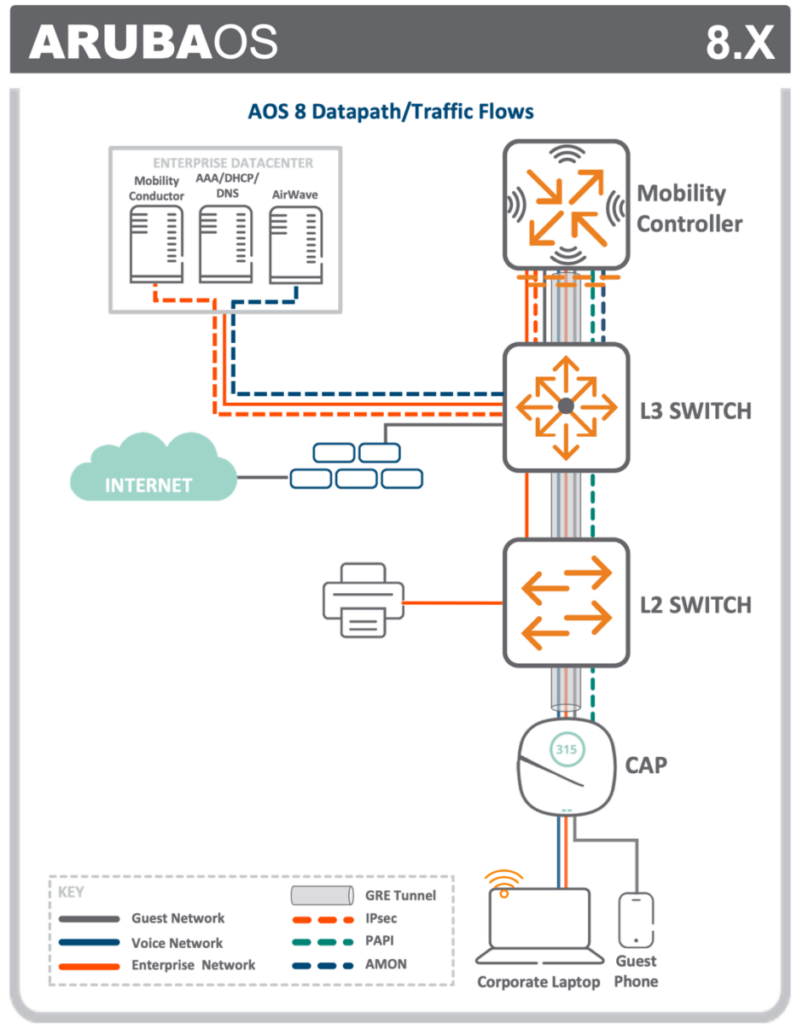
It supports all core deployment methods currently used by existing AOS 8 customers.
Controllerless Deployment: InstantOS / Instant AP (IAP)
Key Wi-Fi 7 Features Supported in AOS 8.13.3
You can enjoy the transmission efficiency and key benefits of the physical layer provided by Wi-Fi 7 hardware in the AOS 8 environment as well.
division
AOS 8.13.3 Support Details
Expected effect
4K QAM (4096-QAM)
Data density improvement
Maximum transmission speed and data efficiency compared to Wi-Fi 6/6E (1K QAM) Up to 20% improvement
802.11be (EHT) Management Frame
Basic EHT (Extremely High Throughput) control support
Normally notifies nearby clients of network performance, security settings, and operational status
6GHz band & 160MHz channel
Utilizing the 6GHz channel
Relieves existing 2.4/5GHz congestion, supports high-volume traffic and real-time video/VR
Enhanced security
WPA3 & Enhanced Open native support
Strengthening security and authentication systems for unencrypted Wi-Fi environments
⚠️ Constraints (Important Note):
One of the features of Wi-Fi 7 MLO (Multi-Link Operation) 및 320MHz channel bandwidthIt is not supported in AOS 8.13.3, and, Supported only in AOS 10 & Aruba Central environmentsIt will work.
This is also the reason why the final destination must ultimately be AOS 10.
Practical Benefits for Engineers and IT Leaders (CIOs)
Investment Protection and Hardware Life ExtensionBy switching to the latest Wi-Fi 7 APs in advance, you can maintain a stable infrastructure for the next few years without replacing hardware.
Operational ContinuityYou can immediately deploy the latest AP without changing existing AOS 8-based operational processes, monitoring tools, CLI, and GUI environments.
Phased Modernization StrategyYou can separate the timing of network equipment (HW) modernization and management platform (SW) modernization. At this stage, you can utilize APs as a stepping stone by introducing them indirectly or as additional resources, and then transition to AOS 10 and Central in the future according to the organization's budget and readiness.
AOS 8 vs AOS 10 Comparison at a Glance
Features / Characteristics
AOS 8.13.3 (Bridge Phase)
AOS 10 + Aruba Central (Final Goal)
7xx series Wi-Fi 7 AP support
O (Support)
O (Full support)
4K QAM & 6GHz support
O
O
MLO (Multi-Link Operation)
X
O
320MHz channel bandwidth
X
O
Operating Model
Mobility Controller / IAP
AI-Native Central Integrated Management
AI/ML-based RF Optimization & Live Upgrade
Limited
O
Conclusion and Migration Proposal
Network modernization is not a massive jump that changes everything at once, but rather a solution tailored to the organization's situation. Step-by-step journeyIt must be.
Wi-Fi 7 AP support in AOS 8.13.3 is not intended to keep using AOS 8, but rather serves as a very useful 'stepping stone' to safely transition to the final destination, AOS 10 and Aruba Central.
Step 1 (Bridge): Prioritize the deployment of Aruba 7xx series Wi-Fi 7 APs based on AOS 8 in locations where the burden of immediate OS transition is significant or where new deployments or replacements are required.
Step 2 (Final Destination): Complete migration to AOS 10 and Central when the organization is ready and requires Wi-Fi 7 100% performance, such as MLO, and AI-based automation.
Please refer to the article below for migration to AOS 10.