|

[ACSA Training #29] Rate Limit & Loop Protection

⏱️ Estimated reading time: Approx. 3 minutes (3 min read)

Rate Limit

If the spanning tree configuration is incorrect, a loop in Layer 2 may be created.
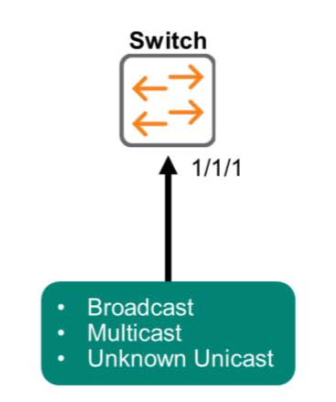
In these situations, AOS-CX can specify how much traffic it can receive on an Ethernet port or Link Aggregation Group (LAG), including broadcast, multicast, or unknown unicast traffic.
[ACSA 교육#29] Rate Limit & Loop Protection - image

This feature is independent of Spanning Tree, but is a mechanism to protect CPU utilization and allow administrators to connect to the switch at any time.

You can apply the command at the interface level as follows:.

switch(config)# interface 1/1/1
switch(config-if)# rate-limit broadcast 4000 pps

Loop Protection

So far, the focus of our look at spanning tree has been on intentionally preventing loops of redundant network ports, such as duplication, when configuring a network.

However, in actual network operations, loops can arise due to the unintentional connection and configuration of numerous ports. These loops typically occur on the switches closest to the user (edge ports).

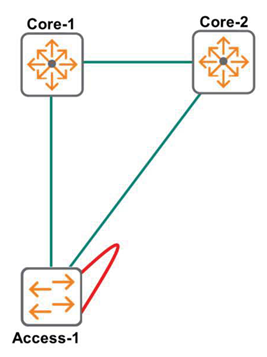
As you can see in the picture below, two Ethernet ports on the Access-1 switch are connected with cables.
Looking at the picture alone, it may seem like something like that would never happen, but when you actually operate a network, it happens more frequently than you might think.
[ACSA 교육#29] Rate Limit & Loop Protection - image 1

The Loop Protection feature protects the edge switch by transmitting loop protocol packets on the port.
Ports with this feature enabled will automatically send Loop Protection Packets at specified intervals (Default: 5 seconds).
At this time, when a Loop Protocol Packet is received on a port with the Loop Protection function enabled, the switch recognizes that a loop has occurred and takes action on its own.

AOS-CX switches support the following actions:.

  • Raise alarms using SNMP without disabling ports
  • Disable forwarding. Ports that transmit loop detection packets are disabled (default).
  • Disable both sending and receiving

This feature can be applied on Layer 2 interfaces or LAGs.

switch# config
switch(config)# interface 1/1/1
switch(config-if)# loop protection
switch(config-if)# loop-protection action {do-not-disable | tx-disabled | tx-rx-disabled}

The Loop Protection feature is useful in environments like offices where users plug cables into wired ports. Please remember to use it appropriately when necessary.
Similar Posts

  • HPE Aruba Networking Data Center Portfolio

    AOS-CX switch products provide powerful hardware and a smart operating system for building data center networks. These switches offer high performance and flexibility across a variety of models, while enhancing management efficiency, offering an optimized solution for the demands of modern data centers.

  • Aruba's Portfolio (1)

    ⏱️ Estimated reading time: Approx. 5 minutes (5 min read) Following the previous post on Aruba ESP, this time we will take a look at what other Aruba products are available. In the last post, I mentioned that Aruba develops and releases products to enhance connectivity and user experience in the Edge domain. Aruba offers not only wired and wireless network products for connectivity but also...

  • [ACSA Training #21] 802.1Q

    ⏱️ Estimated reading time: Approx. 5 minutes (5 min read) In the last post, we learned about VLANs. By creating a virtual switch within a single physical switch, we were able to create and manage broadcast domains more efficiently. Limitations of VLANs However, let's take a look at the following figure. The figure shows ports configured in VLAN 10 and VLAN 20, respectively…

  • [ACP-DC Training #13] Spine-Leaf Architecture

    ⏱️ Estimated read time: Approx. 8 minutes (8 min read) The Spine-Leaf architecture consists of Spine switches acting as the core, Leaf switches serving as the access layer, and numerous endpoints responsible for the data center's computing and storage resources. This structure is highly scalable and efficient, and is optimized for low-latency communication, making it suitable for modern data centers requiring high-performance networks…

  • [ACP-DC Training#7] Deploying Data Center Switches

    ⏱️ Estimated read time: Approx. 16 minutes (16 min read) Deploying data center switches may look similar to installing campus switches, but there are unique aspects specific to data centers. In particular, data center switches often undergo a 'staging' process to prepare their configurations before being brought into the field. Today, we will look at what switch staging is, and two…

  • AOS-CX CLI Commands (3)

    ⏱️ Estimated reading time: Approx. 6 minutes (6 min read) In the last two posts, we explored the basic settings of the AOS-CX switch product family and how to check entered commands. This time, we will look at the commands necessary for switch maintenance. As I have already provided the maintenance commands while writing ACSA training content…