

[ACSA Education #22] Forwarding Table
Layer 2 switches forward data based on MAC addresses. To achieve this, they use a MAC address table. When a device connected to the switch sends a frame, the table is automatically created based on the MAC address of the source frame.
So how does it work?
MAC Address Table
When switch SW1 is powered on and turned on, the MAC address table is initially empty.
“You can check the contents stored in the MAC address table using the command ”show mac-address”.
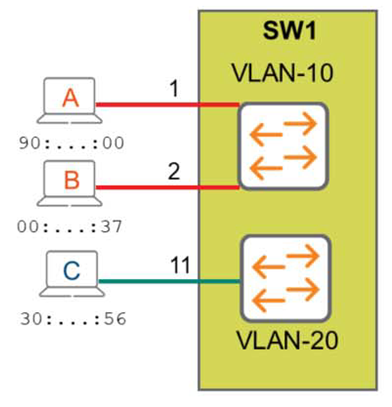
As shown in the figure, Host A sends a frame to Host B.
SW1 receives a frame with source information of MAC address = 90:….:00 from port 1, which is mapped as a member of VLAN 10. It then adds this information to the first entry in the MAC address table, as shown below.
SW1# show mac-address
MAC age-time : 300 seconds Number of MAC addresses : 1 MAC Address VLAN Type Port -------------------------------------------------------
90:20:c2:bc:ee:00	10	dynamic		1/1/1
As you can see, the MAC address, VLAN, and port information are mapped and stored in the MAC address table.
However, since there are no other entries in the table, the switch doesn't yet know where to forward the frame to the destination 00:…:37. Therefore, it floods the frame to all member ports of VLAN 10. All VLAN 10-mapped hosts receive the frame and determine the destination MAC address.
At this time, if it is not your MAC address, the frame is discarded, and if it is your MAC address, a response is made.
That is, Host B responds to Host A with source MAC = 00:….:37 and destination MAC = 90:…:00.
The switch now adds a second entry to the MAC address table with the MAC address 00:0b:86:b4:eb:37.
SW1# show mac-address
MAC age-time: 300 seconds Number of MAC addresses: 2

MAC Address VLAN Type Port --------------------------------------- 90:20:c2:bc:ee:00 10 dynamic 1/1/1
00:0b:86:b4:eb:37	10	dynamic		1/1/2
A similar process occurs on Host C on port 11.

In this way, the switch automatically builds a MAC table based on the source MAC address and forwards frames based on the destination MAC address.
By default, table entries are kept for 300 seconds (5 minutes).
Address Resolution Protocol (ARP)
Okay, so let's imagine we're in a conference room with the people we just met.
We don't know everyone's names yet, but then suddenly someone comes in and says, "“Hong Gil-dongHe hands over a note that says, ”Important message to deliver to you.” Who among the people in the conference room Hong Gil-dongI have no choice but to ask because I don't know for sure.
Excuse me. Who is Hong Gil-dong?
Everyone is listening to what I'm saying, but only Hong Gil-dong will answer, "I'm here!" At that moment, I'll map the chair Hong Gil-dong is sitting on to the name Hong Gil-dong. This is very similar to the Address Resolution Protocol (ARP), which links a Layer 3 IP address to a Layer 2 MAC address.
In the following diagram, Host A needs to communicate with a host with IP address 10.1.20.200. To do this, it must construct an Ethernet frame with its own source MAC address (90:..:00) and the MAC address of Host B, which it does not yet know.
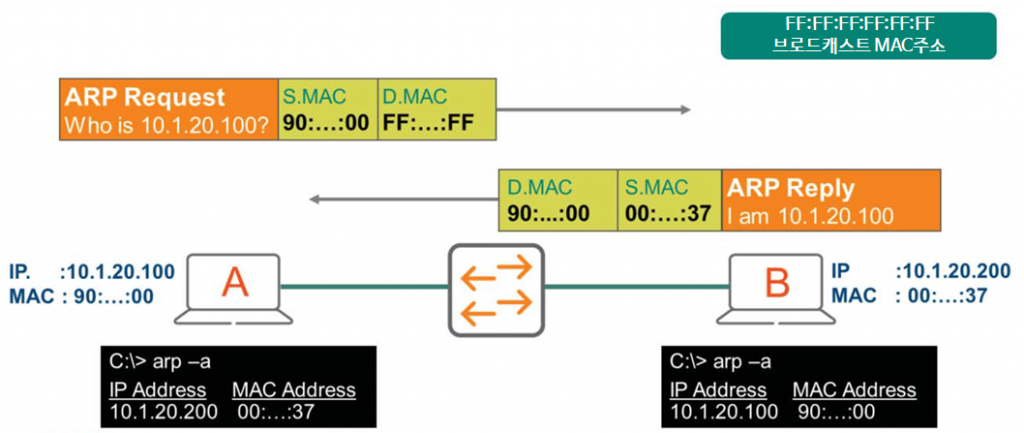
To find out the MAC address, Host A broadcasts an ARP request (destination MAC address FF:FF:FF:FF:FF:FF).
– The destination IP address in the IP header is 255.255.255.255
We already know that a switch forwards broadcasts to all ports in the same VLAN.
Therefore, all hosts in the VLAN will receive this frame and ignore it except for Host B.
Here, Host B responds with unicast communication to Host A's MAC address.
“I am 10.1.20.200, and my MAC address is 00:…:37.”
Host B
Host A receives this response and creates an entry in its ARP table, also known as the ARP cache.
This ARP table maps the IP address 10.1.20.200 to the MAC address 00:0b:86:b4:eb:37. Therefore, the next time Host A and Host B communicate, they do not need to use ARP.
Additionally, when Host B receives an ARP request from Host A, it learns Host A's IP address and MAC address. Therefore, Host B stores these details in its ARP table.
The contents stored in these ARP tables can be checked using the “arp -a” command in the Command Prompt on Windows.