

[ACMA Training #4] AOS 8 Architecture
The ACMA certification exam is based on the AOS 8 operating system. AOS 8 architectureIt is important to understand that in the last post Aruba Wireless LAN PortfolioI have already explained about it.
When explaining AP (Access Point), I talked about the concepts of CAP (Campus AP) and IAP (Instant AP).
Today, we will look at the structure of AOS 8 architecture and how it differs from the previous AOS 6.
AP Terminology (Glossary)
First, let's go over the terminology used for each role in AP.
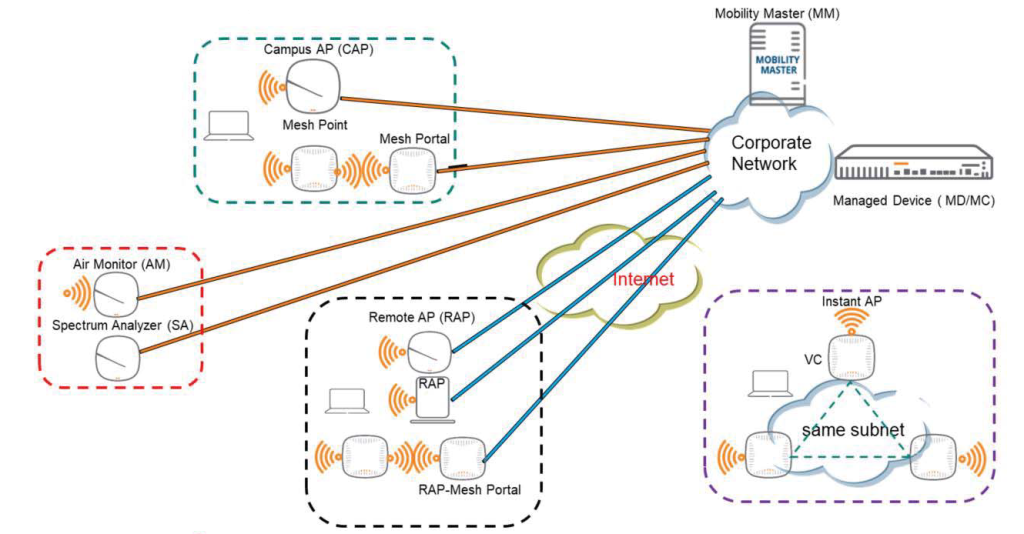
APs can be configured to have specific roles in the WLAN architecture, and each is given a different name depending on its role.
first, CAPis a Campus AP, also commonly referred to as just an AP. As a typical AP, it connects to a controller and receives all configuration commands from the controller. Mesh APis a type of CAP in which the Uplink uses a wireless interface rather than a wired one.
AM (Air Monitor)It continuously scans the wireless environment to collect IDS or RF information.
SA(Spectrum Analyzer)is an AP that captures wireless signals in the surroundings, either temporarily or permanently, for analysis purposes.
RAP (Remote AP)It works similarly to CAP, but connects to the controller over the Internet. This requires setting up a VPN tunnel between the controller and the AP.
IAP (Instant AP)does not require a controller. All IAPs within the same subnet form a group (swarm), and an AP is selected to act as a virtual controller (VC). This allows IAPs to operate independently without a hardware controller.
Controller Mode
Aruba offers three controller modes:.
- Mobility Conductor (Mobility Master)
- Mobility Controller
- Standalone

Mobility Conductor (Mobility Master, MM)
It uses a centralized, multi-tier architecture with a new UI that clearly separates management and control, and delivery functions.
This simplifies and streamlines the configuration process, as it allows you to set up the entire configuration for both Mobility Conductor and managed devices from a centralized point.
Mobility Controller (MC)
Mobility Conductor (Mobility Master, MM) manages the Mobility Controller. And the controller Managed Device (MD)나 Managed Node (MN)Also called MD. MD handles AP and client traffic, and multiple MDs work together to provide high availability to all client terminals and ensure service continuity even if a failover occurs.
Standalone
Mobility Conductor cannot manage standalone controllers. If you install the controller in standalone mode, some AOS 8.x features will be unavailable.
AOS 8 architecture
As previously explained, both the Mobility Conductor and the Managed Devices (MDs) can be configured through a centralized point such as the Mobility Conductor (Mobility Master, MM).
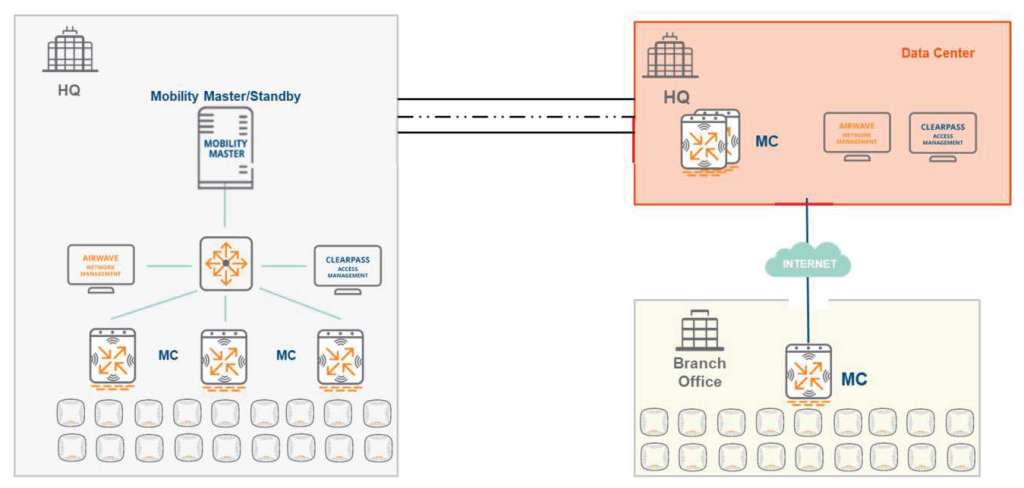
MM unifies existing all-master, single-master-multi-local, or multiple master-local deployment approaches into a single model. It extracts a common configuration (base configuration) as a shared template, enabling device-specific configurations to be merged or configured for individual devices.
The Management Node (MC/MD) handles AP and client traffic. You can also deploy a Branch Office Controller (BOC) via Zero Touch Provisioning (ZTP).
Differences from AOS 6 architecture
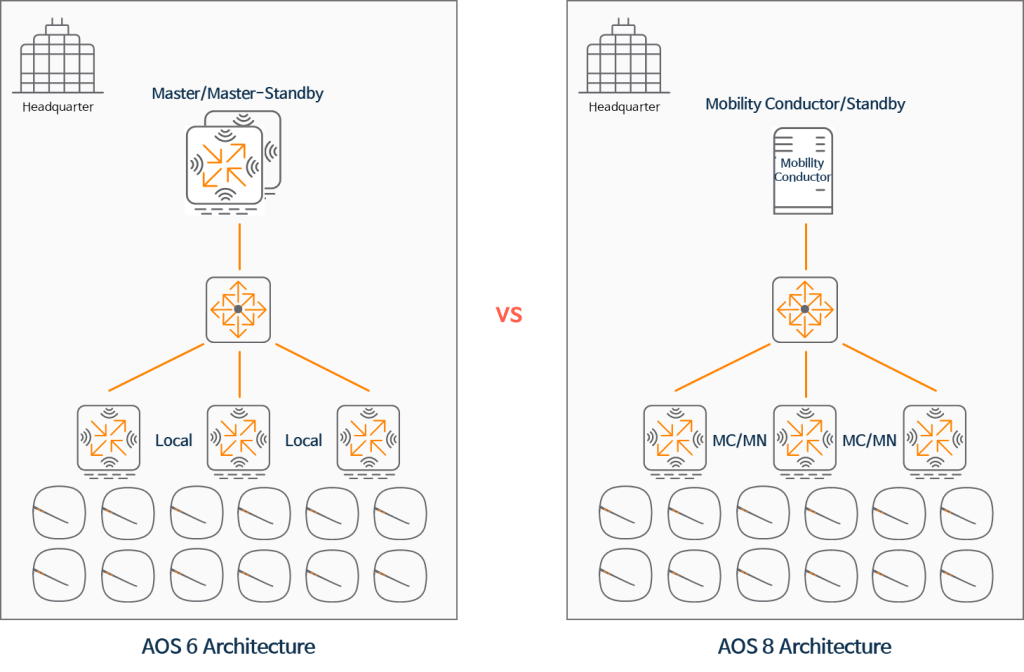
Master Controller vs Mobility Conductor (MM)
In the previous AOS 6 release, the Master Controller (MC) could be deployed on a physical appliance and securely tunneled to the APs. With a master-local architecture, the Master would distribute (push) certain configurations (such as AP Groups, Local DB, and Whitelist DB) to all local devices, without verifying the configuration information (syntax, parameter value range) before sending it.
However, in AOS 8, the Mobility Conductor (MM) can be deployed on either a physical appliance or a virtual appliance (VM). However, it does not configure tunneling to the AP. The MM can push all configuration information to all managed devices (MD/MC) and validate the configuration information before pushing it to the MD.
Local Controller vs Managed Node
In AOS 6, local controllers could only be deployed on physical appliances and had to receive partial configuration information from the master controller. However, L2 and L3 configuration information, such as VLANs and internal IP addresses, had to be configured on the local controller.
However, in AOS 8, Managed Nodes (MNs) can be deployed on both physical devices and virtual machines. The Mobility Conductor (MM) provides all configurations, including L2 and L3 configuration information.
Partial Config vs Hierarchical Config Model
![[ACMA 교육#4] AOS 8 아키텍처 - image 26](/wp-content/uploads/2022/07/image-26-1024x485.png)
In Partial Configuration mode in AOS 6.x, the Master pushes only the WLAN configuration along with the database (shown in orange in the image above). L2 and L3 configurations, such as VLANs, interface information, and IP routing, cannot be pushed. This information must be configured individually on each local controller.
![[ACMA 교육#4] AOS 8 아키텍처 - image 27](/wp-content/uploads/2022/07/image-27-1024x486.png)
However, if configured as an AOS 8.x model as shown in the figure above, the Mobility Master (MM, Mobility Conductor) can push the entire configuration information, such as VLAN, interface information, and IP routing.
With the advent of digital transformation, mobility and mobile offices are becoming increasingly essential. This requires a reliable and scalable wireless network infrastructure.
In line with these requirements and trends, Aruba has launched a new architecture operating system called AOS 8, and has now released its 10th update, version 8.10.x.
The features of AOS 8 are continuously being updated to meet various requirements, such as the increasing number of terminals connected to wireless networks, the need to maintain uninterrupted operation, and the ability to provide IoT connectivity.
In the next post, we will look at the specialized features of AOS 8.
![[ACSA 교육#35] 라우팅 종류](https://egstory.net/wp-content/uploads/2021/07/maxresdefault-768x432.jpg)
![[ACSA 교육#26] RSTP 요소](https://egstory.net/wp-content/uploads/2021/04/GettyImages-9321498141-1920x1279-1-768x512.jpg)
![[ACP-DC 교육#2] DCN 제품 및 특화 기술](https://egstory.net/wp-content/uploads/2025/07/468738883-16-9-768x432.jpg)
![[ACP-DC 교육#5] 데이터센터 네트워크 아키텍처](https://egstory.net/wp-content/uploads/2025/07/0310010-altered-16-9-768x432.jpg)
![[ACSA 교육#3] 물리적 미디어 (장치)](https://egstory.net/wp-content/uploads/2021/01/multi-gig_spot3_580x320.jpg)
![[ACSA 교육#24] Redundant Network](https://egstory.net/wp-content/uploads/2021/04/freeway.aerial.night_.GettyImages-683888632-768x576.jpg)