[Aruba DevNet Lecture 4] Central Webhooks Meet Slack
The destiny of a network engineer is to 'fight against failures'.
But if you only realize the problem after receiving a call in the middle of the night, it's already too late.
today Webhooks in Aruba Central By leveraging this feature, we will build an intelligent control system that immediately sends a notification to Slack when a specific event (AP Down, switch port error, etc.) occurs.
What is a Webhook?
Many people confuse APIs with webhooks. The simplest distinction is "who initiates the conversation?".
To put it simply, if an API is a 'question' that we ask for information, a webhook is a 'request' that the device informs us of.‘trot‘'no see.
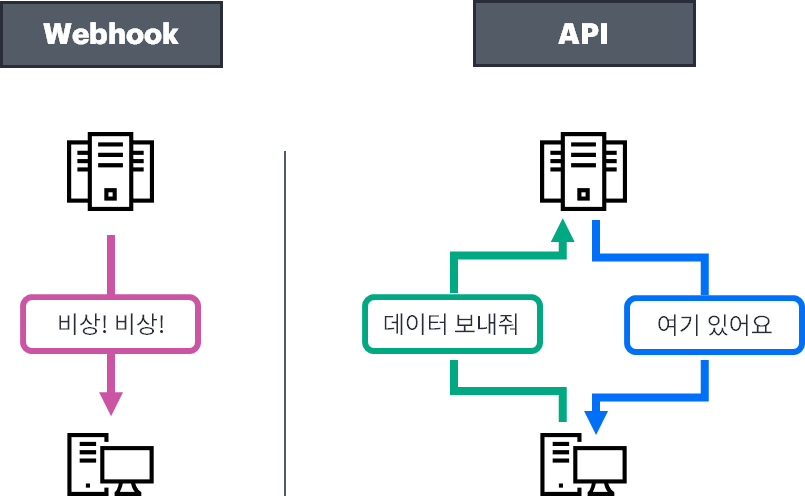
- API: “Hey, is AP 1 still alive?” (You have to keep asking periodically – Polling)
- Webhook: (When an event occurs) "Administrator! AP 1 just died!" (Sent immediately when an event occurs)
What you need: Create a Slack app and a webhook URL
First, in the Slack channel where you want to receive notifications ‘'Incoming Webhook'’ You will need to obtain a unique URL through settings.
- Slack API Portal Login > Create New App
Incoming WebhooksActivation andAdd New Webhook to WorkspaceClick- After selecting the channel to receive notifications, Webhook URL copy
Real-World! A "Bridge" Script Connecting Central and Slack
We need a simple Python server that converts the webhook data sent from Central into a format that Slack can understand.
(Considering the company security network environment, it runs well on Windows Python as well. Flask)
[webhook_receiver.py]
from flask import Flask, request, jsonify
import requests

app = Flask(__name__)

# ==========================================
# 1. Enter setup information
# ==========================================
# [Security Settings] Must be identical to the API Key entered when setting up New Central Webhook.
MY_SECRET_API_KEY = ""Rubaruba_Secret_999!""

# [Slack Settings] Enter the Slack Webhook URL you received.
SLACK_WEBHOOK_URL = ""https://hooks.slack.com/services/XXXX/XXXX/XXXX""

@app.route(''/central_webhook'', methods=[''POST''])
def handle_webhook():
    # ==========================================
    # 2. API Key Authentication Verification (Security Logic)
    # ==========================================
    # New Central usually sends the key in the 'Authorization' header or 'X-API-Key'.
    # (Header name may vary depending on your environment, so modify as needed)
    received_key = request.headers.get('Authorization')

    if received_key != MY_SECRET_API_KEY:
        print(f""❌ Security Alert: Invalid API Key Access (Entered Key: {received_key})"")
        return jsonify({""error"": ""Unauthorized""}), 401

    print(""✅ Authentication successful! Data received from New Central."")

    # ==========================================
    # 3. Parsing New Central Payload (JSON) Data
    # ==========================================
    payload = request.json

    # Extracts the required values based on the actual JSON structure received.
    alert_name = payload.get(""name"", ""Unknown Event"")
    severity = payload.get(""severity"", ""Info"")
    state = payload.get(""state"", ""Unknown"")
    summary = payload.get(""summary"", ""No details"")
    device_type = payload.get(""deviceType"", ""Unknown"")
    alert_time = payload.get(""time"", """")

    Extract the serial number of the # faulty device (since it is in list format, extract the first value)
    impacted_entities = payload.get(""impactedEntities"", {})
    device_serials = impacted_entities.get(""deviceSerial"", [])
    serial_num = device_serials[0] if device_serials else ""N/A""

    # ==========================================
    # 4. Slack Notification Message Design (Block Kit & Attachments)
    # ==========================================
    # Specifies different colors for the left side of Slack messages depending on the severity.
    if severity == ""Critical"":
        color = ""#FF0000""  # Red
    elif severity == ""Warning"":
        color = ""#FFA500""  # Orange
    else:
        color = ""#36A64F""  # Green (Normal/Other)

    slack_msg = {
        ""attachments"": [
            {
                ""fallback"": f""New Central Alert: {alert_name}""",
                ""color"": color,
                ""title"": f""🚨 [New Central Outage Notification] {alert_name}""",
                ""fields"": [
                    {""title"": ""Severity"", ""value"": severity, ""short"": True},
                    {""title"": ""State"", ""value"": state, ""short"": True},
                    {""title"": ""Equipment Type"", ""value"": device_type, ""short"": True},
                    {""title"": ""Equipment Serial"", ""value"": serial_num, ""short"": True},
                    {""title"": ""Summary"", ""value"": summary, ""short"": False},
                    {""title"": ""Time of occurrence"", ""value"": alert_time, ""short"": False}
                ],
                ""footer"": ""Rubaruba DevNet Monitoring | egstory.net""
            }
        ]
    }

    # ==========================================
    # 5. Sending a message via Slack
    # ==========================================
    response = requests.post(SLACK_WEBHOOK_URL, json=slack_msg)

    if response.status_code == 200:
        print(""🚀 Notification sent to Slack!"")
    else:
        print(f""❌ Slack transmission failed: Code {response.status_code}""")

    return jsonify({""status"": ""success""}), 200

if __name__ == ''__main__'':
    # Run the server on port 5000.
    app.run(host='0.0.0.0', port=5000)
Setting up a webhook in New Central
Now we need to tell Central, "If something goes wrong, notify me at that Python server address!".
- Access Central > Click the left menu icon > API Gateway Select a card
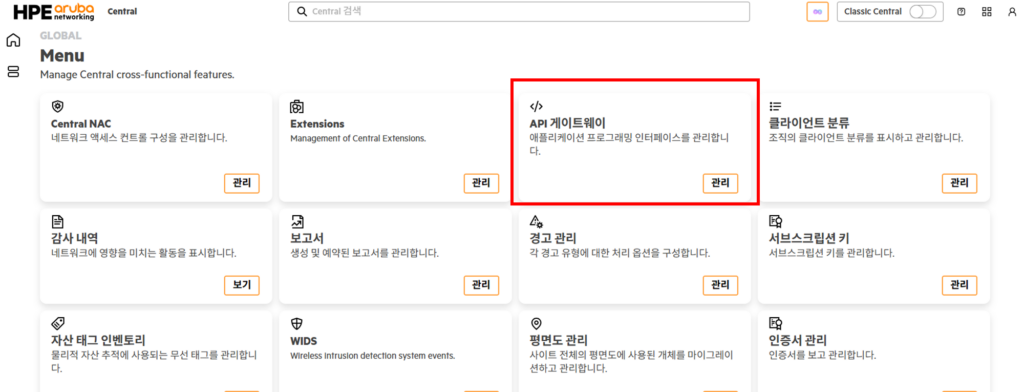
- Click Webhooks > Create Webhook Click
- Enter the following items
- Name: Webhook identifier (e.g.
Slack_Alert_Prod)- Target URL: Receiving server address (e.g.
http://your-server-ip:5000/endpoint)- Authentication Method: Choose a security method
– API Key: Use unique keys for simple and secure authentication between systems
– OIDC: High-level security authentication based on OAuth 2.0 (Client ID/Secret required)
- Click the left menu icon again > Notification Rules Select a card
- After clicking Create Rule, select the event for which you want to receive notifications via Slack.
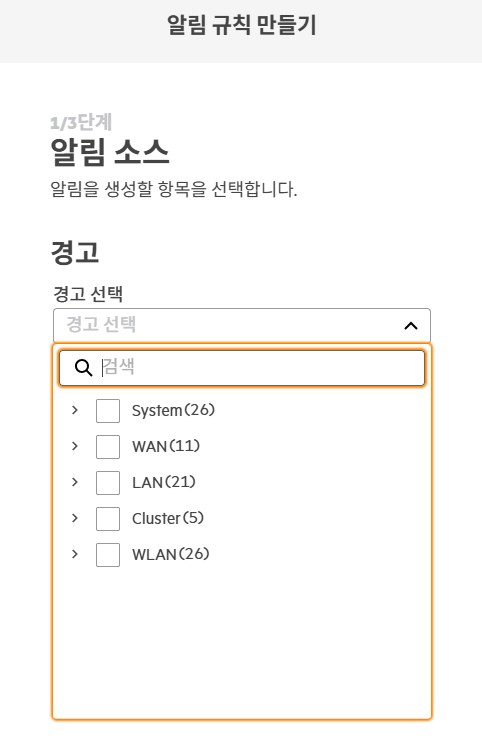
- The Webhook created above(
Slack_Alert_Prod) select
Webhook Points Changed in New Central
Webhooks have become more powerful and secure as they evolve into New Central.
| item | Existing Central | New Central (AOS 10) |
| Management Menu | Organization > Webhooks | Integrated management within the API Gateway card |
| Authentication Security | Simple Header Token | API Key and OIDC (OpenID Connect) support |
| pliability | Limited event notifications | Streaming API integration and service unit subscription available |
| UI/UX | List format listing | Intuitive card-based workflow |
especially OIDC authenticationThis support provides a foundation for building automated pipelines with confidence even in demanding financial or enterprise environments.
In conclusion: From ‘Control‘ to ‘Response’
At New Central API GatewayManaging webhooks through is a very important change.
This means that network automation is no longer a simple 'add-on', but has become a 'standard interface' for infrastructure operations.
Many engineers are content with just receiving an alert. But true engineers need to think beyond that.
Add a 'reboot device button' to your Slack notification message, or simultaneously with the notification Lecture 2Excel report created inWhat if we could automatically generate and attach the New Central API and Webhooks? The combination of the New Central API and Webhooks goes beyond simple monitoring. automated operating systemis the starting point.