|

[ACSA Training #4] Types of Traffic

⏱️ Estimated reading time: Approx. 2 minutes (2 min read)

Today, we'll learn about the types of traffic.
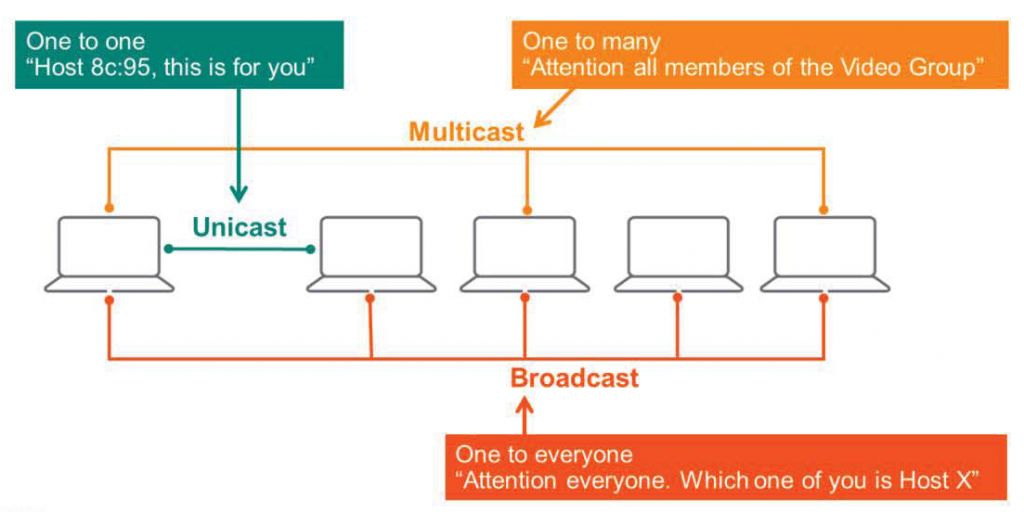
Computer communications can be classified into three categories:.

  • Unicast
  • Multicast
  • Broadcast
[ACSA 교육#4] 트래픽의 종류 - image 14
Types of traffic

Unicast

Unicast is One-to-one communication(1 transmitter – 1 receiver).

To give a simple example, let's assume there are several students in a classroom. A teacher calls out the name of a specific student, say A, at the classroom door and delivers a message. The teacher becomes the transmitter, and student A becomes the receiver.

Similarly, when a PC transfers a file to a server, both devices use unicast communication.

Multicast

Multicast is One-to-many communication(1 transmitter – multiple receivers).

For example, in a classroom, a teacher delivers a message from the podium to only the students in Group 1. This message would originate from the teacher and be delivered to the students in Group 1.

In a network environment, for example, there's video streaming. A video source (transmitter) transmits a video stream to multiple receiving devices (PCs, tablets, smartphones, etc.).

Here, multicast traffic can be sent to many devices, but not to all devices in the network.

Broadcast

Broadcast is One-to-all communication(1 transmitter – all receivers).

When a teacher makes an announcement to all students in a classroom, this can be considered a Broadcast.

Likewise, there is a network address that allows all stations to receive and process.
At Layer 2, the MAC address is FF:FF:FF:FF:FF:FF, and at Layer 3, the IP address is 255.255.255.255.

This allows one computing device to discover other computers on the network.

So today we briefly looked at Unicast, Multicast, and Broadcast.
In the next post, we will learn about TCP/IP.
Similar Posts

  • [ACSA Education #22] Forwarding Table

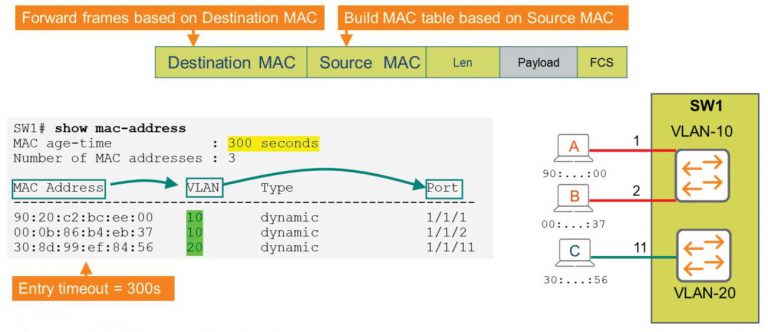
    ⏱️ Estimated read time: Approx. 4 minutes (4 min read) Layer 2 switches transmit data based on MAC addresses. To do this, switches use a MAC Address Table. When a device connected to a switch sends a frame, the table is automatically created based on the MAC address of the source frame. So, how does it work? MAC Address Table Switch…

  • Role-based zero trust environments

    ⏱️ Estimated reading time: Approx. 8 minutes (8 min read) Until now, our network security has been very static. We controlled traffic and strengthened security by creating security policies based on source IP addresses, destination IP addresses, and ports. However, times have changed. IP addresses are also shifting to a DHCP environment, and user devices, including personal devices, are being controlled by the IT team…

  • HPE Aruba Networking Switch Portfolio

    HPE Aruba Networking's latest CX switch portfolio delivers effective network management through four core elements: unified infrastructure, zero trust, and intelligent operations. The switches, based on a single operating system, deliver powerful performance and support a variety of security and management features.

  • IPv6-ready switches: HPE Aruba Networking switches

    ⏱️ Estimated reading time: Approx. 3 minutes (3 min read) Veteran network administrators likely remember the simple network days of the past, when there were few devices required for internet access and connections were static. As the number of network devices increased, to tag them with unique identifiers (i.e., addresses) and to enable management, routing, and security, the Internet…

  • [ACP-DC Training #14] VXLAN

    ⏱️ Estimated read time: Approx. 9 min read Why VXLAN? The foundation of VXLAN functionality is the RFC 7348 standard, which provides an alternative to the existing traditional VLAN concept. 1. Overcoming the limitations of the number of VLANs (ID scalability) Traditional VLANs use 12-bit numeric tags inside the 802.1Q header….

  • [ACSA Education #12] Wi-Fi Frame

    ⏱️ Estimated reading time: Approx. 4 minutes (4 min read) Wi-Fi, a technology that we now take for granted and has become commonplace. Wi-Fi is a technology used at Layer 1 and Layer 2 in wireless communication. The biggest difference from the wired technology Ethernet is that Wi-Fi has two additional frames besides the data frame. This is because, smartphones and…