How to Achieve Wi-Fi 6E Wireless Coverage
When planning its Wi-Fi 6E portfolio, Aruba asked itself the following questions:.
“How can we best provide full coverage across the 2.4GHz, 5GHz, and 6GHz bands in a way that meets the needs and budgets of businesses of all sizes?”
Wi-Fi 6E is an extension of Wi-Fi 6 (802.11ax) that adds unlicensed wireless access up to 1200 MHz in the 6 GHz band.
While supporting Wi-Fi 6 features like OFDMA, uplink/downlink MU-MIMO, WPA3, and Target Wake Time, Wi-Fi 6E includes additional 80/160MHz channels (up to seven 160MHz channels), making it ideal for high-bandwidth, low-latency use cases like high-definition video and augmented reality.
Best Practices for Building Tri-Band Coverage
New enterprise APs are now likely to be tri-band Wi-Fi 6E APs with 2.4GHz, 5GHz, and 6GHz radios.
For densely populated areas, this can be configured for 20 MHz channels in 2.4 GHz, 40 or 80 MHz in 5 GHz, or 80 or 160 MHz in 6 GHz due to the spectrum expansion available in these bands.
These figures allow the Low Power Indoor AP wireless network to support:.
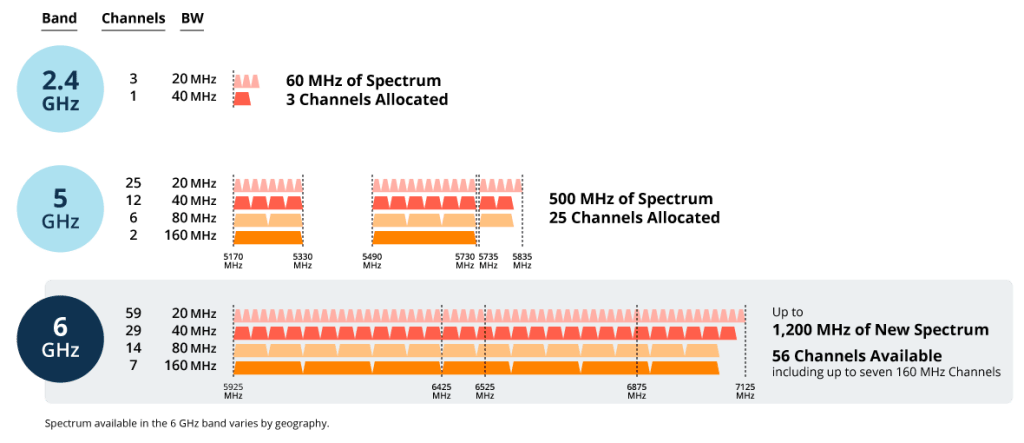
- 2.4GHzat 3 x 20MHz channel
- Including DFS channels 5GHzat 6 x 80MHz channel
- 6GHzat 7 x 160MHz channel

When expanding to new bandwidth, the following approaches may be useful for allocating or steering different traffic or devices:.
- 6GHz: The 6 GHz band is allocated to newer devices with native 6 GHz support, such as Android smartphones, Zebra devices, and laptops. This band offers not only higher data rates but also lower noise levels within the band due to the absence of legacy equipment.
- 5GHz: The 5GHz band is used for mainstream high-performance devices that do not support 6GHz.
Unpreferred client devices, such as guest devices, can be downgraded to 2.4GHz. - 2.4GHz: The 2.4 GHz band is reserved for devices that only have a 2.4 GHz radio, such as IoT, or for guest or non-essential traffic.
Wi-Fi 6E and 6Ghz optimization
When building a wireless network, excess coverage can sometimes occur in the 2.4 GHz band. Some APs, such as the Aruba AP-615, can switch the 2.4 GHz radio to use the 6 GHz band, providing full tri-band (three radio bands) coverage in a multi-AP environment.
This dual-radio/tri-band approach offers the advantage of being more cost-effective, as it eliminates the need to add a third radio to APs where it's not needed. It also offers greater flexibility, as the second radio can be switched from 2.4 GHz to 6 GHz as needed without replacing the AP's hardware.

To support dual radio/tri-band approach, the new 610 series Aruba Air MatchIt applies machine learning algorithms to automatically adjust coverage across all three bands based on the devices in use, channel availability, client density, and potential interference.
The 610 series uses the 6GHz band along with the 5GHz band. Provides a maximum data transfer speed of 3.6 GbpsIt can support additional 80/160MHz channels, making it ideal for high-definition video and hybrid work collaboration.
The 610 Series regularly monitors its coverage model and automatically adapts to changing conditions. This means that if more 6GHz coverage is needed due to the increased use of 6GHz-capable clients, network teams don't need to reconfigure APs.
Aruba Wi-Fi 6E Portfolio
The new 610 Series APs complete our indoor portfolio as the third product in our indoor Wi-Fi 6E lineup.
With the launch of the 610 Series, Aruba offers a full range of Wi-Fi 6E APs to meet the needs of small offices and branch offices, mid-sized enterprises, and large campus environments.

- Aruba 610 Series Wi-Fi 6E Campus AP *NEW*: Featuring a dual-radio, tri-band architecture, the 610 Series features Aruba AirMatch machine learning software that optimizes which bands to use.
Cost-effective, small form factorIt ensures seamless coverage in the 2.4, 5 and 6 GHz bands. - Aruba 630 Series Wi-Fi 6E Campus AP: Full support for the 2.4GHz and 5GHz bands commonly used in IoT and legacy devices, up to the new 6GHz band, to help businesses of all sizes increase efficiency and speed. Comprehensive Tri-Band/Tri-Radio benefitsYou can enjoy it.
- Aruba 650 Series Wi-Fi 6E Campus AP: The 650 series delivers the highest performance Data transfer speeds of up to 7.8 GbpsIt supports 4×4 MU-MIMO to support new high-density use cases such as AR/VR, and Ultra Tri-Band Filtering to eliminate interference.
※ Both the 630 and 650 series automatically segment and filter traffic to eliminate interference, allowing full use of both the upper 5GHz band and the lower 6GHz band. Ultra Tri-Band Filtering functionThis is included.
For more information about Wi-Fi 6E products and technologies, please visit the Aruba website.