

Troubleshooting with AIOps
The ultimate goal of IT is to provide the best possible user experience while enabling the organization to do its best work.
So, every year, our IT team focuses on tasks that support our vision and strategy.
However, a 2021 survey conducted by Aruba found that respondents still spend more than half their time on routine tasks like troubleshooting simple issues. Of those, 44% said troubleshooting, such as data collection and root cause analysis, takes up the majority of their time.
Because we waste time in these places, we don't have enough time to do what we need to do and it's not effective.
For example, let's compare the two scenarios below:.
- How managers traditionally solve problems vs A modern way to solve problems using AI and automation
- How AIOps Helps You Focus on Your Most Critical Business Initiatives
Troubleshooting the old way
“How does a network administrator resolve user-reported Wi-Fi issues?”
To solve a problem, we start with the data.
- We collect the following data from users:
- Type of issue: Connectivity issue? Performance issue? Single application vs. multiple applications? Etc.
- Problem user information: Does it happen to just one person? Multiple people? A specific location? Everywhere?
- When did the issue arise: Did it just arise? A few days ago? A long time ago?
- Leveraging network data: Are there recent changes? Are there logs?
- Once the information is collected, troubleshooting begins.
- Keeping the OSI model in mind, we analyze the data collected at each layer and examine each layer in turn.
- Layer 1: Use tools like Packet Snipper or Spectrum Analyzer to capture wireless packets and analyze the spectrum. Administrators must perform this analysis on-site, but in a global environment, it's difficult to perform this remotely.
- Layer 2: Using port mirroring, we send all traffic to the lab. This allows us to identify issues like port errors and port flapping. However, mirroring traffic remotely is a significant burden.
- Layer 3/4: To move to the next layer related to routing, the administrator should use commands such as ping and trace route to perform tests related to Authentication, Reachability, and Availability, and check for configuration changes related to routing protocols or IP address schemes that may be causing the problem.
- Layer 7: Administrators must perform deep packet inspection using commands like tcpdump, identify DNS-related issues with the nslookup command, or perform extensive testing to identify issues related to other protocols. Furthermore, examining and analyzing TCP data dumps can be a time-consuming process for troubleshooting.
- This process will continue until the manager finds the cause of the problem or escalates the issue to the manufacturer or relevant department for assistance.
The troubleshooting process is as shown in the diagram below. In this environment, resolving issues depends on where the problem occurred and whether automation has been added to the system. From as little as 30 minutes to as long as 5 hours or moreIt may also take a while.
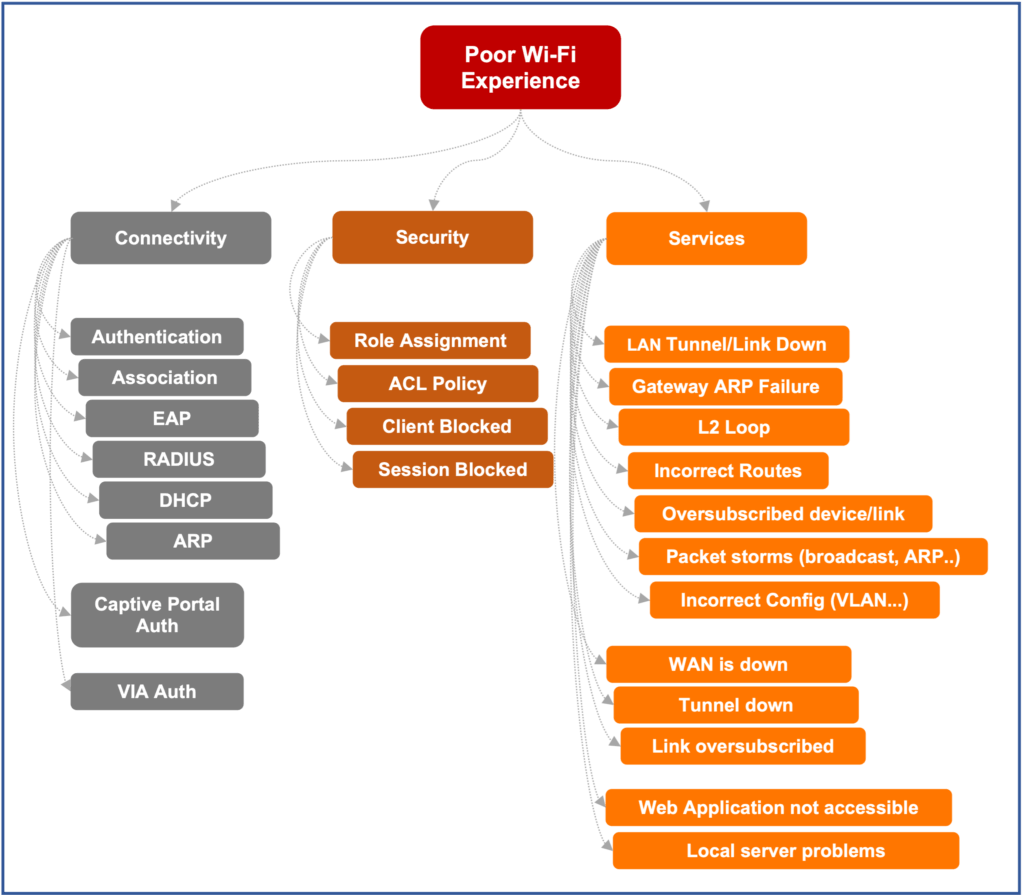
Existing methods for solving problems like this waste time, effort, and resources. AIOpsLet's take a look at how troubleshooting using is different.
Troubleshooting with Aruba AIOps
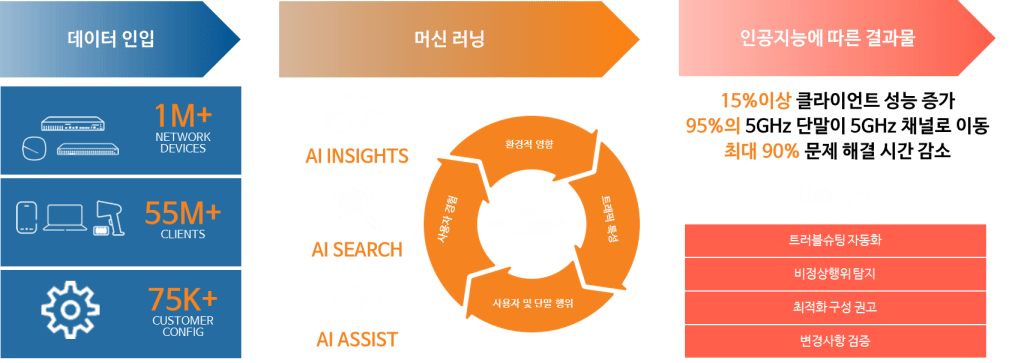
- Automatically collects multiple telemetry data points from over 550 million client endpoints and over 1 million network devices managed by Aruba Central. This means analyzing billions of records.
- Machine learning models create network baselines based on data from a normally functioning environment and compare them to the current situation to identify anomalies. Network Insight identifies issues related to wired, wireless, and WAN networks, such as connectivity, authentication, DNS or DHCP failures, wireless network coverage, and cable breaks.
Aruba Central currently provides insights into a variety of issues. - These insights consider the overall impact of each discovered issue, including the time, site, network device type, and client endpoint.
- Provides recommendations on how to resolve issues based on collected historical data.
- This can reduce troubleshooting time by up to 90%.
Aruba's AIOps doesn't end here. The goal is to identify all issues before they become apparent to administrators or impact network users. Aruba empowers administrators to resolve issues on their own, without manual intervention.
For more information about Aruba's AIOps, please visit:.
https://www.arubanetworks.com/solutions/aiops/
The number of customers connecting to Aruba Central is steadily increasing. Furthermore, data generated at the edge is growing exponentially. As both the quantity and quality of data increase, the capabilities and accuracy of Aruba's AIOps will continue to grow and evolve significantly.